
Most marketing emails are about you. A birthday or anniversary email is one of the few that is about the customer, which is why it tends to feel welcome when done with care and awkward when done carelessly. Used well, it is a simple, low-effort way to say thank you, mark a milestone and give a reason to come back. This guide explains the main types of date-based messages, how to collect dates without being intrusive, when to send, what to offer, how to handle privacy and consent, and how to measure whether the programme is worth running.
The types of date-based emails
| Type | Date it uses | Example message |
|---|---|---|
| Birthday | Customer’s date of birth, or day and month only | A greeting with a small treat |
| Sign-up anniversary | Date the account was created | “One year together” with a thank-you and a recap |
| First purchase anniversary | Date of the first order | A look back at what they bought and a loyalty reward |
| Subscription or membership anniversary | Start of the plan | Appreciation plus tips for the year ahead |
| Pet or product milestone | Date a pet or item was registered | Care tips and a related offer |
| Festival or personal occasion | A date the customer chose | A relevant, timely greeting |
All of these are a form of event-triggered marketing in which the event is a date on the profile instead of an action. They also belong to a wider customer lifecycle programme and often sit inside a loyalty programme.
Collecting the date without being invasive
You cannot send a birthday email without a birthday. How you ask matters as much as what you do with the answer. A full date of birth is sensitive personal data in many places and it also lets people be identified or defrauded, so ask only for what you need. Often the day and month are enough, and age is unnecessary. Explain why you are asking, for example “so we can send you a treat”, make it optional and never make it a requirement for buying. The idea of gathering information bit by bit is covered in our guides to progressive profiling and zero-party data, where the customer volunteers information in return for something useful. For wider context, see personalization and data minimisation.
- Pick the field. Birthday as day and month, or anniversary based on dates you already hold such as sign-up date.
- Ask at a natural moment. In a preference centre, after a first purchase or in a short profile prompt, never as a blocker at checkout.
- Say why. One sentence: what you will do with it and that it is optional.
- Store it in a standard format. A single date field, validated, with consent recorded.
- Let people change or remove it. A link in the preference centre.
Anniversary messages are easier because you already hold the date: the sign-up or first-order date is on the profile from the start. See the contact profile and data model pages for how dates are stored.
When to send
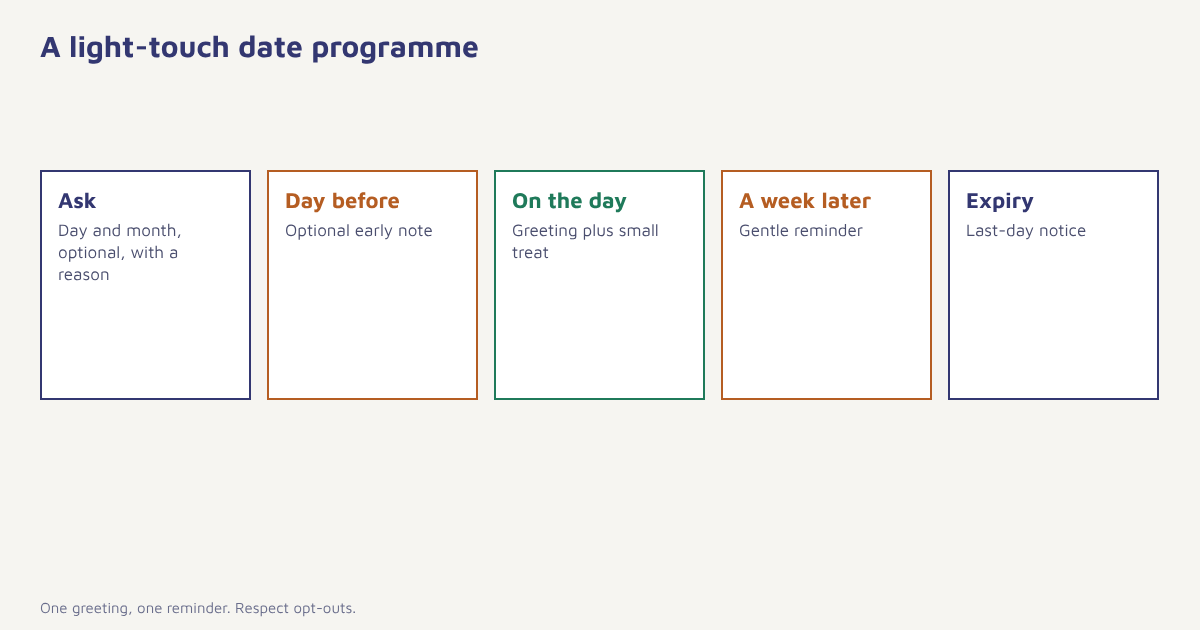
| Option | Pros | Cons |
|---|---|---|
| On the day | Feels personal and timely | Email may be read later; fine, because it is a greeting |
| A few days before | Gives time to use an offer around the date | Slightly less personal |
| Month-based | Simple for large lists; one batch a month | Less personal; avoid for greetings |
| Reminder after | Catches those who missed the first email | Can feel pushy if repeated |
Send in the recipient’s time zone and, for a birthday greeting, early in the morning. Do not send a birthday email to anyone who has opted out of marketing or who is in the middle of a complaint. For other timing questions, see the best time to send email.
What to put in the email
The best date-based emails are warm and short. Start with the greeting, add a small thing of value and make it easy to use.
| Element | Good practice |
|---|---|
| Subject line | Short and human: “Happy birthday, Meera”. Avoid shouting or heavy promotion. See subject lines |
| Greeting | Use the first name with a fallback for missing names |
| Treat | A discount, free shipping, a gift with purchase, double loyalty points or early access |
| Validity | Give a window of a week or two, with a clear end date |
| Design | Light and celebratory but readable. See email design |
| Next step | One clear button |
Choose a treat that suits your margins. A free gift or double points can cost less than a large discount and feel more special. For anniversaries, a recap can be more valuable than an offer: “In your first year with us you made 6 orders and saved 18 hours of work” makes the customer feel seen, as long as the numbers are accurate and not creepy. Personal examples are discussed in email personalization examples.
Which channel?
Email is the usual home for greetings, since it has room for a message and a code. A short WhatsApp or SMS greeting can work for customers who have opted in to those channels and prefer them; check template rules for business messaging first, as outlined in our guides to WhatsApp templates and SMS best practices. Push notifications suit app users. Whatever you use, a single message per occasion is enough, and the channel comparison can help you decide.
Privacy and consent
A birthday is personal data, and the combination of name, birth date and contact details is useful to fraudsters, so collect the minimum, store it securely and limit who can see it. Obtain marketing consent in the usual way, and explain the use of the date in your privacy notice. In India the Digital Personal Data Protection Act, 2023 sets expectations around notice, purpose and consent; in Europe the GDPR applies to residents. Rules differ and change, so check the current position with your legal adviser. Our guides to the DPDP Act, GDPR for email and consent management explain the principles.
Be sensitive. Not every date is a happy one. Avoid assuming age, family status or a celebration. Let people opt out of occasion-based emails, and never mention a birthday date that the customer has not given you.
A worked example
A made-up online pet-supplies store asks new customers for their pet’s birthday and the owner’s birthday month, offering a free treat in return. For the pet, it sends a cheerful email on the day with a coupon for a toy. For the owner, it sends a short message at the start of their birthday month with free shipping for two weeks. Separately, on the first anniversary of each customer’s first order, it sends a summary of what they ordered and a small loyalty bonus. The store compares redemption rates, repeat orders in the following month and unsubscribes against a small holdout that gets no occasion emails. Every figure here is invented; the point is the structure: ask politely, send once, make it easy to use and measure against a control.
Measuring the programme
| Measure | What it tells you |
|---|---|
| Open and click rate | Whether the greeting resonates; judge opens with care |
| Redemption rate | Share who use the treat |
| Repeat purchase in the following 30 days | Whether the programme adds orders. See repeat purchase rate |
| Revenue per recipient versus holdout | The true uplift |
| Unsubscribes and complaints | Whether it is welcome |
| Share of profiles with a date | How well you collect the data |
Margin matters: subtract the cost of the treat from the extra revenue. If the offer mainly gives discounts to people who would have bought anyway, change the treat. The journey builder makes it easy to add a holdout, and analytics reports redemption by cohort.
Common mistakes
- Asking for a full date of birth. Day and month usually suffice.
- Sending without consent. Greetings are marketing in many places.
- Wrong dates. Test with a few profiles, including leap-day birthdays and missing values.
- Heavy discounts. A small, thoughtful gift often works as well.
- Repeating the message. One greeting and one reminder are enough.
A birthday email works when it says you noticed. It fails when it says you tracked.
Mark the moments that matter. Trigger date-based journeys from your customer profile, with consent respected.
Read next: subscription renewal reminders, brand loyalty and the blog.
Frequently asked questions
What are birthday and anniversary emails?
They are automated messages triggered by a date on the customer profile, such as a birthday, sign-up anniversary or first-purchase anniversary, usually thanking the customer and offering a small treat.
When should I send a birthday email?
Commonly on the day, early in the morning in the customer’s time zone, with an optional reminder a week later if the offer has not been used. Test what works for your audience.
How do I collect birthdays without being intrusive?
Ask for day and month only, explain what you will do with it, make it optional and ask at a natural moment such as in a preference centre.
What should a birthday email offer?
A small, genuine treat such as a discount, free shipping, a gift or bonus points, with a clear validity window and one simple button.
Are birthday emails allowed under privacy law?
They can be if you give notice, obtain any required marketing consent, collect only what you need and honour opt-outs. Rules vary, so check with your legal adviser.
Are anniversary emails better than birthday emails?
They are easier because you already hold the date, and they can be more meaningful when they recap the customer’s history. Many brands use both.
How do I measure whether birthday emails work?
Compare redemption, repeat purchases and revenue per recipient with a small holdout group, and subtract the cost of the offer.