
A newsletter goes out because the calendar says Thursday. An event-triggered message goes out because something just happened: a customer paid, a trial ended, a basket was left behind, a parcel was delayed. The second kind tends to feel more useful to the person receiving it, because it arrives while the moment is still fresh. This guide explains what event-triggered marketing is, how it differs from scheduled campaigns, the events worth listening for, how a trigger is built from event, condition, wait and action, how to choose the channel and how to keep these automations from becoming noise.
What is event-triggered marketing?
Event-triggered marketing means sending a message in response to something a customer does, or something that happens to their account, rather than on a fixed date. The idea borrows from event-driven architecture in software, where systems react to events as they occur instead of checking on a timer. In marketing, the event might be a sign-up, a product view, a purchase, a failed payment or a long silence. The message is the reaction. It is one of the core building blocks of marketing automation, and the reason journeys in a tool such as Flowfox journeys start with a trigger rather than a send date.
Triggered vs scheduled campaigns
| Event-triggered | Scheduled | |
|---|---|---|
| Starts when | A customer does something | The calendar says so |
| Audience | One person at a time | A list or segment at once |
| Relevance | High, tied to a moment | Depends on segmentation |
| Typical examples | Cart reminder, welcome, renewal notice | Newsletter, sale announcement |
| Effort | More set-up, then runs itself | Built for each send |
| Measurement | Per journey, over time | Per campaign |
Neither replaces the other. A weekly newsletter builds the habit of hearing from you; triggered messages respond to individual needs. Most healthy programmes run both, and make sure that a person in the middle of a triggered flow is not also hit by a conflicting scheduled promotion.
Events worth listening for
| Event type | Examples | Typical response |
|---|---|---|
| Sign-up and identity | Account created, email verified, first login | Welcome and first-step guidance |
| Browsing | Product viewed twice, pricing page visited | Helpful content, reviews, a nudge |
| Cart and checkout | Item added, checkout started, payment failed | Reminder or payment help. See cart recovery |
| Purchase | Order placed, delivered, returned | Confirmation, review request, accessories |
| Product usage | Feature used, goal reached, usage dropped | Tips, congratulation, check-in |
| Lifecycle and dates | Trial ending, renewal due, birthday | Reminders and offers |
| Inactivity | No visit in 30 days, no order in 90 | Win-back. See win-back campaigns |
| Support and service | Ticket resolved, delivery delayed | Updates and follow-up |
The anatomy of a trigger
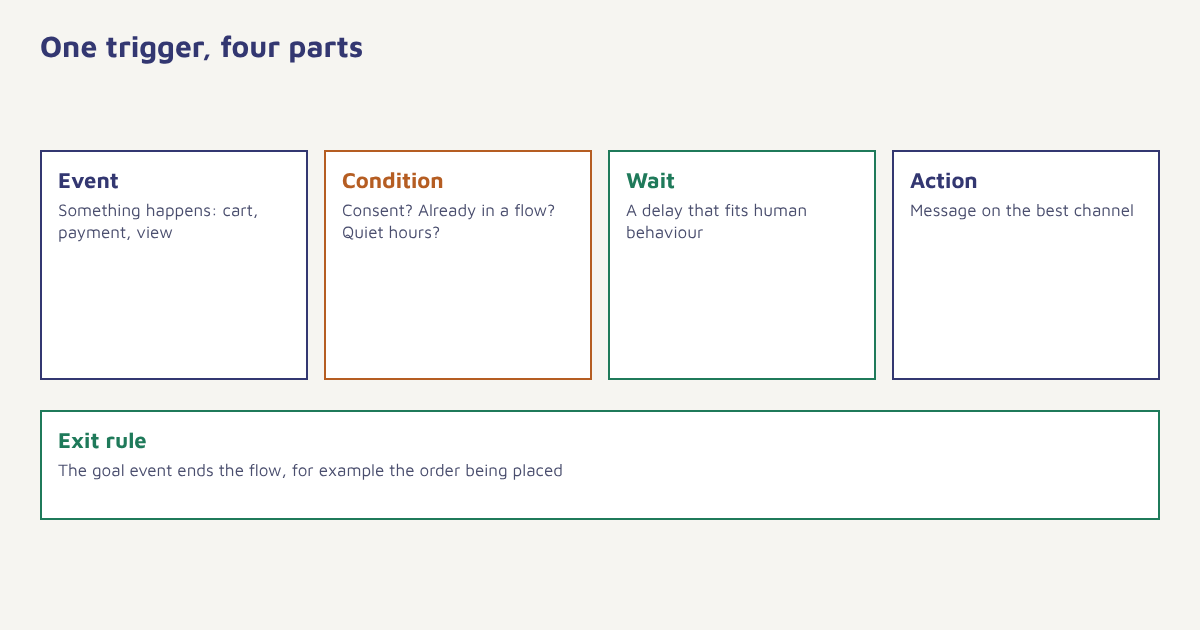
Every well-built triggered message has the same four parts, plus a rule for stopping.
- Event. The thing that happened, recorded with its details: which product, what amount, which plan.
- Condition. A check that decides whether this person should receive the message at all, such as opted in, not already in another flow and outside quiet hours.
- Wait. A deliberate delay that matches human behaviour. A cart reminder an hour later feels helpful; one after 30 seconds feels like surveillance.
- Action. The message itself, on the most suitable channel, with content drawn from the event.
- Exit. A goal or event that ends the flow, for example the order being placed. See goals and waits.
The events come from your website, app or back office, usually through a tracking call or an API. The data model page shows how events and attributes are stored on the profile, and sending your first event walks through a test. A typical event looks like this:
{
  "event": "payment_failed",
  "identity": { "customer_id": "c_20931" },
  "properties": {
    "plan": "Pro monthly",
    "amount": 1499,
    "currency": "INR",
    "reason": "card_expired"
  },
  "timestamp": "2026-11-02T09:41:00Z"
}
From that one event a journey can do several things: wait an hour, check that the payment has still not succeeded, then send a short email with a link to update the card, follow with a WhatsApp message the next morning if the person has opted in and stop as soon as a payment goes through. Merge tags pull the plan name and amount into the text so the message reads as written for that person.
Choosing the channel for each trigger
| Situation | Good first channel | Reason |
|---|---|---|
| Urgent and personal (payment failed, delivery today) | SMS, WhatsApp or push | Needs to be seen soon |
| Needs detail or a receipt | Room for content and a record | |
| User is in the app now | In-app message | Seen in context |
| Gentle reminder | Push or email | Low pressure |
Whatever you choose must match the customer’s consent for that channel. Our guide to email vs SMS vs WhatsApp compares them, and the push notifications guide covers app messages. Where you have several channels, set a lead channel and a fallback, and let the journey try the fallback only if the first message was not acted on.
A worked example
Imagine an online stationery shop with a customer called Meera. On Monday evening she views a fountain pen twice and adds a notebook to her cart, then leaves. The shop has three triggered journeys. The first reacts to the cart event: after two hours, a reminder email shows the notebook and its reviews. The second reacts to the product views: because she looked at the pen twice but did not add it, a message the next day shares a short guide on choosing nibs. The third is a delivery-update flow that is not relevant to her yet. When Meera buys the notebook on Tuesday, the cart journey exits at once, so she never receives the second reminder it had planned. Three days after delivery, a review request is triggered automatically. The shop, the customer and the timings are invented to illustrate the logic.
Keeping triggered messages under control
Because triggers fire on their own, they can multiply unnoticed. A customer who views a product, abandons a cart, has a delivery delayed and hits a renewal date in the same week could receive four automated messages. Use these controls.
- Frequency caps. Limit the total messages per person per day and per week across all journeys.
- Priority. Decide which journey wins when two fire together. A payment failure should outrank a product tip.
- Suppression. Stop promotions for people with an open support issue.
- Quiet hours. Hold non-urgent messages overnight in the recipient’s time zone.
- Exit rules. Always define the goal that ends the flow.
- Review. Audit what customers actually receive every quarter.
The same discipline is covered in our omnichannel guide, which explains why one shared profile and one set of rules matter. For the idea of reacting to the moment, see real-time marketing. In Flowfox, the segment builder supplies the conditions, the journey builder supplies waits and exits, and analytics shows what each trigger earns.
Measuring event-triggered programmes
| Question | Measure |
|---|---|
| Does it work? | Conversion or goal completion against a holdout group that did not receive the message |
| Is it annoying? | Unsubscribe, complaint and opt-out rates per journey |
| Is it fast enough? | Time from event to message |
| Is it reliable? | Share of events that produced the intended message |
| What does it earn? | Revenue per recipient and per journey |
Keep a small random holdout (a few percent) so you can tell the difference between a customer who would have bought anyway and one the message persuaded. Read more about how to design such comparisons in our A/B testing guide and about picking numbers in marketing KPIs. For a general overview of the practice, the article on marketing automation is a useful starting point.
Common mistakes
- Firing too fast. A message seconds after an action feels intrusive.
- No exit rule. People receive reminders for things they already did.
- Messy event data. Inconsistent names and missing properties break personalisation.
- Ignoring consent. Automation is not an exemption from permission rules.
- Set and forget. Products, prices and customers change, so review each journey.
A scheduled message asks when you want to talk. A triggered message listens for when the customer does.
Start from what customers do. Send events, build conditions and run journeys across email, WhatsApp, SMS and push.
Read next: SaaS onboarding emails, post-purchase emails and the blog.
Frequently asked questions
What is event-triggered marketing?
Event-triggered marketing sends a message automatically in response to something a customer does or something that happens to their account, instead of on a fixed schedule.
What is the difference between triggered and scheduled campaigns?
Scheduled campaigns go to a list at a chosen time. Triggered messages go to one person when an event occurs, so they are usually more relevant to that moment.
What are examples of marketing triggers?
Sign-up, product views, abandoned carts, purchases, delivery, failed payments, trial endings, birthdays, renewals and long inactivity are common triggers.
How long should I wait before sending a triggered message?
It depends on the event. A cart reminder often goes after an hour or two, a review request days after delivery, and an urgent payment alert as soon as possible. Test your own timings.
How do I stop customers getting too many triggered messages?
Use frequency caps across all journeys, set priorities between flows, add suppression rules and quiet hours, and give every journey an exit rule.
Which channel is best for triggered messages?
Urgent personal events suit SMS, WhatsApp or push, detailed ones suit email, and in-app messages suit users who are active in the app. Always respect channel consent.
How do I measure whether triggers work?
Compare results with a small holdout group that does not receive the message, and track conversion, revenue per recipient, unsubscribes and complaints per journey.