Marketing automation means letting software send the right message at the right moment, based on what a person has done, instead of someone remembering to press send. A welcome email the minute somebody signs up, a WhatsApp reminder when a cart is left behind, a check-in when a customer goes quiet. This guide explains what marketing automation is, how it differs from a simple scheduled campaign, which workflows are worth building first, and how to start without building a tangle you cannot maintain.
What is marketing automation?
Marketing automation is the use of software to run marketing tasks and workflows automatically, usually across email, SMS, WhatsApp, push and the web. Every automation has the same three parts: a trigger (something happens), a condition (does this person qualify) and an action (send a message, update a record, wait, or branch). Chain a few of these together and you have a workflow, often called a journey or a drip campaign.
Automation vs a regular campaign
| Scheduled campaign | Automated journey | |
|---|---|---|
| Starts when | You choose a date and time | A person does something |
| Audience | One list at one moment | Anyone who qualifies, whenever they do |
| Message timing | Same for everybody | Relative to each person’s action |
| Effort | Built and sent each time | Built once, runs continuously |
| Best for | Announcements and sales | Onboarding, reminders, recovery, nurture |
You still need campaigns. A festival sale announcement is a campaign. What automation takes over is everything that depends on individual behaviour.
How marketing automation works
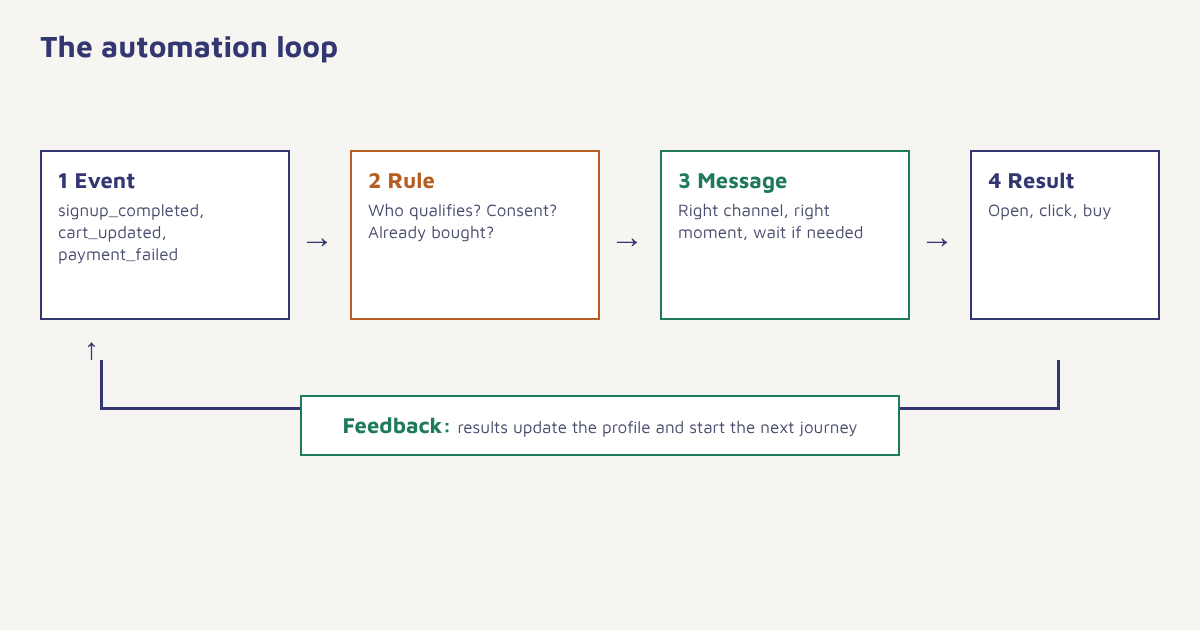
- Collect events. Your site, app or store sends events such as signup_completed, cart_updated or payment_failed. Our events guide shows how.
- Match the trigger. The platform sees an event and starts a journey for that person.
- Check conditions. Is this a new or returning customer? Did they already buy? Are they allowed to receive WhatsApp?
- Wait and act. Pause for a set time or until another event, then send on the best channel.
- Branch on response. If they open, click or buy, continue or stop. If not, try another channel or offer.
- Learn. Each result is stored on the profile and can feed the next decision.
Marketing automation examples worth building first
| Workflow | Trigger | Core steps | Goal |
|---|---|---|---|
| Welcome series | Signup completed | Welcome message, key feature, offer or guide over a week | Activation |
| Abandoned cart | Cart updated, no purchase in 1 hour | Reminder, objection handler, last nudge | Recovered sales |
| Post-purchase | Order delivered | Care tips, review request, cross-sell | Repeat orders and reviews |
| Payment failed | Payment failed event | Retry link by SMS or WhatsApp, follow-up email | Saved revenue |
| Win-back | No activity in 60 to 90 days | Check-in, incentive, final goodbye | Reactivation |
| Birthday or anniversary | Date attribute reached | Personal greeting and small perk | Loyalty |
Each of these has a ready-made version in our use cases. See onboarding, churn prevention, retention and festival campaigns, or read the full recovery guide for abandoned carts.
Benefits of marketing automation
- Speed. A message sent within minutes of an action is far more relevant than one sent at the next weekly blast.
- Consistency. No lead or customer is forgotten because someone was busy.
- Personalisation at scale. Names, products, dates and preferences are filled in automatically.
- Better use of time. The team designs the journey once and spends its energy on strategy and creative.
- Measurable. You can see which step drives conversions and which one leaks.
Choosing channels for automation
Different steps suit different channels. Use email for detail, WhatsApp for fast, personal updates, SMS for short alerts and OTPs, and push or in-app messages for people already in your app. A good journey picks the channel per step and falls back to another if the first is not available or not opened. Always respect consent per channel: see our guides to WhatsApp opt-in and SMS rules in India.
How to get started, step by step
- Pick one outcome. Choose the single metric you want to move: activation, repeat orders, recovered carts.
- Map the moment. Write down what the customer does and where they stall. If you have not mapped the path, start with journey mapping.
- Send the events. Make sure the triggers and exits you need are tracked: the start event and the goal event at minimum.
- Build the smallest useful journey. One trigger, one wait, one message, one exit. The first journey tutorial takes about twenty minutes.
- Set a goal and quiet hours. Stop the journey when the person converts, and avoid sending late at night. See goals and waits.
- Test with yourself, then a small group. Send the full path to a test contact and check every message on a phone.
- Review weekly. Look at entries, drop-offs and conversion at each step before you add anything.
Resist the 40-step journey. The most effective automations are usually short. Add branches only when data shows a step is leaking, and keep a note of why each one exists so the next person can maintain it.
Metrics that matter
| Metric | What it tells you |
|---|---|
| Journey entries | How many people triggered it |
| Step-to-step drop-off | Where people leave or the message fails |
| Goal conversion | How many reached the outcome (purchase, activation) |
| Revenue per entry | Value created, compared with a holdout group |
| Unsubscribe and complaint rate | Whether the volume or timing is too high |
Marketing automation in Flowfox
Flowfox journeys are built on a visual canvas: pick an event or segment as the entry, add waits, conditions and messages across email, SMS, WhatsApp, push and in-app, and set a goal that removes people automatically. The journey builder validates the path before you publish, segments keep audiences current, analytics shows step-level results, and FoxAI helps draft and refine the copy. If you are moving from another platform, the migration guide explains how to bring over existing workflows.
What to look for in a marketing automation platform
Most tools can send an email on a schedule, so look past that. Ask whether it can start journeys from your own events rather than only from form fills, because behaviour is where the useful triggers live. Check that it keeps one profile per person across channels, similar in spirit to a customer data platform, so a WhatsApp reply and an email click land in the same record. Look for per-channel consent, frequency caps, a test mode, and an audit trail of what was sent and why. Finally, check how it connects to your CRM or store, since an automation is only as good as the data feeding it.
- Event-based triggers from your site, app or store.
- Unified profiles across email, SMS, WhatsApp and push.
- Consent and frequency controls built into every send.
- Visual builder with validation so mistakes are caught before launch.
- Reporting by step, not only by campaign.
Common mistakes
- Automating a broken experience. Fix the product or checkout problem first; messaging cannot hide it.
- No exit condition. People keep getting reminders after they buy.
- Over-messaging. Add frequency caps across journeys so one person does not get five messages in a day.
- Ignoring data quality. A wrong name or product in a personalised message is worse than no personalisation.
- Set and forget. Review results regularly and retire journeys that no longer help.
Automation does not replace the marketer. It replaces the reminder to send.
Launch your first automated journey. Start from an installable template and tune it to your events and channels.
Teams in different sectors use automation differently. See how in our ecommerce, SaaS and edtech solutions, understand audiences with the guide to customer segmentation, and browse more playbooks on the blog.
Frequently asked questions
What is marketing automation?
Marketing automation is software that sends messages and runs marketing workflows automatically based on triggers such as a sign-up, a purchase or inactivity, across channels like email, SMS and WhatsApp.
What are examples of marketing automation?
Common examples are welcome series, abandoned cart reminders, post-purchase review requests, failed payment follow-ups, birthday messages and win-back campaigns for inactive customers.
What is the difference between marketing automation and email marketing?
Email marketing is one channel. Marketing automation is the logic that decides who gets which message, when and on which channel, and it can include email, SMS, WhatsApp, push and in-app messages.
How do I start with marketing automation?
Pick one outcome, map the customer moment, make sure the trigger events are tracked, build one small journey with an exit condition, test it, then review the results weekly before adding more.
Is marketing automation only for large companies?
No. Small teams often benefit most because automation covers tasks they would otherwise forget. Start with a welcome message and one reminder.
How many steps should an automated journey have?
Start with three to five steps. Add more only when the data shows where customers drop off and a new step would help.
Is marketing automation spam?
Not when it is based on consent, sent to relevant people at a sensible frequency and easy to opt out of. Poorly targeted, high-volume sending is what makes it feel like spam.