If you searched for the WhatsApp Business API, you probably want one of three things: to message customers at scale without getting banned, to send order and payment updates automatically, or to understand why the free app stopped being enough. This guide covers all three. It explains what the API is, how the WhatsApp Business Platform is priced since the July 2025 change, what you need before you apply, and how to go live without losing your phone number or your quality rating along the way.
What is the WhatsApp Business API?
The WhatsApp Business API, officially called the WhatsApp Business Platform, is the programmatic version of WhatsApp for companies. Where the WhatsApp Business app is a phone app one person taps through, the platform is an application programming interface that lets your software send and receive messages, so a CRM, a helpdesk or a marketing tool can talk to customers on your behalf. There is no app screen. Everything you see comes from whatever tool you connect.
Today the platform runs on the Cloud API, which Meta hosts for you. Earlier you had to host the software yourself on your own servers, and that route is being retired in favour of the cloud version, so unless a vendor tells you otherwise, assume you are on the Cloud API. You can call it directly with HTTP requests or, far more commonly, reach it through a Business Solution Provider (BSP) or a platform such as Flowfox that has already built the template manager, inbox, opt-in handling and reporting on top.
WhatsApp Business API vs the WhatsApp Business app
Most small shops start on the free app and outgrow it within a few months. The table below shows where the lines are.
| WhatsApp Business app | WhatsApp Business API | |
|---|---|---|
| Who uses it | One owner or a small team on phones | Any number of agents and systems |
| Linked devices | One phone plus up to four linked devices | Unlimited, through your software |
| Broadcasts | Limited lists, recipients must save your number | Template campaigns to opted-in contacts, with approval |
| Automation | Away message, greeting, quick replies | Chatbots, journeys, triggers from orders and events |
| Cost | Free to use | Pay per delivered message plus your provider fee |
| Verified green tick | Not available | Available after Meta review |
| Best for | A local shop with a few chats a day | Any business sending order, payment or marketing messages at volume |
The practical trigger for switching is usually one of two things. Either the team needs more than a handful of people replying from the same number, or you want automated messages (order confirmed, cart reminder, appointment tomorrow) to leave your system without anybody picking up a phone.
How the platform works: templates, the 24-hour window and opt-in
Three rules explain nearly every confusing behaviour on the platform.
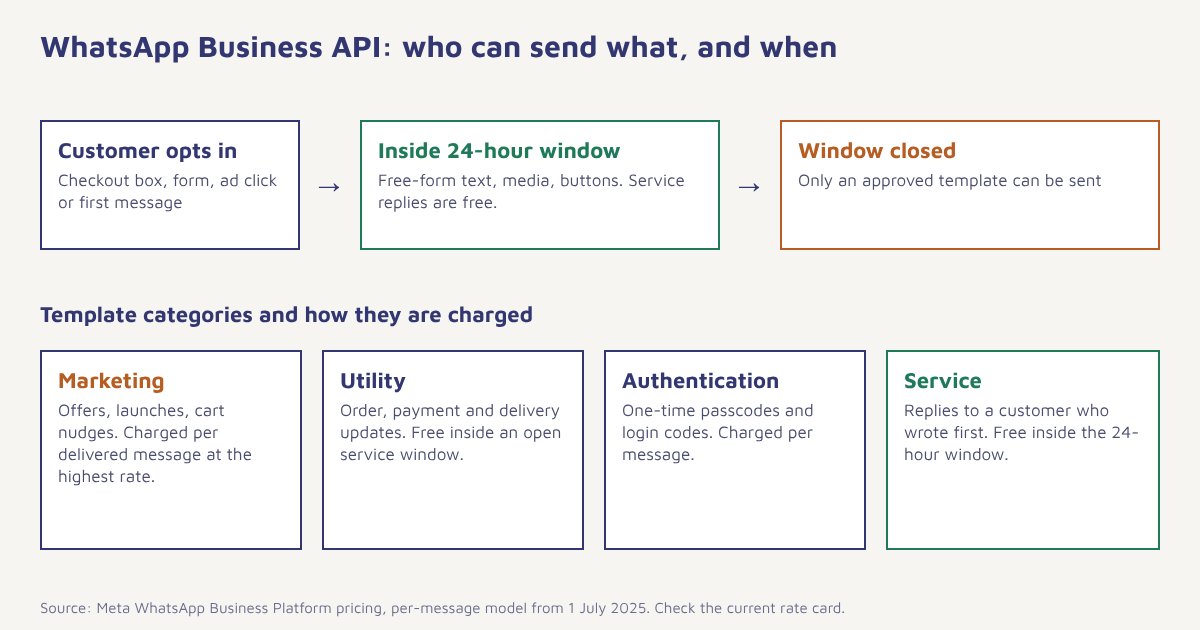
Rule one: the customer service window. When a customer messages you, a 24-hour window opens. Inside it you can reply with ordinary free-form text, images, buttons and lists. Each new message from the customer restarts the clock. Once the window closes you cannot send free-form text; you can only send an approved template.
Rule two: templates need approval. A template is a pre-written message with numbered placeholders, such as “Hi {{1}}, your order {{2}} has shipped.” You submit it with a category, and Meta reviews it, normally within minutes to a day. Templates are how you start conversations, and the category you choose decides what you pay.
Rule three: opt-in is required. You must have clear permission before sending business-initiated messages. A checkbox at checkout, a click-to-WhatsApp ad, a form field or a customer starting the chat all count, as long as you can show where and when it was given. Buying a list of numbers does not count, and it is the fastest route to a poor quality rating.
WhatsApp Business API pricing
Until mid-2025 Meta charged per 24-hour conversation. Since 1 July 2025 it charges per delivered template message, with the rate set by the message category and the recipient’s country code. The current rate card for each market is published on the Meta pricing page, and it is revised on a published schedule, so check it before you budget. Your provider adds its own platform fee on top, which is why two vendors can quote different totals for the same traffic.
| Category | What it is for | Charged? |
|---|---|---|
| Marketing | Offers, launches, abandoned-cart nudges, anything promotional | Yes, per delivered message; the highest rate |
| Utility | Order updates, delivery status, payment receipts, appointment reminders | Yes per message, but free when sent inside an open 24-hour service window |
| Authentication | One-time passwords and login codes | Yes, per message |
| Service | Replies to a customer who messaged first | Free inside the 24-hour window |
Budgeting tip. Do not price your plan on marketing rates alone. For most e-commerce and service businesses, order and delivery updates make up the majority of volume, and those are utility messages. Split your expected sends by category before you compare quotes.
One more detail worth knowing: messages that start from a Click-to-WhatsApp ad open a longer free window, which Meta documents as 72 hours. That makes ads that land in WhatsApp a cheap way to start conversations you can then follow up on.
What you need before you apply
- A Meta Business portfolio (formerly Business Manager) in your company’s name.
- A phone number that is not currently registered on the regular WhatsApp or WhatsApp Business app. If it is, you will have to delete that account first, which also erases the chat history on the phone.
- A display name that matches your brand and website. Meta rejects names that are generic or that imply an affiliation you do not have.
- Business verification documents (certificate of incorporation, GST certificate or similar) for higher messaging limits and the green tick.
- A website or social page that shows who you are.
How to get started, step by step
- Create or open your Meta Business portfolio. Use an admin account that will still be with the company next year. Losing access to the portfolio later is a painful support case.
- Pick your access route. Go direct to the Cloud API if you have developers and want full control, or connect through a BSP or platform if you want templates, inbox and campaigns ready to use.
- Add and verify the phone number. Receive the code by SMS or voice call. Pick a number your customers will recognise, because it is hard to change later.
- Get the display name approved. Review typically takes a short while. Fix any rejection before you plan campaigns.
- Submit Business Verification. Upload the documents. Verification raises your daily limit for new conversations and unlocks the official business account.
- Build and submit templates. Start with two or three utility templates (order confirmation, shipping update) before marketing ones. Our guide to WhatsApp template approval lists the usual reasons for rejection.
- Set up opt-in capture. Add a clear consent line at checkout, sign-up and your lead forms, and store the timestamp and source in your customer profile.
- Send a test, then a small live batch. Check rendering on Android and iPhone before you widen the audience.
Sending your first template message through the API
If you are calling the Cloud API yourself, a template send is a single HTTPS request. This example uses a placeholder phone number ID and token, and a template named order_shipped with two variables. Use the API version shown in Meta’s current documentation rather than the one in the sample.
curl -X POST "https://graph.facebook.com/v21.0/<PHONE_NUMBER_ID>/messages" \
  -H "Authorization: Bearer <ACCESS_TOKEN>" \
  -H "Content-Type: application/json" \
  -d '{
    "messaging_product": "whatsapp",
    "to": "91XXXXXXXXXX",
    "type": "template",
    "template": {
      "name": "order_shipped",
      "language": { "code": "en" },
      "components": [{
        "type": "body",
        "parameters": [
          { "type": "text", "text": "Asha" },
          { "type": "text", "text": "FX-20481" }
        ]
      }]
    }
  }'
A success response returns a message ID. Delivery, read and failure events arrive afterwards on your webhook, which is where a platform earns its keep: it matches those events back to the contact, retries safely and shows them on a timeline. If you prefer not to build that plumbing, Flowfox’s WhatsApp channel handles templates, webhooks and opt-in records for you.
Messaging limits and quality rating
New numbers start with a cap on how many unique customers you can start conversations with in a rolling 24 hours. The starting cap is small, and Meta raises it in tiers as your business is verified and your messages are received well. Quality is measured from what recipients do: blocks, reports and how many people read your templates. A burst of marketing sent to people who did not expect it can pull a number’s quality down and, if it keeps happening, restrict it.
Three habits keep quality healthy: send only to people who opted in, make the unsubscribe path obvious (a “Reply STOP” line works), and cap how often one person hears from you. Sending a marketing template to someone who has not engaged in months is rarely worth the risk.
What businesses actually use it for
The strongest uses are the unglamorous ones. Order and delivery notifications get opened because they are expected. Payment reminders and failed-payment retries recover revenue that would otherwise slip. Appointment reminders cut no-shows for clinics and coaching centres. For online stores, playbooks on our blog and the guide to abandoned cart recovery show how a WhatsApp message an hour after someone leaves their basket often brings back a measurable slice of those sales. Festival campaigns work too, as long as the audience has opted in; see how festival campaigns are planned in Flowfox.
Treat WhatsApp like a conversation you were invited into, not a notice board you own.
Common mistakes to avoid
- Using a number that is still on the consumer app. Migrate it deliberately and back up chats first.
- Starting with promotional templates. Begin with utility messages so your number builds a clean record.
- Vague opt-in. “We may contact you” will not hold up. Say WhatsApp, say what for.
- Ignoring replies. If customers answer a template and nobody replies, the next campaign suffers. Route replies to an inbox someone watches.
- Hard-coding journeys. Tie sends to events with journeys and segments so the right message goes to the right person, and quiet hours are respected.
Want WhatsApp running without the setup work? Flowfox connects the Cloud API, manages templates and keeps consent on each profile, so your first message can go out this week.
Where to go next
If you are comparing channels, our channels overview shows how WhatsApp sits alongside SMS, email and RCS. Indian senders should also read about DLT and Meta approvals before launching, and ecommerce teams will find a ready plan in the ecommerce solution. When you are ready to estimate spend, our pricing page shows what the Flowfox side costs, and the plan usage guide explains how channel costs are tracked.
Frequently asked questions
What is the WhatsApp Business API?
It is the Meta-run interface, officially the WhatsApp Business Platform, that lets companies send and receive WhatsApp messages from software such as a CRM or marketing platform. It supports multiple agents, automation and approved message templates.
Is the WhatsApp Business API free?
Using the API is not free. Since 1 July 2025 Meta charges per delivered template message, with the rate depending on the category and the recipient country. Replies inside the 24-hour customer service window are free, and utility templates sent inside an open window are free too. Your provider may charge a platform fee on top.
What is the difference between WhatsApp Business and the WhatsApp Business API?
The Business app is a free phone app for small teams with limited broadcast and automation. The API connects WhatsApp to your own software, supports unlimited agents and automated campaigns, and requires template approval and per-message payment.
How do I get WhatsApp Business API access in India?
Create a Meta Business portfolio, choose direct Cloud API access or a Business Solution Provider, add a phone number that is not on the regular WhatsApp app, get your display name approved, complete business verification and submit message templates.
Do I need a BSP to use the WhatsApp Business API?
No. You can use the Cloud API directly if you have developers. Most businesses use a provider or platform because it supplies the inbox, template manager, opt-in tracking and reporting that the raw API does not include.
How long does WhatsApp template approval take?
Many templates are reviewed within minutes, and most within a day, but this is not guaranteed. Clear wording, a correct category and no promotional language in utility templates make approval faster.
Can I send bulk messages on the WhatsApp Business API?
Yes, to customers who have opted in, using approved templates, and within your messaging limit. Unsolicited bulk messaging breaches the policy and damages your quality rating.