WhatsApp marketing is the practice of promoting your products to customers on WhatsApp with their permission. Done well, it gets read quickly and starts real conversations. Done badly, it gets you blocked, and your number’s quality rating suffers. This guide focuses on the marketing side: how to build an opted-in audience, which message types to send, how campaigns are priced, ten message ideas you can adapt, and how to measure whether it pays. If you want the technical and setup side first, read our guide to the WhatsApp Business API.
What is WhatsApp marketing?
It is using WhatsApp as a channel for offers, launches, reminders and customer conversations. There are two ways to do it. The free WhatsApp Business app lets a small team message customers by hand and keep simple broadcast lists. The WhatsApp Business Platform, reached through the API, lets you send approved template messages to many opted-in customers, trigger them from events and manage replies in a shared inbox. Most brands that take marketing seriously end up on the platform, because it adds automation, reporting and several agents on one number.
Why brands use it
- It is where customers already are. In India it is often the first app people open, so messages are seen quickly.
- It is two-way. A customer can reply with a question and get an answer in the same thread, which email and SMS do poorly.
- It supports rich content. Images, buttons, product lists and payment links fit inside one message.
- It links to ads. Click-to-WhatsApp ads open a chat directly, shortening the path from interest to conversation.
Where WhatsApp fits in the funnel
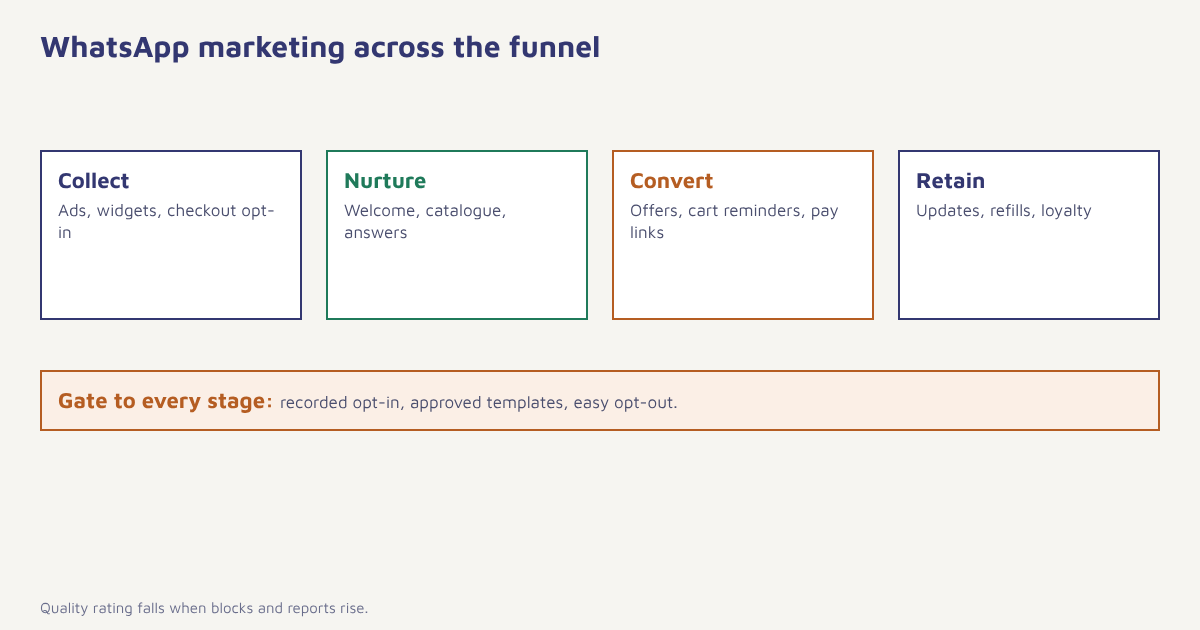
Use it to collect interest (ads and website prompts that start a chat), nurture (welcome note, product recommendations, answers to questions), convert (offers, cart reminders, payment links) and retain (order updates, replenishment reminders, loyalty messages). Teams that send only promotions and nothing helpful tend to see opt-outs and blocks climb.
The rules you need to follow
WhatsApp’s business policy decides what you can send. The essentials:
- Opt-in is required. People must agree to hear from you on WhatsApp. A checkbox at checkout, a form, a Click-to-WhatsApp ad or a customer starting the chat all work if you can prove it.
- Templates must be approved. Outside the 24-hour customer service window you can only send pre-approved templates, and marketing templates are reviewed for category and tone.
- Offer an easy opt-out. A line such as “Reply STOP to unsubscribe” protects both customers and your quality rating.
- Quality matters. High block and report rates reduce your messaging limits.
Check the category. Meta classifies a message as marketing if it promotes something, even when it also carries an update. Mislabelling a promotion as utility to save cost can lead to rejection or reclassification and a higher rate. Our template approval guide lists the common reasons.
How WhatsApp marketing is priced
Since 1 July 2025 Meta charges per delivered template message, with the rate set by category and the recipient’s country. Marketing messages carry the highest rate. Utility messages inside an open service window are free, and replies to a customer who messaged you first are free within 24 hours. Check the current Meta rate card before budgeting, because rates are revised on a schedule. Your provider’s fee comes on top.
That pricing shapes strategy. Because each marketing message costs money, it pays to segment well and send fewer, better messages, rather than blasting the whole list.
Message types you can send
| Type | What it is | Good for |
|---|---|---|
| Text template | Approved message with variables | Offers, reminders, updates |
| Media template | Template with an image, video or document header | Launches, lookbooks, brochures |
| Button template | Quick-reply or call-to-action buttons | Opt-out, “Shop now”, “Book a slot” |
| Catalogue or product message | Products shown inside the chat | Ecommerce browsing |
| List and reply messages | Menus inside the 24-hour window | Support and qualifying questions |
10 WhatsApp marketing message ideas
| Goal | Example (as a template) |
|---|---|
| Welcome | Hi {{1}}, welcome to Asha’s Kitchen. Here is your 10% code for your first order: {{2}} |
| New arrival | New this week: the Monsoon collection is live. Tap to browse. |
| Back in stock | Good news {{1}}, the Trail Runner in size 7 is back. Grab it before it sells out. |
| Cart reminder | You left {{1}} in your cart. Complete your order here: {{2}} |
| Festival offer | Diwali sale is on: extra 15% off today only. Shop now. |
| Order update | Your order {{1}} is on the way. Track it here: {{2}} |
| Review request | How was your {{1}}? Tell us in 20 seconds: {{2}} |
| Replenishment | Your coffee beans are due for a refill. Reorder in one tap. |
| Event invite | Join our live demo on Friday at 6 pm. Reserve your seat. |
| Win-back | We miss you, {{1}}. Here is Rs 150 off your next order, valid for 7 days. |
The abandoned cart message is one step in a sequence, which we detail in our cart recovery guide, and seasonal sends are planned in the festival campaign use case.
How to launch a WhatsApp marketing campaign
- Build your opted-in audience. Add WhatsApp consent to checkout, sign-up forms and ads. Store when and where it was given.
- Segment. Group people by behaviour and value, as shown in our segmentation guide. A new-arrivals message should not go to someone who bought yesterday.
- Pick the template category and write it. Short, specific and honest about the offer. One call to action.
- Submit for approval and wait. Most are approved quickly, but allow time before a launch date.
- Send in waves. Start with a small group, check blocks and replies, then widen.
- Handle replies. Route replies to an inbox someone watches and answer within the 24-hour window.
- Measure. Look at delivered, read, replies, clicks and orders, plus opt-outs.
WhatsApp vs email vs SMS for marketing
| SMS | |||
|---|---|---|---|
| Attention | Very high | Moderate | High |
| Rich content | Images, buttons, catalogue | Full design | Text and link |
| Two-way chat | Yes | Limited | Limited |
| Cost per message | Per-message fee by category | Lowest | Per-segment fee |
| Consent | Explicit WhatsApp opt-in | Email consent | DLT consent in India |
For the other two channels see email marketing and SMS marketing in India.
Running WhatsApp marketing in Flowfox
The Flowfox WhatsApp channel stores consent on each profile, manages templates and sends campaigns and journey steps through the Cloud API. Use campaigns for one-off sends, journeys to combine WhatsApp with email and SMS fallbacks, and segments to keep audiences current. Analytics reports delivery, reads and revenue by campaign.
Putting it together: two sample flows
New customer flow. A shopper clicks a Click-to-WhatsApp ad from Meta, asks about size, and gets a human reply inside the 24-hour window. After the first order, a utility template confirms shipping, and three days after delivery a short message asks for a review. Only then, and only if the person has not opted out, does a marketing template invite them to see new arrivals.
Returning customer flow. A segment finds people who bought twice in the last 90 days and are WhatsApp opted in. They receive an early-access note a day before a sale opens. Anyone who clicks but does not buy gets a gentle reminder the next morning. Both flows use a small number of messages, each tied to something the customer did, which keeps blocks low and results measurable.
Mistakes that hurt quality rating
- Messaging people who never opted in. It drives blocks and reports.
- Sending too often. Cap marketing messages per person per week.
- Ignoring replies. An unanswered reply teaches customers not to bother.
- Long walls of text. Keep it short and scannable.
- Using it as an email replacement. Keep it personal and useful.
On WhatsApp you are a guest in a conversation, so behave like one.
Start WhatsApp campaigns the right way. Connect your number, keep consent on each profile and send approved templates in minutes.
Retailers can see a ready programme in the ecommerce solution, and you can read more playbooks on the Flowfox blog.
Frequently asked questions
What is WhatsApp marketing?
WhatsApp marketing is promoting products and services to customers on WhatsApp, with their permission, through broadcasts, approved template messages, catalogues and conversations.
Is WhatsApp marketing legal?
Yes, when you have opt-in consent, use approved templates for business-initiated messages, follow WhatsApp’s business policy and offer an easy opt-out. Local laws on data and consent also apply.
How much does WhatsApp marketing cost?
Since 1 July 2025 Meta charges per delivered template message, with marketing messages at the highest rate and prices varying by country. Replies inside the 24-hour service window are free. Your provider adds its own fee.
How do I get customers to opt in on WhatsApp?
Add a clear consent checkbox at checkout and on forms, use Click-to-WhatsApp ads, and invite website visitors to start a chat. Record the time and source of each opt-in.
Can I send bulk messages on WhatsApp?
Yes, to opted-in customers using approved templates through the WhatsApp Business Platform. The free app has strict limits on broadcasts and is not suited to large campaigns.
What is a good WhatsApp marketing message?
One that is short, clearly from your brand, offers one specific benefit, includes a single call to action and gives a simple way to opt out.
How do I measure WhatsApp marketing results?
Track delivered and read rates, replies, link clicks, orders attributed to the campaign and opt-out or block rates, and compare against a holdout group.