Email is the oldest digital marketing channel still earning its place. It is cheap per message, you own the list, and every serious business already has the addresses. But the gap between a list and a programme that makes money is wide. This guide explains what email marketing is, the kinds of email you should send, how to build a list properly, how to write and design messages, which metrics to trust (and which to ignore), and a ten-step plan to get started.
What is email marketing?
Email marketing is sending commercial or informational messages to people who gave you their address, with the aim of building a relationship and driving action: a purchase, a sign-up, a renewal, a reply. It covers one-off campaigns (a sale announcement), automated sequences (a welcome series), and transactional messages (an invoice or password reset). Each kind has a different job and different rules.
Types of marketing email
| Type | Trigger | Example | Goal |
|---|---|---|---|
| Newsletter | Schedule | Monthly product and content roundup | Stay top of mind |
| Promotional campaign | You choose the date | Weekend sale announcement | Revenue |
| Welcome series | Signup | Three emails over a week | Activation |
| Behavioural | Customer action | Cart reminder, browse follow-up | Conversion |
| Lifecycle | Stage or date | Replenishment, renewal, birthday | Retention |
| Transactional | A purchase or request | Order receipt, password reset | Service and trust |
Transactional email should not carry heavy promotion. Keep it useful, and put the marketing in the other types.
Why email still works
- You own the audience. A social platform can change its algorithm. Your list is yours.
- Low cost. Sending is cheap compared with paid channels.
- Room to explain. Email carries detail, images and links that SMS and push cannot.
- Automation-friendly. It connects naturally to triggers and segments.
The email marketing system at a glance
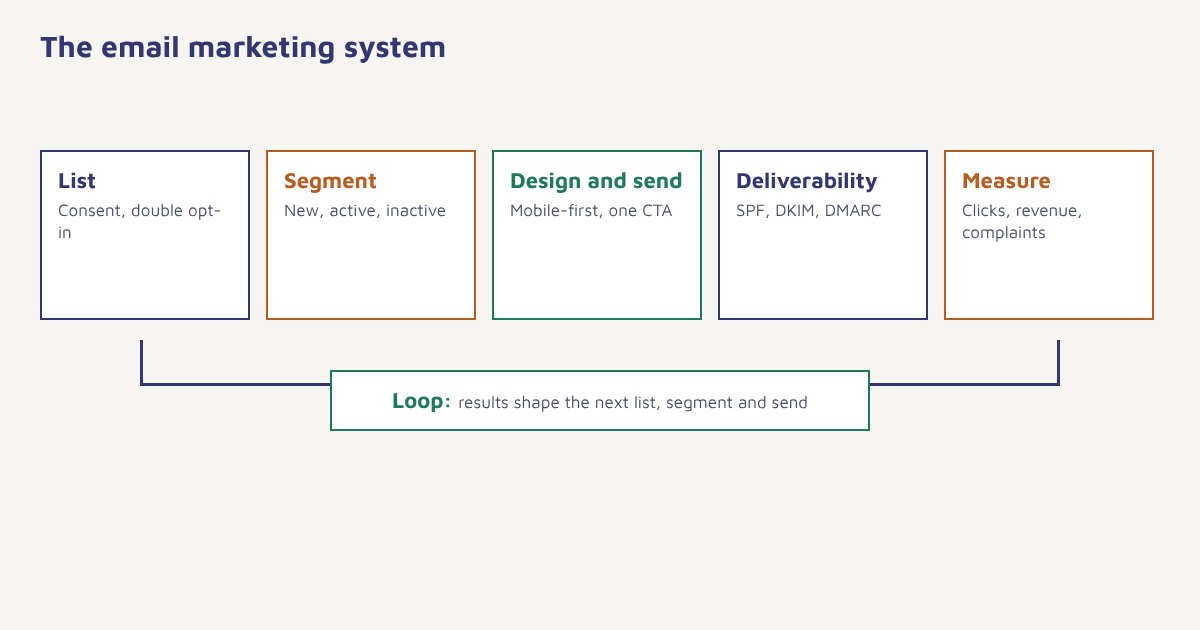
Step 1: Build a list people want to be on
Collect addresses with a clear promise, such as a discount, a guide or order updates. Use a form that says what you will send and how often. Many senders add double opt-in, where a new subscriber confirms by clicking a link, which cuts fake addresses and complaints. Laws vary, but the principles are consistent: consent, identification and an easy opt-out. In the US the CAN-SPAM Act sets rules for commercial email, and the GDPR requires a lawful basis, usually consent, for people in the EU. Never buy a list.
How to start email marketing: ten steps
- Choose a platform. Pick one that supports automation, segmentation and domain authentication, not just sending.
- Authenticate your domain. Publish SPF, DKIM and DMARC before the first campaign. See our setup guide.
- Set up sign-up forms. Place them on your site, at checkout and in your footer.
- Send a welcome series. Three emails over a week: a warm hello, what to expect, and a first reason to buy or use.
- Segment from the start. At least new, active and inactive. See customer segmentation.
- Design simple, mobile-first emails. One column, readable type and one clear button.
- Send consistently. Pick a rhythm you can keep, weekly or fortnightly, and stick to it.
- Automate the obvious. Cart reminders, post-purchase and win-back. See marketing automation.
- Test one thing at a time. Subject lines, send times and offers. See A/B testing.
- Review monthly. Look at revenue, clicks, complaints and list growth, not only opens.
How to write emails that get read
- Subject line: specific, honest and short enough to read on a phone. Avoid shouting and false urgency.
- Preview text: use it. It is a second subject line.
- From name: a recognisable brand or person people trust.
- First sentence: deliver the point immediately.
- One call to action: repeated once, not five different asks.
- Plain-text version: include it, since it helps deliverability.
Write for one person. Imagine one real customer reading on a phone in a queue. If your email needs more than ten seconds to make sense, cut it down.
Design and the email builder
Most opens now happen on phones, so use a single column, a 16 px minimum body size, buttons at least 44 px tall and images with descriptive alt text, since many clients block them by default. The Flowfox email builder provides responsive blocks and a plain-text version automatically, and Liquid personalisation fills in names, products and dates.
Email marketing metrics that matter
| Metric | What it tells you | Caution |
|---|---|---|
| Delivery and bounce rate | Whether the list and setup are healthy | A high delivery rate can still hide spam placement |
| Click-through rate | Interest in your content | More reliable than opens |
| Conversion and revenue per email | Business result | Needs tracking set up |
| Unsubscribe and complaint rate | Relevance and frequency | Keep complaints very low |
| List growth | Net new subscribers | Quality matters more than size |
| Open rate | Rough subject line signal | Inflated by Apple Mail Privacy Protection |
Apple introduced Mail Privacy Protection in 2021, which pre-loads images and makes many opens look real when they are not. Treat opens as a loose guide and base decisions on clicks and conversions.
Deliverability in one paragraph
Emails that land in spam earn nothing. Authentication, a clean list, consistent sending and low complaints decide placement. Our full guide to email deliverability goes through the checks and a warm-up schedule.
Email marketing in Flowfox
In Flowfox email you verify your domain, design in the builder, send campaigns to segments and build journeys that add WhatsApp or SMS if an email is not opened. Analytics shows revenue by campaign. Already using another tool? The migration guide explains how to switch safely, and the first campaign guide covers your first send.
Three email examples to copy
| Subject line | What it does | |
|---|---|---|
| Welcome | Welcome to Asha’s Kitchen: here is what happens next | Sets expectations, one link to the best-selling item |
| Cart reminder | You left something behind, Ravi | Shows the product image and one button back to checkout |
| Win-back | It has been a while. Here is what is new | Three new items and a small, time-limited incentive |
Notice the pattern: each email has a single purpose, a specific subject line and one thing to do. The same structure works for newsletters, where the single purpose is usually “read this one article”.
How often and when to send
Frequency is a balance. Too rare and people forget why they subscribed, which makes the next email look like spam. Too often and unsubscribes and complaints rise. Start with a weekly or fortnightly rhythm for broadcasts, add triggered emails that arrive because of something the customer did, and look at the unsubscribe rate each time you increase volume. For timing, test rather than copy a generic “best time” list: your customers’ routines differ, and you can often send at the time each person usually opens. Keep an eye on spam signals, since a sudden jump in volume to an unengaged list is a common cause of poor placement.
Common mistakes
- Batch-and-blast. Sending everything to everyone lowers engagement and reputation.
- Skipping the welcome. The first email gets the most attention. Use it.
- Too many images, too little text. It hurts accessibility and spam scoring.
- Hiding the unsubscribe. It increases spam complaints.
- Reporting only opens. Look at what people did next.
A small list that wants your email will outsell a large list that merely tolerates it.
Send email that earns its place in the inbox. Authenticate, segment and automate in one workspace.
If you also use messaging apps, read about WhatsApp marketing, and browse more guides on the blog.
Frequently asked questions
What is email marketing?
Email marketing is sending commercial or informational emails to people who agreed to receive them, in order to build relationships and drive actions such as purchases, sign-ups and renewals.
How do I start email marketing?
Choose a platform, authenticate your domain with SPF, DKIM and DMARC, add sign-up forms, send a welcome series, segment your list, design simple mobile-first emails and review clicks and conversions monthly.
Is email marketing still effective?
Yes. You own the list, it is inexpensive per message and it supports detailed content and automation. Results depend on consent, relevance and deliverability.
What is a good open rate for email marketing?
Open rates vary by industry and are inflated by Apple Mail Privacy Protection, so focus on click-through, conversion and revenue per email instead of a single open rate target.
How often should I send marketing emails?
Choose a rhythm you can keep, usually weekly or fortnightly for newsletters, plus automated emails triggered by behaviour. Watch unsubscribe and complaint rates and adjust.
Do I need permission to send marketing emails?
In most places yes, or at least a clear opt-out and honest identification. The EU requires a lawful basis, usually consent, and many senders use double opt-in. Check the laws that apply to your audience.
What is the difference between email marketing and marketing automation?
Email marketing is the channel. Marketing automation is the logic that sends emails and other messages based on triggers and segments, such as a cart reminder or a welcome series.