Email deliverability is the share of your messages that land in the inbox rather than the spam folder or nowhere at all. It is not the same as delivery: a message can be accepted by the receiving server and still be filed as junk. If your open rates have dropped, replies have gone quiet, or a campaign that used to work now seems to vanish, this guide shows how to find the cause and fix it, in the order that gives the biggest gain first.
What is email deliverability?
Deliverability is the outcome of three separate checks. First, is the message accepted by the receiving server, which depends on authentication and technical setup. Second, is it placed in the inbox or the spam folder, which depends on your sender reputation and the content. Third, do people engage with it, because opens, replies and deletions without reading feed back into the next decision. Mailbox providers such as Gmail, Outlook and Yahoo make these judgments on your domain, your sending IP and your recipients’ behaviour over weeks, not on a single message.
Delivery rate vs deliverability vs inbox placement
| Term | What it measures | Where you see it |
|---|---|---|
| Delivery rate | Messages accepted by the receiving server divided by messages sent | Your sending platform report |
| Bounce rate | Messages rejected, split into hard (bad address) and soft (temporary) | Your sending platform report |
| Inbox placement | Share of accepted messages that reach the inbox, not spam | Seed tests and mailbox tools |
| Spam complaint rate | Recipients who press “Report spam” | Google Postmaster Tools and feedback loops |
| Sender reputation | Trust a provider assigns to your domain and IP | Postmaster tools and reputation lookups |
A 98 percent delivery rate can hide a 40 percent spam placement. That is why delivery alone is a poor health check.
What affects email deliverability
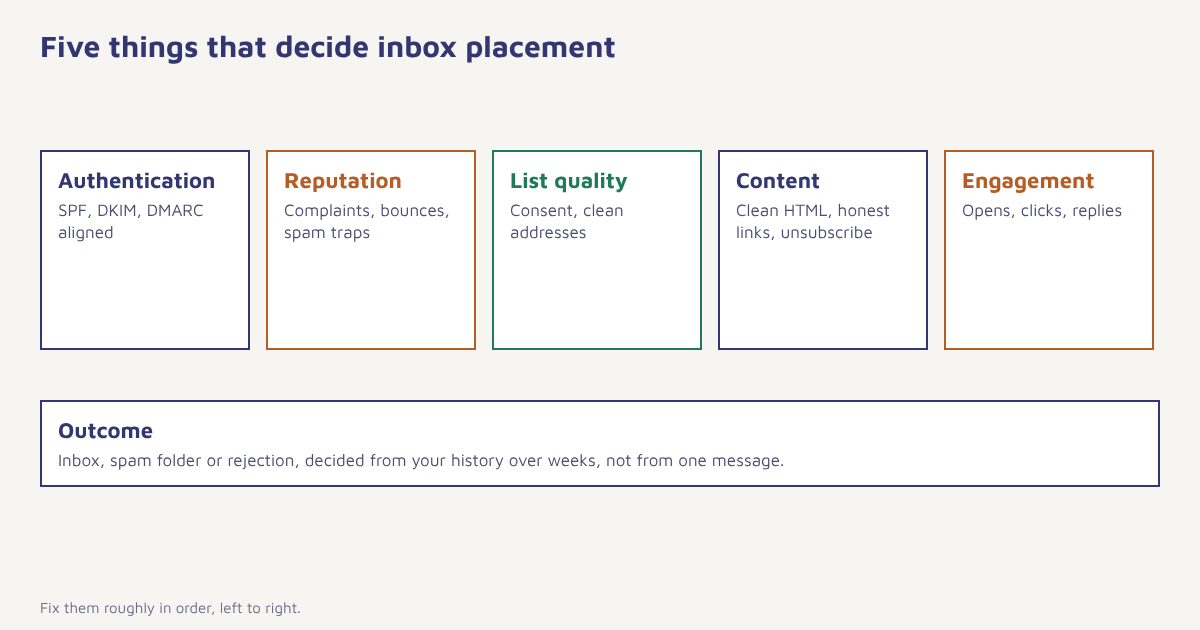
1. Authentication
Without SPF, DKIM and DMARC your mail is treated as suspicious, and large providers now require them from bulk senders. This is the first fix and often the cheapest. Our guide to SPF, DKIM and DMARC setup gives the exact records and a safe rollout order.
2. Sender reputation
Providers score your domain and sending IP on how recipients treat your mail. Complaints, spam traps and high bounce rates lower it. Google asks bulk senders to keep the spam rate shown in Postmaster Tools under 0.10 percent. You can also check whether your IP or domain is listed by organisations such as Spamhaus.
3. List quality
The fastest way to ruin reputation is to mail people who do not know you. Old lists produce bounces and recycled addresses that mailbox providers use as spam traps. Use confirmed or clearly consented sign-ups, remove hard bounces immediately, and suppress anyone who has not engaged in a long time.
4. Content
Filters look at the combination of signals, so a single word rarely sinks a message. Problems that do matter: image-only emails, link shorteners, mismatched link and display domains, shouting subject lines, missing plain-text part and a missing unsubscribe link. Keep the HTML clean, balance text and images and make the sender name recognisable. See the general idea of email spam and how filters treat it.
5. Engagement
Opens, clicks, replies and moving a message out of spam all tell a provider that people want your mail. Deletions without opening, ignoring and spam reports tell it the opposite. Send less to disengaged people and more to those who respond.
How to improve email deliverability, step by step
- Authenticate your domain. Publish SPF, DKIM and DMARC, and use a custom signing domain so the checks align with your From address.
- Send from a dedicated subdomain. Use something like
mail.example.comfor marketing so a reputation problem does not spill onto your main business domain. - Clean your list. Remove hard bounces, role addresses you never confirmed and anyone inactive for 12 months or more. Re-permission the borderline group once before dropping them.
- Warm up new domains and IPs. Start with your most engaged subscribers in small volumes and increase gradually over two to four weeks.
- Make unsubscribing easy. Add a visible link and the one-click header. A quick unsubscribe is better than a spam complaint.
- Monitor weekly. Watch bounce rate, complaint rate and Gmail reputation. Investigate any jump the same day.
- Segment and slow down. Mail engaged people more often, others less often. Our segment rules guide shows how to build an “engaged in 90 days” audience.
Warm-up in practice. A common pattern is 500 to 1,000 sends a day to your best subscribers in week one, doubling every few days while complaint and bounce rates stay low. If the numbers worsen, step back to the last good volume and hold there.
A sample warm-up schedule
This is an example for a new sending domain, not a rule. Adjust it to your list size and the provider mix.
| Day | Daily volume | Who to send to |
|---|---|---|
| 1 to 3 | 500 | Opened or clicked in the last 30 days |
| 4 to 7 | 1,000 to 2,000 | Opened or clicked in the last 60 days |
| 8 to 14 | 5,000 to 10,000 | Active in the last 90 days |
| 15 to 21 | 25,000 and rising | Whole engaged list |
| 22 onwards | Normal volume | Add less-engaged segments slowly |
The bulk sender rules in short
Since 2024, Gmail and Yahoo have asked senders of more than about 5,000 messages a day to authenticate with SPF, DKIM and DMARC, keep complaint rates low and offer one-click unsubscribe on promotional mail. Microsoft added similar requirements for Outlook.com in 2025. Smaller senders are not formally in scope, but providers use the same signals for everyone, so following the rules from day one is the safer route.
Troubleshooting: where is my email going?
| Symptom | Likely cause | First thing to check |
|---|---|---|
| Sudden fall in opens at Gmail only | Reputation or complaint spike at one provider | Postmaster Tools spam rate and domain reputation |
| High hard bounces | Old or mistyped list | Remove bounced addresses, add double opt-in |
| Everything in spam at all providers | Authentication failure or blocklisting | Raw headers for dkim=fail or spf=fail, blocklist lookups |
| Emails delayed or deferred | Sending too fast for the provider | Lower rate, spread across the day |
| Opens fine, clicks zero | Content or link problem | Test links, check for mismatched domains |
To read the raw headers of a message that went to spam, open it in Gmail and choose “Show original”. The summary at the top shows whether SPF, DKIM and DMARC passed.
Authentication-Results: mx.google.com;
  dkim=pass header.i=@mail.example.com;
  spf=pass smtp.mailfrom=bounce.mail.example.com;
  dmarc=pass (p=NONE sp=NONE dis=NONE) header.from=example.com
How Flowfox supports deliverability
In Flowfox email you verify your sending domain, see the exact DNS records to publish and keep suppression lists in one place, so bounces and unsubscribes are removed from every journey automatically. You can connect your own email provider if you already have infrastructure. The email builder produces clean HTML with a plain-text version, and analytics shows delivery, opens, clicks and complaints by campaign and by segment. If you are moving from another tool, the migration guide explains how to carry over your sending reputation safely.
Mistakes that quietly hurt inbox placement
- Sending a big campaign from a cold domain. Warm up first.
- Buying or scraping lists. Spam traps and complaints follow.
- Ignoring the unsubscribe. Hiding it increases spam reports.
- Switching sending domains to escape a bad reputation. It resets nothing if the behaviour stays the same.
- Only watching opens. Apple’s Mail Privacy Protection inflates them. Use clicks, replies and conversions.
Deliverability is earned slowly with every send, and lost quickly with one careless campaign.
Protect your sender reputation. Verify your domain, suppress bounces automatically and watch delivery health in one place.
If you also message on other channels, read how the same discipline of consent and quality applies to WhatsApp and SMS in India. Retention teams should pair this with the retention use case, and more reading is on the blog.
Frequently asked questions
What is email deliverability?
Email deliverability is the ability of your messages to reach the recipient’s inbox instead of the spam folder or being rejected. It depends on authentication, sender reputation, list quality, content and engagement.
How do I improve email deliverability?
Authenticate your domain with SPF, DKIM and DMARC, clean your list, warm up new domains gradually, keep complaints low, make unsubscribing easy and monitor reputation weekly.
Why are my emails going to spam?
Common causes are missing authentication, a poor sender reputation from complaints or bounces, a purchased or old list, spammy content, and sending large volumes from a new domain without warming up.
What is a good email deliverability rate?
Aim for a delivery rate above 95 percent and inbox placement as high as you can measure. Keep bounce rate under about 2 percent and spam complaints under 0.10 percent.
What is the difference between delivery rate and inbox placement?
Delivery rate counts messages accepted by the receiving server. Inbox placement counts how many of those reach the inbox rather than spam. A message can be delivered and still land in spam.
How long does email warm-up take?
Usually two to four weeks for a new domain or IP, starting with your most engaged subscribers and increasing volume gradually while complaint and bounce rates remain low.
Do I need DMARC for email deliverability?
Yes for bulk senders. Gmail and Yahoo require SPF, DKIM and DMARC for senders above about 5,000 messages a day, and it protects your domain from spoofing even if you send less.