A push notification is a short message that appears on a person’s phone or browser even when your app or site is closed. It is the fastest way to reach someone who has already chosen to hear from you, and the easiest way to annoy them if you overdo it. This guide explains what push notifications are, how they work, the main types, when to ask for permission, what to write, how often to send, and how to measure results, with examples you can adapt.
What are push notifications?
Push notifications are messages a server sends to a device, delivered through the operating system rather than through your app. Because the operating system handles delivery, the message can arrive when your app is not running. Each one typically has a title, a short body, an optional image and a tap action that opens a specific screen or page.
Types of push notifications
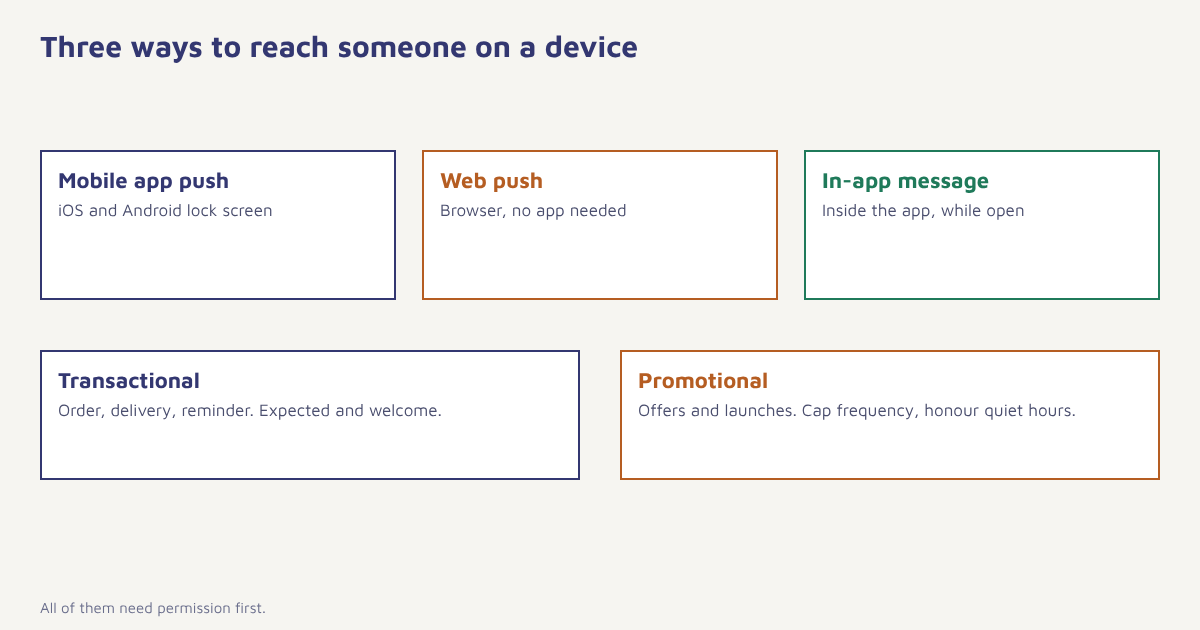
| Type | Where it appears | Needs the app installed? | Typical use |
|---|---|---|---|
| Mobile app push | Lock screen and notification shade on iOS and Android | Yes | Order updates, offers, reminders |
| Web push | Desktop and Android browsers, and installed web apps on iOS | No, only a browser | News, price drops, back in stock |
| In-app message | Inside the app while it is open | Yes | Feature tips, onboarding, announcements |
| Rich push | Mobile push with image, buttons or carousel | Yes | Product launches, quick actions |
On iPhones, web push works for sites added to the home screen, which Apple enabled from iOS 16.4. Android and desktop browsers support it more broadly.
How push notifications work
- The app or site registers. On first launch the app asks the operating system for a push token for that device.
- The user grants permission. On iOS you must ask. On Android 13 and later you must ask too, using the notification permission. Browsers show their own prompt for web push.
- Your platform stores the token. It is linked to the customer profile so you can target the right person.
- You send a message. Your platform hands it to Apple Push Notification service for iOS or Firebase Cloud Messaging for Android, and to browser push services for the web.
- The device displays it. A tap sends the person into your app with a deep link and reports the event back to you.
Our push channel handles token storage and delivery for you, and web messaging covers browser prompts.
When to ask for permission
The biggest lever on push results is not the copy. It is whether people say yes. On iOS especially, you only get one real chance to show the system prompt, because a refusal is hard to reverse. A few habits help:
- Ask at a moment of value, such as after the first order is placed (“Want tracking updates?”), not on the first screen.
- Use a soft prompt first. Show your own screen explaining the benefit, and only trigger the system prompt if the person agrees.
- Be specific. “Get delivery updates” beats “Allow notifications”.
- Offer control. Let people choose topics, such as orders, offers and news.
Never trick the prompt. If someone declines on iOS, you cannot ask again through the system dialog. Treat that first prompt as valuable and do not waste it on a cold start.
Push notification examples
| Goal | Title and message | Why it works |
|---|---|---|
| Order update | Your order is out for delivery. Arriving today by 6 pm. | Useful and expected |
| Cart reminder | Still thinking? Your Trail Runner is waiting. | Specific and gentle |
| Back in stock | Back in stock: Trail Runner, size 7. | Responds to stated interest |
| Onboarding nudge | Finish setting up in 2 minutes to see your first report. | Clear and short |
| Reminder | Your appointment is tomorrow at 11 am. Tap to reschedule. | Prevents no-shows |
| Re-engagement | New episodes of your show dropped today. | Personal relevance |
You can see notifications used across a full flow in our onboarding and retention use cases.
How to write a good push notification
- Lead with the value. Most lock screens show only the first line or two.
- Keep it short. Aim for a title under about 40 characters and a body under about 100. Different devices truncate differently.
- Use the person’s context. Name, product, order number or time.
- One action. A clear tap target with a deep link into the right screen.
- Emoji sparingly. One can help scanning. A row of them looks like spam.
How often to send
There is no universal number. A delivery app can justify several operational messages in a day. A shopping app should be sparing with promotions. Set a weekly frequency cap per person across all journeys, honour quiet hours (often 10 pm to 8 am in their local time) and send marketing push at a time they usually use the app. If someone ignores several in a row, reduce frequency rather than escalate. In Flowfox, frequency caps and quiet hours apply across channels, which stops one person receiving a push, an SMS and a WhatsApp message about the same thing within minutes.
Setting up push in Flowfox
- Install the SDK or add the web snippet. Follow the developer docs to register devices and send tokens to the platform.
- Send events. Cart updates, order status and screen views. See sending your first event.
- Create segments. For example, “opted in to push, cart value over 1,000, no purchase in 1 hour”.
- Build the journey. Push first, then an email or WhatsApp message if the push is not opened. See your first journey.
- Test on real devices. Check iOS, Android and the web, including deep links.
{
  "channel": "push",
  "to": "contact_8841",
  "title": "Your order is out for delivery",
  "body": "Arriving today by 6 pm. Tap to track.",
  "image": "https://cdn.example.com/push/delivery.png",
  "deep_link": "myapp://orders/FX-20481",
  "ttl_seconds": 7200
}
The time-to-live setting matters. A delivery alert that arrives hours late is worse than none, so give time-sensitive messages a short expiry.
Metrics to track
| Metric | What it shows |
|---|---|
| Opt-in rate | Share of users who accepted the prompt |
| Delivery rate | Share of sent messages that reached a device |
| Tap or open rate | Share who engaged with the message |
| Conversion rate | Share who completed the goal after the tap |
| Opt-out and uninstall rate | Warning of over-sending |
Behind the scenes: who delivers the message
Apple routes iOS notifications through its Apple Push Notification service, and Android messages travel through Firebase Cloud Messaging. Neither guarantees instant delivery, and devices in battery saver mode may delay messages. That is why a short time-to-live and a fallback channel matter for anything urgent. If a push is not tapped within a sensible window, a follow-up on WhatsApp or SMS is a common pattern, provided the person has opted in to that channel.
Push vs SMS vs email
| Push | SMS | ||
|---|---|---|---|
| Needs permission | Yes, device prompt | Yes, consent and DLT in India | Yes, consent |
| Needs app or number | App or browser | Phone number | Email address |
| Cost per message | Very low | Per-segment fee | Lowest |
| Best for | Timely, in-the-moment nudges | Alerts and OTPs | Detail and content |
See SMS marketing in India and email marketing for the other two.
Common mistakes
- Asking for permission on first launch. People have no reason to say yes yet.
- Treating push like email. Messages should be shorter and more timely.
- Sending to everyone. Use segments and behaviour.
- Dead deep links. A tap that lands on the home screen wastes the moment.
- Ignoring uninstall data. Rising uninstalls after campaigns are a warning.
The best push notification is one the customer would have asked for.
Reach customers in the moment. Combine push with email, SMS and WhatsApp in a single journey.
Pair push with other channels using the guides to marketing automation and segmentation. Apps in several sectors have ready setups in our industry solutions, and more reading is on the blog.
Frequently asked questions
What are push notifications?
Push notifications are short messages sent to a phone or browser through the operating system, which can appear even when the app or website is closed.
What is the difference between push notifications and in-app messages?
Push notifications appear outside the app, on the lock screen or notification shade. In-app messages appear inside the app while someone is using it.
Do users need to opt in to push notifications?
Yes. iOS, Android 13 and later, and browsers all require the user to grant permission before notifications can be shown.
How often should I send push notifications?
It depends on your product. Operational alerts can be frequent, but promotional push should be limited, with a weekly cap per person, quiet hours and a reduction in frequency for people who stop engaging.
How do I increase push notification opt-in rates?
Ask at a moment of value rather than on first launch, show a soft prompt that explains the benefit before the system prompt, be specific about what people will receive and offer topic controls.
Does web push work on iPhone?
Yes, for websites added to the home screen, since iOS 16.4. Android and desktop browsers support web push more broadly.
How long should a push notification be?
Keep the title under roughly 40 characters and the body under roughly 100, with the most important words first because devices truncate messages differently.