Since early 2024, getting email into the inbox has had a paperwork requirement. Google and Yahoo began enforcing rules for bulk senders in February 2024, and Microsoft followed for Outlook.com addresses in May 2025. All three expect your domain to prove who you are using three DNS records: SPF, DKIM and DMARC. This guide explains what each does in plain terms, shows the exact records to publish, and walks through a safe order of rollout so you do not accidentally block your own mail.
Why email authentication matters now
Email was designed without any check that the sender is who they claim to be. Anyone can put your domain in the From line, and for years phishers did exactly that. Email authentication is the set of standards that closes that gap, and mailbox providers now treat it as the baseline rather than a bonus.
Google’s sender guidelines ask every sender to set up SPF or DKIM, and bulk senders (those sending more than 5,000 messages a day to Gmail addresses) to set up all three, keep spam complaints low, and offer one-click unsubscribe on marketing mail. Yahoo published a matching set through its sender hub, and Microsoft applied similar rules to high-volume senders to its consumer domains. If you send from a platform like Flowfox, much of this is handled for you, but the DNS records still live on your domain, which means someone on your side has to publish them.
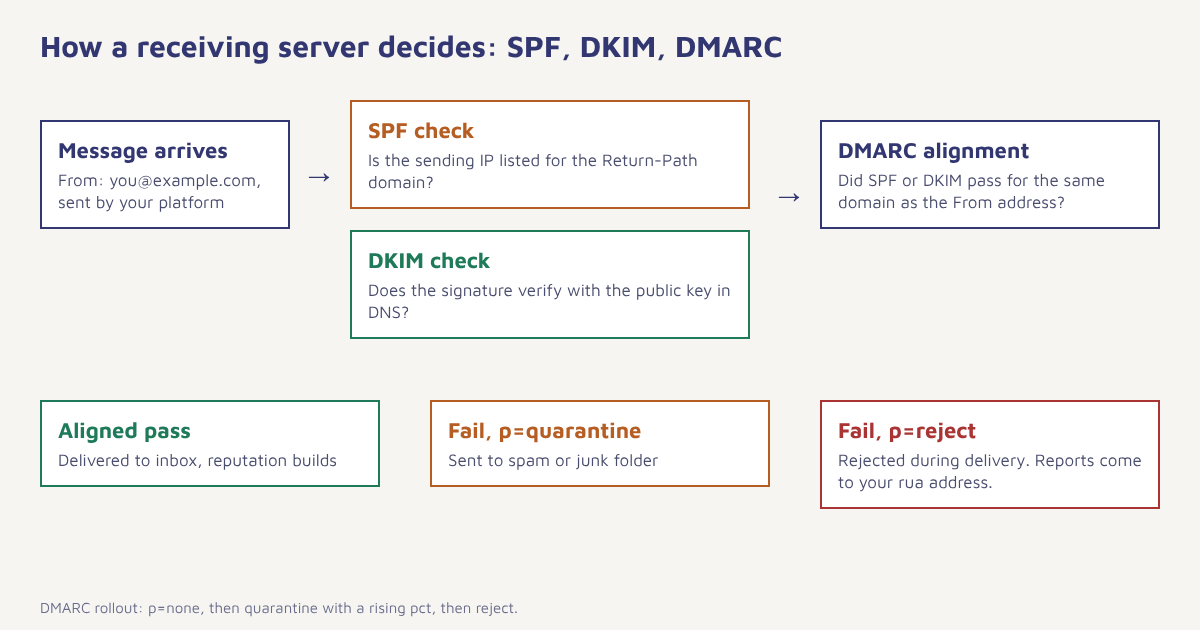
The short version. SPF says which servers may send for your domain. DKIM signs each message so tampering is detectable. DMARC tells receivers what to do when the first two fail, and sends you reports. You need all three, and they need to line up with your visible From domain.
What is SPF?
Sender Policy Framework (SPF) is a DNS TXT record listing the servers and services allowed to send mail for your domain. When a message arrives, the receiving server looks at the envelope sender (the Return-Path), fetches that domain’s SPF record and checks whether the connecting IP address is on the list. The standard is defined in RFC 7208.
A typical record for a domain that sends through Google Workspace and one marketing platform looks like this:
example.com. IN TXT "v=spf1 include:_spf.google.com include:spf.your-platform.example ~all"Three details trip people up. First, you can have only one SPF record per domain; two records cause a permanent error, so merge them. Second, SPF allows ten DNS lookups in total, counting each include and nested include. Adding a fifth or sixth service often pushes you over. Third, the ending matters: ~all (soft fail) is the usual starting point and -all (hard fail) is stricter. Because most large receivers now rely on DMARC to decide, soft fail plus an enforced DMARC policy is a sound combination.
What is DKIM?
DomainKeys Identified Mail (DKIM) adds a cryptographic signature to each outgoing message. The sending system signs selected headers and the body with a private key. You publish the matching public key in DNS under a selector, and the receiver uses it to verify that the message came from an authorised system and was not altered on the way. The specification is RFC 6376.
Your sending platform generates the key pair and gives you a record to publish. It will usually be a CNAME or a TXT record at a name like selector1._domainkey.example.com:
selector1._domainkey.example.com. IN TXT "v=DKIM1; k=rsa; p=MIIBIjANBgkqhkiG9w0BAQEFAAOCAQ8AMIIBCgKCAQEA..."Use a 2048-bit key where your provider offers it; 1024-bit still works but is no longer the recommended length. If you send from several systems (your website, your helpdesk and your marketing tool), each needs its own DKIM selector. Rotate keys once or twice a year if your team has the discipline to do so, and always before removing a former employee’s access to DNS.
What is DMARC?
Domain-based Message Authentication, Reporting and Conformance (DMARC) ties the other two together. It tells receivers two things: what to do with mail that fails authentication, and where to send reports about it. Crucially it adds alignment. SPF and DKIM can pass on a domain that has nothing to do with the From address a human sees; DMARC requires that at least one passing method uses the same domain (or a subdomain, depending on settings) as the From header.
_dmarc.example.com. IN TXT "v=DMARC1; p=none; rua=mailto:dmarc-reports@example.com; pct=100"| Tag | Meaning | Typical value |
|---|---|---|
| v | Protocol version, must come first | DMARC1 |
| p | Policy for failures | none, quarantine or reject |
| rua | Where aggregate reports go | mailto:dmarc-reports@example.com |
| pct | Share of failing mail the policy applies to | 100 (start lower when moving to enforcement) |
| adkim / aspf | Strict or relaxed alignment | r (relaxed) is fine for most senders |
| sp | Policy for subdomains | Same as p unless you need an exception |
SPF vs DKIM vs DMARC at a glance
| SPF | DKIM | DMARC | |
|---|---|---|---|
| What it proves | Sending server is authorised | Message is signed and unchanged | Authentication matches the From domain |
| Where it lives | TXT record on the sending domain | TXT or CNAME at selector._domainkey | TXT record at _dmarc |
| Survives forwarding? | Often breaks | Usually survives | Passes if DKIM survives |
| Gives you reports? | No | No | Yes, aggregate and failure reports |
| Required by Gmail/Yahoo bulk rules? | Yes | Yes | Yes, with alignment |
How to set up SPF, DKIM and DMARC step by step
- List every system that sends as your domain. That means your mailbox provider, marketing platform, CRM, billing software, support desk and any server that sends password resets. Missing one is the most common cause of “why did our invoices go to spam”.
- Publish one merged SPF record. Combine the include statements from each provider into a single TXT record at the root of your domain and keep an eye on the ten-lookup limit.
- Turn on DKIM in each system. Copy the record each provider gives you into DNS and wait for the provider to confirm that signing works. Send a test message and read the headers to confirm
dkim=pass. - Publish DMARC at
p=none. Pointruato a mailbox or a reporting service. Monitoring mode changes nothing about delivery while you learn who sends mail as you. - Read the reports for two to four weeks. Look for legitimate senders that fail alignment and fix each one. Ignore unknown IP addresses with low volume, they are often forwarders or spoofers.
- Move to
p=quarantineat a low percentage. Start withpct=10, then step up to 25, 50 and 100 as reports stay clean. - Move to
p=rejectwhen ready. Full enforcement stops anyone else from spoofing your domain and is what brands like banks and marketplaces run.
Do not skip monitoring. Jumping straight to p=reject is how companies block their own newsletter, payment receipts or HR mail. Stay at p=none until the reports show every real sender passing.
What the bulk sender rules require
Authentication is only part of the rules. If you send marketing or promotional mail at volume, the major mailbox providers also expect the following.
| Requirement | What to do |
|---|---|
| SPF, DKIM and DMARC | Publish all three, aligned with your From domain |
| Low spam complaints | Keep the rate reported in Google Postmaster Tools under 0.10 percent and never reach 0.30 percent |
| One-click unsubscribe | Add List-Unsubscribe and List-Unsubscribe-Post headers (RFC 8058) to promotional mail and honour requests within two days |
| Valid forward and reverse DNS | Sending IPs need matching PTR records |
| TLS for transmission | Use encrypted connections between servers |
| Properly formatted messages | Follow the Internet Message Format standard, and do not impersonate Gmail in the From header |
Thresholds and wording are updated by the providers from time to time, so treat the numbers above as a guide and confirm them on Google’s and Yahoo’s own pages. If your list has gone quiet for a year, clean it before the next campaign. Sending to dead addresses is one of the easiest ways to raise bounce and complaint signals.
How to test your setup
After DNS changes propagate, send a message from each system to a Gmail address. In Gmail choose “Show original” and look at the summary at the top. You want to see PASS beside SPF, DKIM and DMARC. If you see FAIL or NEUTRAL, read the line below it; it normally names the domain that did not align.
Command-line checks help too. These look up the three records for a domain without relying on a website:
dig +short TXT example.com | grep spf1
dig +short TXT selector1._domainkey.example.com
dig +short TXT _dmarc.example.com
Then add ongoing monitoring: a DMARC report reader (many are free for small volumes) and Google Postmaster Tools for Gmail reputation. Both take minutes to set up and show problems days before customers complain.
Common mistakes
- Two SPF records. Only one is allowed. Merge them.
- Over ten SPF lookups. Use a flattening feature in your DNS tool or remove services you no longer use.
- Authenticating the platform’s domain instead of yours. If DKIM signs with the vendor’s domain, DMARC alignment fails. Ask for a custom signing domain.
- Forgetting subdomains. Mail sent from
news.example.comfollows yoursppolicy. Check it. - Setting reject too early. See the callout above.
Authentication inside Flowfox
When you connect a sending domain in Flowfox email, the workspace shows the exact SPF, DKIM and DMARC records to publish and checks them for you, so a missing record shows up before a campaign does. If you bring your own provider, the setup is covered in connect your email provider. Once your domain is verified, design and test messages in the email builder, and watch delivery, opens and complaints in analytics. Teams moving from another tool can follow the migration guide to keep sender reputation intact during the switch.
Send email that reaches the inbox. Verify your domain in minutes and let Flowfox watch your records and delivery health.
Looking at the wider picture of deliverability? Pair this guide with our notes on sending your first campaign, and read how teams use messaging for retention without burning their sender reputation. The WhatsApp equivalent of keeping your numbers clean is covered in our WhatsApp Business API guide.
Frequently asked questions
What are SPF, DKIM and DMARC?
SPF lists the servers allowed to send mail for your domain. DKIM adds a signature that proves a message was not altered. DMARC sets a policy for mail that fails those checks, requires alignment with the From domain and sends you reports.
Do I need all three of SPF, DKIM and DMARC?
Yes if you send bulk or marketing email. Gmail and Yahoo require all three for senders above roughly 5,000 messages a day, and Microsoft applies similar rules to high-volume senders to Outlook.com. Even small senders should publish them because they protect your domain from spoofing.
How long do DNS changes take to work?
Often a few minutes, but changes can take up to 48 hours to reach every resolver depending on the TTL of your records. Lower the TTL before making changes if you need faster results.
What DMARC policy should I start with?
Start with p=none and a reporting address. Review reports for a few weeks, fix legitimate senders that fail, then move to quarantine and finally reject in stages using the pct tag.
Can I have more than one SPF record?
No. A domain must publish a single SPF record. Multiple records produce a permanent error, so combine all include statements into one.
Why is my email failing DMARC even though SPF and DKIM pass?
Alignment is probably failing. SPF or DKIM may be passing for the sending platform’s domain rather than yours. Configure a custom DKIM signing domain and a custom return-path so at least one method matches the From domain.
What is the spam rate limit for Gmail?
Google asks bulk senders to keep the spam rate reported in Postmaster Tools below 0.10 percent and to avoid reaching 0.30 percent or higher.