The order confirmation is not the end of the sale. It is the start of the part that decides whether the customer buys again, recommends you or asks for a refund. Post-purchase emails are the messages that follow the transaction: confirming it, keeping the customer informed, helping them get value from what they bought, asking for feedback and gently introducing what might come next. This guide sets out a practical sequence, explains how it differs from transactional emails, shows what to put in each message, covers timing by product type and tells you how to measure the programme without annoying the people who just paid you.
What are post-purchase emails?
Post-purchase emails are automated messages sent after a customer completes an order. They sit between two ideas. Transactional messages such as receipts and shipping notices are required and expected. Marketing messages such as offers need permission and a reason. Post-purchase emails blend the two: they support the transaction, then gradually move toward relationship building. The aim, in the language of customer retention, is to turn a first order into the start of a relationship. They are a core part of any customer lifecycle programme.
Post-purchase vs transactional emails
| Transactional | Post-purchase | |
|---|---|---|
| Purpose | Complete and confirm the transaction | Build the relationship after it |
| Examples | Receipt, shipping notice, password reset | Usage tips, review request, replenishment reminder |
| Consent | Generally expected as part of the service | Needs marketing permission where it promotes |
| Tone | Factual and fast | Helpful and personal |
| Can include offers | Sparingly, if at all | Yes, if relevant and permitted |
| Timing | Immediate | Days and weeks later |
Rules differ between countries, and the line between an informational and a promotional message is not always clear, so check current rules for your markets and keep service messages mainly about the order. Our email compliance checklist and DPDP Act guide are good starting points.
A post-purchase sequence that works
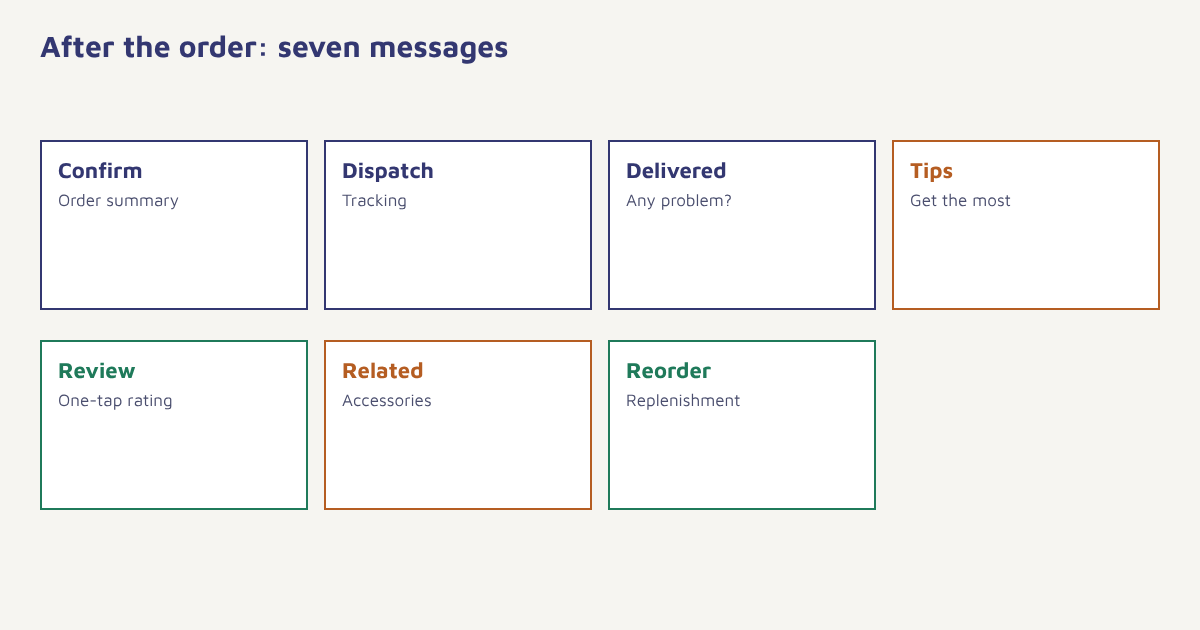
| When | Message | Purpose | Includes offers? |
|---|---|---|---|
| Immediately | Order confirmation | Reassure, summarise, set expectations | No |
| On dispatch | Shipping update with tracking | Reduce anxiety and support contacts | No |
| On delivery | Delivered, and what to do if there is a problem | Catch issues early | No |
| 2 to 5 days after | Getting the most from your purchase | Tips, care guide, setup help | Rarely |
| 7 to 14 days after | Review request | Collect feedback and proof. See review request emails | No |
| 2 to 4 weeks after | Related products | Accessories or complements. See cross-selling | Yes |
| Before it runs out | Replenishment reminder | Make reordering easy | Optional |
The timings are starting points. A phone case and a sofa do not need the same schedule. Think about when the customer will realistically have used the product, then place the message just after.
What goes into each message
Confirmation and shipping
Make the order number, items, price, address and delivery estimate easy to find. Add a single line on how to get help. Resist stuffing the page with promotions; people open these emails to check details and a cluttered layout makes that harder. A small, relevant suggestion at the bottom is acceptable where rules allow.
Delivery and first use
When the parcel arrives, a short message asking “Did everything arrive as expected?” with a clear link to support catches problems before they become angry reviews. A few days later, a useful guide such as set-up steps, care instructions or a recipe shows you care about the result. These messages tend to earn trust more than any discount does.
Review and feedback
Ask when the customer has had a fair chance to use the product. Keep the first step to a single tap, then offer an optional comment or photo. Route unhappy customers to a human conversation rather than hiding them. More on this is in our guides to user-generated content and the customer feedback loop.
The next purchase
Recommendations should come from what the customer bought, not from a generic bestseller list. See product recommendation engines for methods. For consumables, a replenishment reminder timed to the usual usage cycle is among the most welcome emails, because it saves the customer effort.
How to build the sequence
- Send order events. Order placed, shipped, delivered and returned, each with item details. See the data model.
- Create a delivery-based journey. Start the clock from delivery, not from the order date.
- Add conditions. Skip the review request if there is an open support ticket or a return.
- Branch by product. Different care tips and timings for different categories.
- Apply channel rules. Use email for detail, and WhatsApp or SMS for time-sensitive delivery notes where the customer has opted in.
- Set exits and caps. End the flow on a repeat purchase and respect weekly message limits.
In Flowfox, a journey can begin on the delivery event, check the customer’s consent and open support issues with the segment builder, and send through email, WhatsApp or SMS. The ecommerce solution page shows sector flows.
Subject: Getting the most from your [product_name]
Hi [first_name],

Your [product_name] arrived on [delivered_date].
Here are three tips to start well:
1. [tip_1]
2. [tip_2]
3. [tip_3]

Questions? Just reply to this email.
The snippet above is a template sketch. Square brackets stand in for merge tags, whose exact syntax differs between tools; see our Liquid guide for dynamic content. Whatever the syntax, always set a fallback for missing values so that a blank first name never appears as an empty gap. It also pays to preview the email with a few real customer records before switching the journey on, including one with unusual data such as a very long product name or a missing delivery date, because small template slips become embarrassing at scale.
A worked example
A made-up coffee-equipment shop sells a manual grinder to a customer named Arjun. On the day of delivery, he gets a short note with a link to a brewing guide. Four days later, an email shows how to adjust the grind setting for different brew methods. Ten days after delivery, once he has had time to try it, a review request arrives with a one-tap rating. Because Arjun rates it five stars, the follow-up page invites him to add a photo; had he rated it two, it would have opened a support conversation instead. Three weeks after delivery, a message suggests a matching coffee scale and a bag of beans that fit the brew methods he read about. Six weeks later, a replenishment reminder for the beans arrives. The shop, product and sequence are invented to show the flow.
Measuring post-purchase programmes
| Measure | Reading it |
|---|---|
| Repeat purchase rate | The main outcome. See repeat purchase rate |
| Review and rating rate | Share of customers giving feedback |
| Support contacts after delivery | Should fall as guidance improves |
| Return rate | Better guidance may reduce avoidable returns |
| Revenue per recipient | Value of cross-sell and reorder messages |
| Unsubscribes and complaints | Signals whether the sequence is too heavy |
Compare with a holdout group of customers who receive only the transactional messages. For a wider view of loyalty beyond the second order, see loyalty programs and retention strategies. The broader customer experience idea reminds us that the time after payment is part of the product.
Common mistakes
- Starting the clock at order date. A parcel may take a week; time from delivery.
- Selling too early. Confirmations should reassure, not upsell.
- Generic recommendations. Use what was bought.
- Ignoring returns and issues. Do not send a review request to someone mid-complaint.
- Too many messages. Cap the weekly total.
The customer made their decision when they paid. The next emails decide whether they would make it again.
Turn first orders into second orders. Trigger delivery-based journeys across email, WhatsApp and SMS.
Read next: abandoned cart recovery, ecommerce email marketing and the blog.
Frequently asked questions
What are post-purchase emails?
Post-purchase emails are automated messages sent after an order, covering confirmation, shipping, delivery, usage help, review requests and suggestions for the next purchase.
What is the difference between post-purchase and transactional emails?
Transactional emails complete the transaction, such as receipts and shipping notices. Post-purchase emails build the relationship afterwards with tips, feedback requests and relevant suggestions.
How many post-purchase emails should I send?
A common sequence has five to seven messages from confirmation to a reorder reminder, adjusted to the product and capped so the customer is not overloaded.
When should I send a review request?
After the customer has had a fair chance to use the product, often a week or two after delivery for many products, and never while a return or complaint is open.
Can post-purchase emails include promotions?
Often yes, but keep the first messages about the order, check marketing consent and local rules, and make any offer relevant to what was bought.
Should I start the timing from order date or delivery date?
From delivery for anything about using or reviewing the product. Order-date timing can ask for a review before the parcel arrives.
How do I measure post-purchase email success?
Track repeat purchase rate, review rate, support contacts, return rate, revenue per recipient and unsubscribes, compared with a holdout group.