Open any large online store and the page already seems to know you: “customers also bought”, “picked for you”, “complete the look”. Behind each of those blocks sits a product recommendation engine, software that decides which items to show to which person. Done well, it helps shoppers find things they would not have searched for and lifts order value. Done badly, it shows a customer the kettle they bought yesterday. This guide explains how recommendation engines work, the main approaches, the data they need, how to use them in email, WhatsApp and push as well as on your site, how to start small and how to measure whether they pay for themselves.
What is a product recommendation engine?
A product recommendation engine is a system that predicts which products a customer is most likely to want and presents them at the right moment. It belongs to the wider family of recommender systems, which also power film, music and news suggestions. In commerce, the output is usually a short ranked list: the top four items for a product page, the next best offer for an email or the products to place in a cart reminder. The goal is not to be clever. It is to reduce the effort of choosing and to raise the chance that the customer finds something worth buying.
The main approaches
| Approach | How it decides | Strength | Weakness |
|---|---|---|---|
| Rules and merchandising | Hand-written rules such as “show accessories for this category” | Simple, transparent, works with no data | Does not scale; needs constant upkeep |
| Popularity | Bestsellers overall or in a category | Works for new visitors | Everyone sees the same thing |
| Collaborative filtering | People who behaved like you liked these items | Finds surprising links | Struggles with new items and new customers |
| Content-based | Items similar to ones you liked, based on attributes | Handles new items well | Can become narrow and repetitive |
| Hybrid | Combines the above, often with a ranking model | Best overall accuracy | Takes more data and effort |
| Context-aware | Adds time, device, location, stock and season | Feels relevant to the moment | Needs rich, fresh data |
The idea behind collaborative filtering is the best known: if many people who bought A also bought B, then B is a good suggestion for someone viewing A. Content-based methods instead compare product attributes such as category, brand, price band, colour and description. Most mature systems blend both and then re-rank the result using business rules, for example hiding out-of-stock items or boosting products with healthy margins.
The data it needs
| Data | Examples | Used for |
|---|---|---|
| Catalogue | Titles, categories, attributes, prices, images, stock | Similarity and filtering |
| Behaviour | Views, searches, wishlist adds, cart adds, orders | Interest and intent |
| Customer profile | Past purchases, city, language, preferred channel | Personal relevance |
| Context | Time, device, season, campaign source | Moment-specific picks |
| Outcomes | Which recommendations were seen, clicked and bought | Learning and measurement |
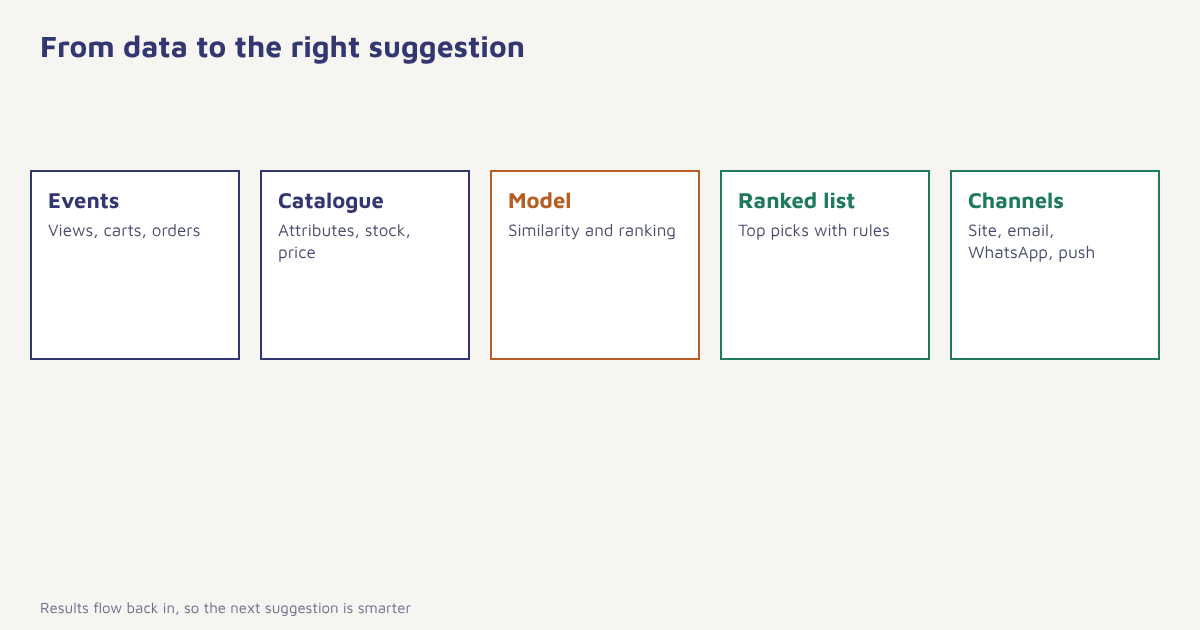
Good recommendations depend on clean, joined-up data. If a customer appears as three different people across your site, app and store, no model can serve them well. That is why identity and one profile matter, as explained in our guide to the customer data platform. In Flowfox, events and orders live on the same data model used by segments and journeys, so the same behaviour that powers a segment can power a recommendation block.
Where to use recommendations
| Placement | What to recommend | Why it works |
|---|---|---|
| Product page | Similar items, accessories, “frequently bought together” | Helps comparison and cross-sell. See cross-selling and upselling |
| Cart | Small add-ons | Raises order value without distracting from checkout |
| Homepage | Picks based on recent behaviour, trending items | Gives returning visitors a shortcut |
| Abandoned-cart email | The items left behind, plus close alternatives. See cart recovery | Reminds and offers a way out of indecision |
| Post-purchase email | Refills, accessories, the next item in a series | Timed to the likely next need |
| Newsletter | A personalised block under the main story. See email newsletters | Same send, different content per reader |
| WhatsApp or push | One or two items tied to a trigger | Short, timely and within consent |
Recommendations are a core tool of personalization. In an email, they are often dynamic blocks filled at send time with data from the profile; the email builder supports this, and WhatsApp and push messages can carry the same item data. Our ecommerce solution page shows typical flows.
How to start without a data science team
- Begin with rules and bestsellers. A “top sellers in this category” block is better than nothing and gives you a baseline to beat.
- Clean the catalogue. Consistent categories, attributes and images matter more than any algorithm.
- Collect the events. Product views, cart adds and orders, tied to a customer ID. See sending your first event.
- Add “bought together” logic. Simple co-purchase counts already work well for accessories.
- Use recommendations in triggered messages. Cart reminders and post-purchase emails are the easiest wins.
- Test against a control. Show one group the recommendations and another the default. See A/B testing.
- Improve over time. Add personal and context signals once the basics work.
Start with the message, not the model. A modest list inside a well-timed cart or post-purchase email usually earns more than a sophisticated model on a page few people visit.
A worked example
Take an online shop selling coffee equipment, with 30,000 customers. The team first adds a “frequently bought together” block on grinder pages, based on simple co-purchase counts, which suggests filters, scales and cleaning tablets. Next, it adds a post-purchase journey: ten days after a grinder is delivered, customers receive an email with beans that match their brewing method, and a month later a descaling reminder for kettle owners. A third change targets lapsed customers, using the last category they bought from. Each change is tested against a holdout group that sees the generic version. The shop and the numbers are invented, but the approach is typical: begin with obvious relationships, put them where the customer is already paying attention, and keep a control group so you know what worked.
How to measure whether it works
| Metric | What it shows |
|---|---|
| Recommendation click-through rate | Whether the suggestions are noticed and interesting |
| Conversion rate from recommendations | Whether clicks turn into orders |
| Revenue per visitor or per email | The overall financial effect |
| Average order value | Whether add-ons raise basket size |
| Items per order | Cross-sell effect |
| Return and complaint rate | Whether suggestions are misleading |
| Holdout lift | Difference versus the group without recommendations |
Always judge results against a control. Recommendations can claim credit for sales that would have happened anyway, since people often click on the item they were already going to buy. Lift over the holdout is the honest number. Related measures are covered in email marketing metrics and conversion rate optimization.
Privacy, fairness and trust
Recommendations use personal data, so be open about it. Say in your privacy notice that you use browsing and purchase history to suggest products, honour opt-outs and avoid sensitive inferences, such as guessing at health conditions from purchases. Under India’s Digital Personal Data Protection Act, notice and consent matter; see our guide to the DPDP Act for marketers. Also watch for the “filter bubble” effect described in the literature on filter bubbles: if you only ever show people what they already like, discovery narrows and you can miss new interests. Mix in some exploration, such as new arrivals or items from adjacent categories.
Common mistakes
- Recommending what was just bought. Exclude purchased items unless they are consumables.
- Showing out-of-stock items. Filter by live stock.
- Ignoring the cold start. New visitors and new products need fallbacks such as bestsellers.
- Overloading the page. Four good suggestions beat twenty.
- No holdout. You cannot prove the effect.
- Messy catalogue data. Bad attributes produce bad matches.
The best recommendation is the one the customer thinks they found by themselves.
Put the right product in front of the right customer. Use behaviour and order data in email, WhatsApp, SMS and push.
Read next: AI in ecommerce, customer lifetime value and the blog.
Frequently asked questions
What is a product recommendation engine?
A product recommendation engine is software that predicts which products a customer is most likely to want and shows a ranked list at the right moment, on a site, in email or in other channels.
How do product recommendation engines work?
They use catalogue data and customer behaviour, such as views, carts and orders, with methods like collaborative filtering, content-based matching or a hybrid, then rank items and apply business rules such as stock.
What is collaborative filtering?
Collaborative filtering recommends items based on the behaviour of similar customers, for example suggesting product B to people viewing product A because many who bought A also bought B.
Do I need AI to start with recommendations?
No. Bestseller blocks, category rules and simple “bought together” counts work well to begin with, and you can add more advanced models later.
Where should I use product recommendations?
Product pages, carts, the homepage, abandoned-cart and post-purchase emails, newsletters, and short WhatsApp or push messages, within customer consent.
How do I measure the impact of recommendations?
Compare conversion, revenue per visitor and average order value for people who saw recommendations with a holdout group that did not.
Are product recommendations a privacy risk?
They use personal data, so you need clear notice, consent where required, opt-outs and care to avoid sensitive inferences. Follow local rules such as the DPDP Act.