A new subscriber is never more interested in you than in the first few minutes after signing up. They have just handed over an address, they remember why, and they are waiting to see what happens next. Most brands waste that moment with a single generic “thanks for subscribing” or, worse, silence until the next campaign. A welcome email series uses those first days on purpose. This guide explains what a welcome series is, why it earns more attention than almost any other email you send, how many emails to use and when, what each one should say, a full worked example, the setup steps and the measures that tell you whether it works.
What is a welcome email series?
A welcome series is a short, automated run of emails sent to a new subscriber or customer, starting the moment they join. It is the first and simplest kind of drip campaign, and the one almost every business should have. Unlike a newsletter, it is triggered by behaviour (the sign-up), not by the calendar, and each person starts at the beginning no matter when they join. The wider idea sits inside email marketing practice: ask permission, deliver on the promise made at sign-up, and build the relationship step by step.
Why welcome emails matter
- Peak attention. Welcome messages are usually opened and clicked far more than ordinary campaigns. The exact gap varies by business, so compare against your own averages.
- First impression. The tone, design and usefulness of the first email set expectations for everything that follows.
- Reputation. Early opens and clicks help mailbox providers see you as a wanted sender. See deliverability.
- Faster first purchase. A well-timed nudge in the first week can move a browser to a buyer. See conversion rate optimization.
- Better data. You can ask one or two preference questions while interest is high, which helps segmentation.
How many emails, and when?
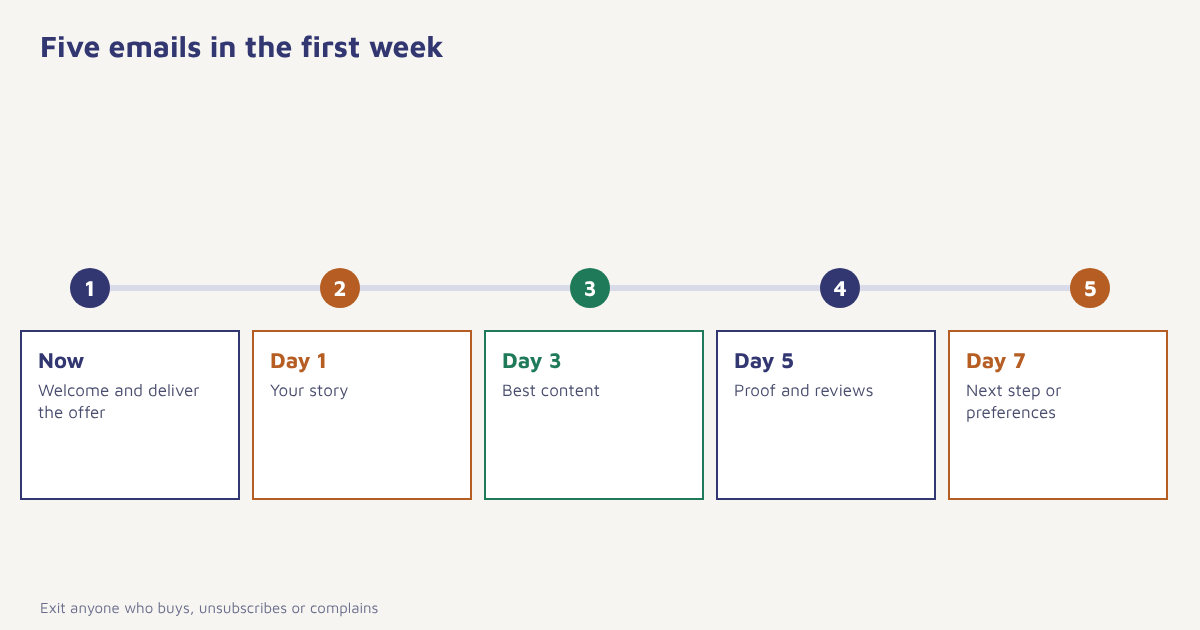
| Timing | Purpose | Main call to action | |
|---|---|---|---|
| 1. The welcome | Immediately | Confirm the sign-up, deliver anything promised, say what to expect | Use the promised offer or read the first guide |
| 2. Your story | Day 1 | Explain who you are and why you do this, in two or three short paragraphs | Visit the about page or best-seller |
| 3. Best content | Day 3 | Show your most useful guide, product or feature | Read or try it |
| 4. Proof | Day 5 | Customer reviews, results or a short case story | See what others say |
| 5. Nudge | Day 7 | A gentle reminder of the offer or a next step, with an easy way to set preferences | Buy, book or choose interests |
Three to five emails over about a week suit most businesses. A simple product with a clear offer may need only two or three. A complex product or a high-priced service may benefit from more, spread over two or three weeks. Stop sending the series to anyone who converts, so that a person who buys on day two does not get a sales nudge on day five.
Send the first email immediately. The first message should arrive within a minute or two. Delay lowers opens and can cause people to forget who you are. If you use double opt-in, send the confirmation email first, then the welcome email as soon as they confirm.
What to put in each email
Email one: deliver and set expectations
Thank the subscriber in one line, give them what you promised (the discount code, the guide, the access link), and tell them what they will receive and how often. A short sentence like “We send one email a week, usually on Thursdays” reduces unsubscribes later. Add a single clear button and a plain-text reply invitation such as “Reply and tell us what you are looking for”, which also encourages inbox engagement.
Email two: introduce yourself
People do business with people. Share a brief, honest story: why the brand exists, what it stands for and who is behind it. Avoid a long company history. One memorable detail does more than five paragraphs of mission statement.
Email three: be useful
Share your best guide, a how-to, a popular product or the feature that helps new users succeed. If you sell a product, show how to get value from it. If you offer software, link to the quick-start. For onboarding flows, read our customer onboarding guide.
Email four: show proof
Reviews, ratings, short testimonials or a mini case study reduce doubt. Real customer words work best, as discussed in our guide to user-generated content. Do not invent quotes or inflate numbers; that is misleading and, in some places, unlawful.
Email five: invite the next step
Remind people of any time-limited offer honestly, or invite them to choose their interests so that future emails fit them. Make the preference link easy to find. A subscriber who picks topics is far more likely to stay.
A worked example
Imagine an online tea shop with a 10 percent first-order offer for new subscribers. The numbers below are invented to show the shape of the series.
| Subject line | What is inside | |
|---|---|---|
| 1 (immediate) | Welcome, and here is your 10% off | Code, delivery promise, what to expect weekly |
| 2 (day 1) | Why we started with one tea garden | Short founder story, photo of the garden, link to best-sellers |
| 3 (day 3) | How to brew the perfect cup | Brewing guide by tea type, link to starter box |
| 4 (day 5) | What 2,000 customers say | Three real reviews and a rating summary |
| 5 (day 7) | Your code expires soon | Reminder with expiry date, link to choose interests |
The shop sends this to everyone, but exits buyers from the series as soon as they order and moves them to a post-purchase flow with a review request. It also adds a second branch: subscribers who clicked the green tea link in email one skip the generic third email and get a green tea guide instead. After a month the team compares the series with a plain single welcome email, using a small holdout group, and keeps whichever earns more revenue per recipient.
How to set up a welcome series
- Choose the trigger. Sign-up, or double opt-in confirmed, or first purchase if it is a customer welcome. Keep subscriber and customer welcomes separate.
- Define the goal. One main goal, for example first purchase within 14 days or completing a profile.
- Write the emails. Plan five at most. Keep each focused on one action. See email design best practices and subject lines.
- Add exit rules. Remove people who convert, unsubscribe or complain from the remaining emails.
- Personalise. Use name, sign-up source and any interest chosen. See marketing personalization.
- Test before launch. Send tests to different mail apps and check links, images and mobile layout.
- Measure and improve. Review clicks, conversion and unsubscribes weekly at first, then monthly.
In Flowfox you build this as a journey: a sign-up trigger, waits between emails, conditions that read the event data (for example, order placed), and an exit when the goal is met. Use the email builder for the design and the segment builder to give each sign-up source its own starting path. Where the person also consented to WhatsApp, you can send a short welcome there as well, as discussed in the channel comparison.
What to measure
| Measure | What it tells you | What to look at |
|---|---|---|
| Open rate | Whether the subject and sender work (treat with caution, see email marketing metrics) | Compare with your normal campaigns |
| Click rate | Whether the content is relevant | Per email, and which link |
| Conversion rate | Whether the series achieves its goal | Share who act within 14 or 30 days |
| Revenue per recipient | Total value of the series | Compare with a holdout group |
| Unsubscribe and complaint rate | Whether expectations were set correctly | Watch spikes on a particular email |
| Drop-off | Where people stop engaging | Opens by email number |
Welcome emails also affect your technical health. Because early engagement is high, a good series helps new domains and new lists build reputation. If you are starting from scratch, pair it with our guide to email warm-up. For a historical angle on why permission-based welcome messages became standard, the page on opt-in email is a useful read.
Variations worth testing
Once the basic series runs, test one change at a time. Try a shorter series against a longer one, a first email with the offer against one with value first, and a plain-text style note from a named person against a designed template. Test send times in the first email too, though immediate delivery is usually best. Branching adds relevance: split the path by sign-up source, so that a reader who joined from a recipe page gets recipes, while someone who joined at checkout gets order help and care tips. For stores with a catalogue, the third email can show products related to what the person browsed, as long as you have the consent and the data to do so. Keep a holdout group, and read results by revenue per recipient and long-term engagement, not opens alone. Background on testing methods is in the article on A/B testing, and our own A/B testing guide shows how to run it properly.
Common mistakes
- Waiting to send. A welcome that arrives a day late feels like spam.
- Hard selling in email one. Deliver first, sell later.
- One-size-fits-all. Sign-up source and interest should change the path.
- No exit rule. Buyers keep getting “buy now” emails.
- Forgetting plain text and mobile. Most welcome emails are read on phones.
- Never reviewing. Offers, links and tone age quickly.
You only get one first impression with a subscriber. A welcome series makes sure it is a good one.
Welcome every new subscriber properly. Build a welcome journey with waits, conditions and exits across email and WhatsApp.
Read next: email list building, email newsletters, lead scoring and the blog.
Frequently asked questions
What is a welcome email series?
A welcome email series is a short automated sequence sent to new subscribers or customers, starting at sign-up, to introduce the brand, deliver any promised offer and guide them to a first action.
How many emails should a welcome series have?
Three to five emails over about a week suits most businesses. Simple offers may need two or three, and complex products may use more over a longer period.
When should the first welcome email be sent?
Immediately, within a minute or two of sign-up. With double opt-in, send it as soon as the subscriber confirms.
What should I include in a welcome email?
Thank the subscriber, deliver what you promised, say what to expect and how often, and offer one clear next step.
Should I put a discount in my welcome email?
It can lift first purchases, but it is not required. Many brands lead with value and use an offer in a later email, so test both against a holdout group.
How do I measure the success of a welcome series?
Track clicks, conversion within a set period, revenue per recipient, and unsubscribe and complaint rates, ideally compared with a holdout group.
Should customers and subscribers get the same welcome series?
No. Subscribers need a reason to buy, while new customers need onboarding and help getting value. Use separate series with different goals.