You have a new domain, a new sending address or a new platform, and a list of people waiting to hear from you. The tempting move is to send to everyone on day one. It is also the quickest way to land in spam. Mailbox providers have no history for a new sender, so they watch the first few weeks closely. Email warm-up is the practice of building that history on purpose: starting small, sending to your most engaged people, and increasing volume gradually while the signals stay healthy. This guide gives you a practical schedule, the rules that matter, and what to do when something goes wrong.
What is email warm-up?
Email warm-up is a gradual increase in sending volume on a new domain or IP address so that mailbox providers learn to trust it. Providers such as Gmail, Outlook and Yahoo judge a sender by past behaviour: how many recipients open or reply, how many complain, how many addresses bounce and whether the mail is properly authenticated. A brand-new sender has no record, so a sudden burst of thousands of messages looks the same as a spam run. Warming up replaces that suspicion with a track record. The related idea of SPF and other authentication is the foundation, and our guide to email deliverability covers the wider picture.
When you need to warm up
- A new sending domain or subdomain. Even if your company domain is old, a fresh subdomain for marketing starts with no reputation of its own.
- A new dedicated IP address. Shared IPs are already warm, which is one reason small senders often begin on shared infrastructure.
- Switching platforms. A move to a new provider changes the sending IPs, and you should ramp up rather than move the whole list at once. See our migration guide for the process.
- A long pause. If you have not sent for several months, treat the first campaign back with the same care.
- A sudden jump in volume. Going from 5,000 to 100,000 a month deserves a ramp.
Before you send the first message
Warm-up only works if the technical basics are right. Set up SPF, DKIM and DMARC, make sure the sending domain and the visible From domain align, add a working unsubscribe link and a reverse DNS record where you control the IP. Our step-by-step SPF, DKIM and DMARC guide walks through each record. Also clean the list. Remove addresses that bounced before, role addresses such as info@ if they were never opted in, and anyone who has not engaged in a long time. A small, clean list sent carefully beats a large, dirty one. If you are unsure how the list was collected, read email list building first, because a poor list undoes every other precaution.
A sample warm-up schedule
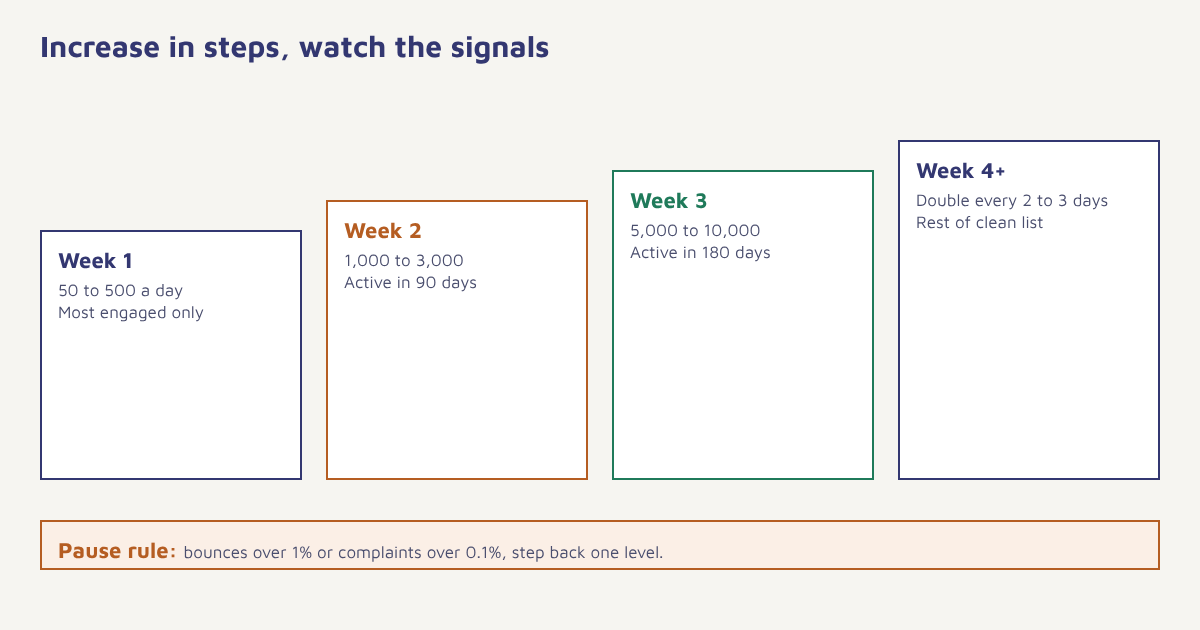
There is no official schedule, because every provider and every audience behaves differently. The table below is a cautious starting point for a sender who expects to reach tens of thousands of contacts a month. Smaller senders can compress it, and larger ones may need longer.
| Day | Emails per day | Who to send to |
|---|---|---|
| 1 to 3 | 50 to 100 | Most engaged: recent buyers, people who replied, staff and friends who will open |
| 4 to 7 | 200 to 500 | Contacts who opened or clicked in the last 30 days |
| 8 to 14 | 1,000 to 3,000 | Active in the last 90 days |
| 15 to 21 | 5,000 to 10,000 | Active in the last 180 days |
| 22 to 30 | Double every 2 to 3 days | The rest of the clean list, in segments |
The exact numbers matter less than the shape: steady growth, the best audience first, and the freedom to slow down. Spread sends across the day instead of firing everything at once, and keep a consistent cadence. Sending 500 one day and nothing for a week looks erratic. In Flowfox you can use the segment builder to create the engagement tiers and the campaign scheduler to throttle each send.
What to watch while warming up
| Signal | Healthy range | If it goes wrong |
|---|---|---|
| Hard bounce rate | Under 1 percent | Pause, check for typos and old addresses, clean the list |
| Spam complaint rate | Under 0.1 percent | Pause, review who you are sending to and how they joined |
| Open and click rate | Stable or rising | Send only to the most engaged, review content and subject lines |
| Deferrals and blocks | Rare | Slow the pace, check authentication and blocklists |
| Placement | Mostly in the inbox | Test with seed addresses, review content and links |
Treat opens carefully. Mail privacy features inflate open rates, so use clicks, replies and complaint data as your main guide. A rising complaint rate matters far more than a slightly lower open rate.
Google publishes guidance for bulk senders that sets a spam complaint threshold well under half a percent, and recommends staying much lower. Check the current text on their site because requirements change. Free tools from the providers, such as Google Postmaster Tools, show domain reputation and spam rate for Gmail traffic once you send enough volume.
Step by step
- Authenticate. Publish SPF, DKIM and DMARC, and confirm they pass on a test message.
- Clean and tier the list. Remove bounces and inactive contacts, then group the rest by recent engagement.
- Start with the most engaged. Send a small, genuinely useful message to people who are likely to open and reply.
- Increase gradually. Raise volume in steps only while bounces and complaints stay low.
- Keep content consistent. Avoid big images-only emails, link shorteners and heavy promotional language in the first weeks.
- Monitor daily. Check bounces, complaints, deferrals and placement after every send.
- Hold or step back. If a signal worsens, go back to the previous volume and wait a day or two before climbing again.
Content and cadence during warm-up
What you send during the ramp matters as much as how much. Use messages people have a reason to open: a welcome note, an order update, a useful guide, or a request for a reply. Ask a question in the first email, because replies are a strong positive signal. Keep the design simple, write a clear subject line, and avoid anything that resembles bulk promotion. Our subject line guide has patterns that work. Once reputation builds, you can add promotions, newsletters and automated sequences such as a welcome drip.
Warm-up tools and what they really do
You will see services that promise to warm a domain by exchanging mail between networks of inboxes. They simulate opens and replies. The idea is controversial, because providers keep improving at spotting artificial patterns, and the benefit rests on engagement that is not real. The safer foundation is genuine mail to genuine, consenting recipients. If you do use an automated tool, treat it as a supplement and not a substitute for good list practices. Remember too that cold outreach has different rules from marketing to opted-in subscribers, and unsolicited bulk mail falls under email spam regulations in many countries.
What to do when things go wrong
- Mail is going to spam. Pause bulk sending. Send a small message to engaged contacts, ask them to reply, and check authentication and content.
- You are blocked by one provider. Check the bounce message, which usually names the reason and a link to request a review. Slow down for that provider only.
- Complaints spike. Review the segment you sent to and how those contacts joined. Stop mailing the cold part.
- You hit a spam trap. Remove old and purchased addresses, and tighten sign-up controls. Read about spam traps to understand how they arise.
Common mistakes
- Skipping authentication. No ramp can compensate for failing SPF or DKIM.
- Sending the whole list at once. The most common cause of a damaged start.
- Warming with the wrong audience. Cold contacts first produce complaints and bounces.
- Ignoring the signals. A schedule is a plan, not an obligation.
- Stopping after the ramp. Reputation is kept by consistent sending and clean lists over time.
Reputation is earned slowly and lost quickly. Warm-up is how you earn it on purpose.
Ramp up with control. Segment by engagement, throttle sends and watch bounces and complaints in one place.
Continue with email marketing basics and transactional emails, and see the blog for more.
Frequently asked questions
What is email warm-up?
Email warm-up is the practice of gradually increasing sending volume on a new domain or IP address, starting with engaged recipients, so mailbox providers learn to trust the sender.
How long does it take to warm up an email domain?
Most senders need about four to six weeks to reach full volume, depending on list size and engagement. Smaller senders can move faster, and large senders may need longer.
How many emails should I send on the first day?
A cautious start is around 50 to 100 messages to your most engaged contacts, then increase in steps while bounces and complaints stay low.
Do I need to warm up a shared IP?
Usually not, because shared IPs already have established traffic. A new domain, however, still builds its own reputation, so ramp up gradually.
What is a safe bounce and complaint rate?
Aim for hard bounces under about 1 percent and spam complaints under about 0.1 percent. Check current provider guidance because thresholds change.
Can I use a warm-up tool?
Some tools simulate engagement between inboxes. They are controversial and may stop working as providers detect artificial patterns. Real mail to consenting recipients is the safer foundation.
What if my emails go to spam during warm-up?
Pause bulk sending, verify authentication, send to your most engaged contacts, ask for replies, review content and check for blocklists before increasing volume again.