Not every push notification is meant to be seen. Some are sent only to wake the app quietly in the background, so that it can refresh content, sync data or update a badge without buzzing the user’s phone. These are silent push notifications. They are useful, but they are also limited, unreliable by design and easy to misuse. This guide explains what silent pushes are, how they work on iOS and Android, what they are used for, the limits you must plan around and how to use them without draining batteries or breaking trust.
What is a silent push notification?
A silent push notification, also called a background or data notification, is a message delivered to an app through the platform’s push service that shows nothing to the user. No banner, no sound, no alert. Instead it gives the app a short chance to run code in the background. It is delivered through the same services as ordinary push notifications: Apple Push Notification service on iOS and Firebase Cloud Messaging on Android. If you are new to push, begin with our guide to push notifications.
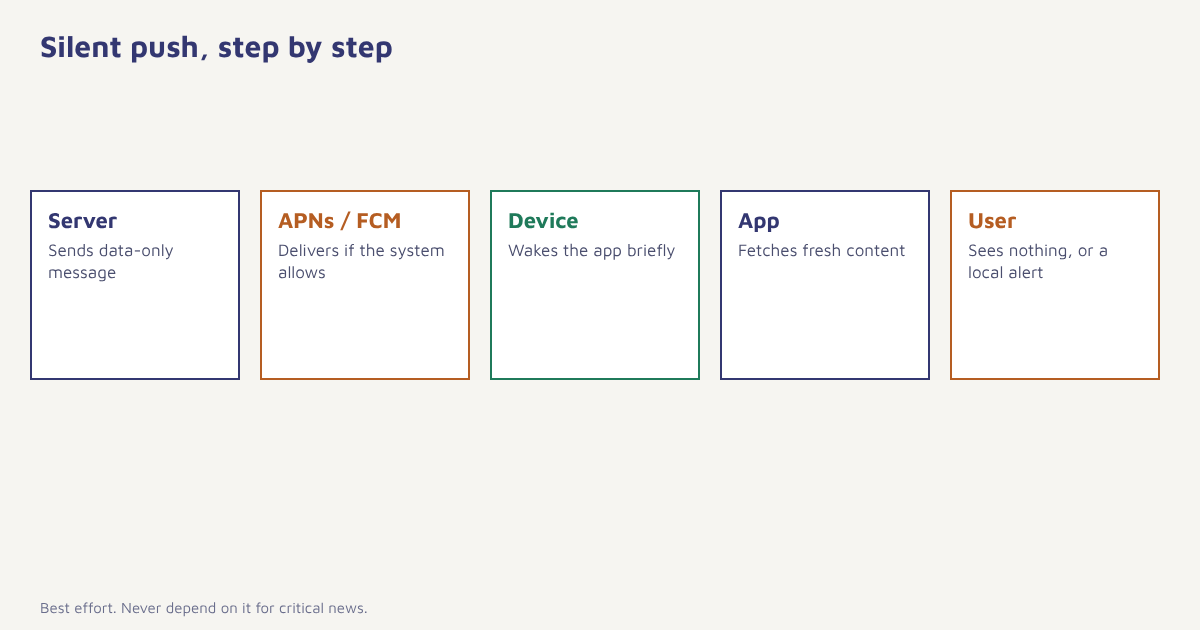
How silent pushes work
| Step | iOS | Android |
|---|---|---|
| Service | Apple Push Notification service (APNs) | Firebase Cloud Messaging (FCM) |
| Message type | Payload with content-available set to 1 and no alert | Data message with key-value pairs and no notification block |
| Priority | Low priority, apns-priority 5 | Normal or high priority |
| App behavior | App is woken in the background for a short time | App service runs and handles the data |
| Delivery | Not guaranteed, throttled by the system | Not guaranteed, affected by battery and standby |
{
  "aps": {
    "content-available": 1
  },
  "sync": "inbox",
  "version": 42
}
On iOS, the payload tells the system there is new content and carries no visible alert. Apple documents this as a background update, and it expects such pushes to be used sparingly. On Android, a data-only message goes straight to the app’s message handler rather than being shown by the system. Details change between OS versions, so check the current platform documentation before you build.
What silent pushes are used for
| Use | Example |
|---|---|
| Content refresh | Prefetch the latest news, offers or catalogue so the app opens instantly |
| Data sync | Update messages, orders or settings across devices |
| Badge update | Refresh the unread count. See notification badges |
| Local notification | Wake the app, check conditions and then show a tailored local alert |
| Remote configuration | Tell the app to refresh feature flags or config |
| Token and session housekeeping | Trigger a re-registration or logout |
| Tracking delivery | Confirm a device is reachable (use carefully) |
Limits you must plan around
- No delivery guarantee. The system may delay, batch or drop silent pushes, especially when the device is low on battery or the app is rarely used.
- Throttling. Sending many in a short time leads to fewer being delivered.
- Force-quit apps. On iOS, an app the user has swiped away may not be woken.
- Short run time. You get seconds, not minutes. Keep the work small.
- Low-power and restricted modes. Background activity may be paused.
- Manufacturer battery rules. Some Android makers restrict background work aggressively.
For these reasons, never build a critical function on silent push alone. Treat it as an optimisation that makes the app feel fresher when it works, with the app still able to fetch the latest data when opened.
Rule of thumb. If the user must be told something, send a visible notification. If the app merely wants to be ready, a silent push may help.
How to implement them well
- Enable background modes. On iOS, turn on remote notifications under background modes. On Android, handle data messages in the messaging service.
- Send data-only payloads. No alert or notification block, so the system does not display anything.
- Keep the work light. Fetch small deltas, not the whole catalogue.
- Handle failure. Let the app refresh itself on open if no silent push arrived.
- Limit frequency. Send only when something has changed, and group updates.
- Respect privacy. Do not use silent pushes to track users covertly. Be clear in your privacy notice.
- Measure. Compare how fresh the app is with and without silent pushes, and watch battery impact.
In Flowfox, push is one of the channels in a journey, alongside in-app messages, and delivery and open data feed back into analytics. If you need visible reach with a fallback, combine push with in-app messaging or another channel as described in choosing between channels.
Silent push vs visible push
| Silent push | Visible push | |
|---|---|---|
| User sees it | No | Yes |
| Purpose | Background update | Get attention |
| Permission | Works without notification permission on some platforms, but with limits | Needs notification permission |
| Reliability | Low to medium | Higher |
| Frequency tolerance | Low | Depends on user |
| Best for | Freshness, sync | Alerts, offers, reminders |
Keep in mind that platform policies change. Apple and Google adjust background rules regularly, and abuse of silent pushes for advertising or tracking can lead to restrictions or rejection from the app stores. Review the current guidance on APNs and FCM before relying on specific behaviour.
Designing around unreliable delivery
The safest way to use silent push is to assume that some will never arrive and to design a graceful fallback. Imagine a news app that uses silent pushes to prefetch the morning edition. If the push arrives, the app opens with fresh articles ready. If it does not, the app fetches the edition when the user opens it, with a brief loading indicator. Either way the user gets the content; the push only made it faster. Compare that with a design in which the app only shows new content after a silent push. On a phone in low-power mode, or one where the user force-quit the app, that app would look broken.
Test on real devices under realistic conditions: battery saver on, app not opened for days, poor network and different manufacturers on Android. Log when silent pushes arrive and how long your handler runs, then compare with how many you sent. The gap is your real delivery rate, and it is often lower than people expect. Monitor battery usage reports too, because users notice apps that drain power and may uninstall them. Apple and Google both publish guidance on background work, and the general concept of background processes is a helpful starting point if your team is new to it.
Also decide who owns the decision to send. Silent pushes sent by marketing campaigns can quickly multiply, since every campaign tool is tempted to add “just one more refresh”. Keep a central list of what each silent push does, how often it is allowed and who approved it. For anything that needs the user’s attention, send a visible notification, tell the user why, and let them control it in settings. Pair push with other channels such as WhatsApp or email when the message matters, so that one dropped silent push never costs you a customer. Used with these limits in mind, silent push is a quiet helper; used carelessly, it is a battery drain with no benefit.
Common mistakes
- Relying on delivery. It is best effort.
- Sending too many. The system throttles you.
- Heavy background work. You get a few seconds.
- Hiding tracking in silent pushes. It erodes trust and can break rules.
- Skipping tests on real devices. Emulators do not show throttling and battery behaviour.
A silent push is a nudge to the app, not a promise to the user. Build as if it may never arrive.
Reach customers on push, with a plan B. Combine push, in-app, WhatsApp and email in one journey.
Read next: notification badges, customer engagement and the blog.
Frequently asked questions
What is a silent push notification?
A silent push notification is a data message sent through APNs or FCM that wakes an app in the background without showing any alert, sound or banner.
What are silent push notifications used for?
They are used to refresh content, sync data, update badge counts, trigger local notifications and refresh configuration.
Are silent push notifications guaranteed to be delivered?
No. The operating system may delay, throttle or drop them, so apps should never depend on them for critical functions.
How do silent pushes work on iOS?
On iOS, you send a payload with content-available set to 1 and no alert, at low priority. The system may wake the app for a short background run.
How do silent pushes work on Android?
On Android, you send an FCM data message without a notification block, and the app’s messaging service handles it in the background.
Do silent push notifications drain the battery?
Excessive silent pushes and heavy background work can use battery, which is why platforms throttle them. Send only when needed and keep the work light.
Can silent pushes be used to track users?
They should not be used for covert tracking. Be transparent in your privacy notice and follow platform rules and data protection laws.