Your subject line decides whether the email gets opened, ignored or reported. It has a few words and one job: make the right person want to read on. Most advice on the topic is a list of tricks. This guide is different: it explains how subject lines are actually displayed, what makes them work, gives forty examples sorted by purpose, tells you what to avoid and shows how to test your own. Use the examples as starting points, not as templates to copy, because the best subject line is the one that sounds like your brand talking to your customer.
What a subject line does
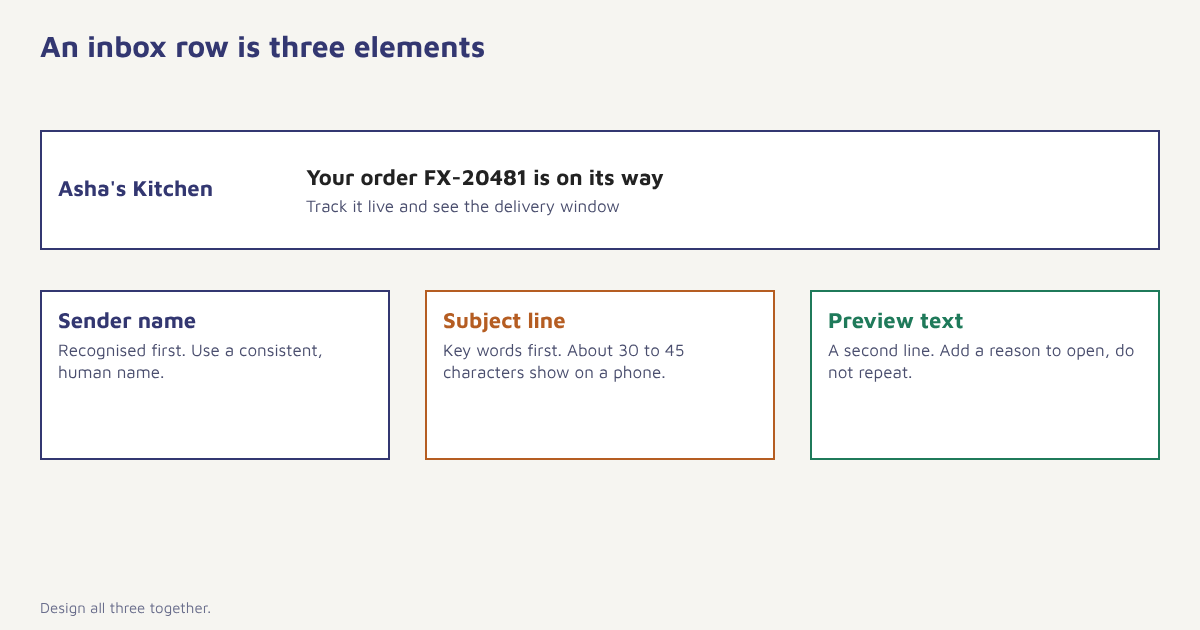
The subject line is the single line of text in the inbox list, shown next to your sender name and a short preview of the body. Together these three elements make up the first impression. People rarely read the line closely. They scan it in a fraction of a second and decide, based on whether the sender is familiar, whether the line is specific and whether it seems relevant right now. Because it works with the sender name and preview text, you should design all three together.
How long should a subject line be?
There is no magic number, because display depends on the device, the email app and the screen width. A phone often shows somewhere around 30 to 45 characters of a subject before cutting it off, while a desktop client may show 60 or more. The practical rule is to put the most important words first, so even a truncated line makes sense. Anything beyond about 50 characters is a risk. Do not count characters obsessively. Read the line on your own phone and see where it breaks.
Use the preview text. Many senders leave it empty, so the inbox shows “View this email in your browser”, which is a wasted line. Treat preview text as a second subject line that extends the first, adds a reason to open and never repeats it.
Principles that make subject lines work
- Be specific. “Your order FX-20481 has shipped” beats “An update for you”. Details signal that the message is for this person.
- Match the promise. If the subject says one thing and the body another, people stop trusting you, and complaint rates rise.
- Lead with the benefit or the news. What changes for the reader, not what you did.
- Sound like a person. Plain, conversational language usually outperforms headline-style writing.
- Create curiosity honestly. A question or a partial reveal can work, but only if the email delivers.
- Add urgency only when it is true. A real deadline helps. A fake countdown every week teaches people to ignore you.
40 subject line examples by purpose
Edit these to fit your brand and audience. Each pairs a purpose with a pattern.
| Purpose | Examples |
|---|---|
| Welcome | Welcome to Asha’s Kitchen. Here is what to expect You are in. Your first step takes two minutes Thanks for joining, Ravi. A quick tour Start here: three things new members do first |
| Order and delivery | Your order FX-20481 is on its way Arriving today: your Trail Runner Delivered. How did we do? Good news: your refund has been processed |
| Abandoned cart | You left something behind, Meera Still thinking it over? Your cart is saved Your size 7 is almost gone Complete your order and get free delivery |
| Promotion | The Monsoon sale starts tonight Extra 15 percent off, today only Early access for you, 24 hours before everyone else Last chance: offer ends at midnight |
| Newsletter | This week: three ways to cut your delivery costs What we learned from 1,000 orders The simple fix for a common checkout problem Five minutes on email authentication |
| Re-engagement | It has been a while. Here is what is new Should we keep emailing you? We miss you, Karan. Here is Rs 150 off Last email unless you click |
| Reminder and service | Your appointment is tomorrow at 11 am Your premium is due on 5 Nov Action needed: confirm your email address Your trial ends in 3 days |
| Feedback and reviews | How was your Trail Runner? Two questions, 30 seconds Tell us what we got wrong Your review could help someone choose |
| Events and content | Join us Friday: live demo at 6 pm Your seat is reserved The recording is ready New guide: setting up SPF, DKIM and DMARC |
| Referral and loyalty | Give Rs 200, get Rs 200 You have reached Gold Your points expire next month Thank you for a year with us |
What to avoid
- Deceptive lines. Faking a reply (“Re: your request”) when there was none is misleading and in many places unlawful.
- All capitals and heavy punctuation. They look like spam to people and filters.
- A wall of emoji. One can help a line stand out. Several look noisy, and some render badly on older devices.
- Vague teasers. “You will not believe this” says nothing.
- Sameness. If every email starts with the same phrase, people stop seeing it.
Spam filters look at many signals together, so a single word rarely matters, but a pattern of pushy language combined with poor authentication and low engagement does. Fix the basics first: see our guides to email deliverability and SPF, DKIM and DMARC.
Personalising subject lines
Using a name can help, but it is the weakest kind of personalization and loses effect when overused. Stronger options use behaviour or context: the product someone viewed, the date of their appointment, their city, or what they bought last time. In Flowfox you can insert these with Liquid, for example {{ contact.first_name | default: "there" }}, your {{ event.product_name }} is back in stock. Always include a default so an empty field does not leave a gap. Our personalization guide shows more patterns, and the Liquid reference lists the fields.
How to test subject lines properly
- Choose one change. Test question versus statement, or specific versus general, not several differences at once.
- Pick the right metric. Opens are inflated by mail privacy features, so judge winners by clicks or conversions where you can.
- Split randomly. Send both versions at the same time to similar groups.
- Use enough people. A few hundred recipients rarely settle anything. Our A/B testing guide includes a sample size calculator.
- Record what you learn. Keep a log of tests, results and the lesson, so patterns emerge.
In Flowfox campaigns you can create up to several variants of a subject line and let the platform send the better one to the rest of the list. FoxAI can draft alternatives, which you should then edit to match your voice.
Open rates, privacy features and the law
Since mail apps began preloading images, the open rate has become a noisy number. Email tracking relies on a hidden image, and when a mail app fetches it automatically, an open is recorded even if nobody read the message. Treat opens as a rough signal for comparing subject lines inside one campaign, and rely on clicks, replies and conversions for decisions. Subject lines are also covered by law in many places. The US CAN-SPAM Act requires that a subject line must not mislead about the content, and similar rules apply elsewhere. Beyond legality, plain honesty is better marketing, because the complaint button is one tap away. If you want a wider background on the problem itself, read about email spam and how filters evolved.
Common mistakes
- Ignoring the sender name. A recognisable name often matters more than the subject.
- Optimising opens at the expense of trust. Clickbait raises opens once and unsubscribes forever.
- Copying competitors. What works for them may not suit your audience.
- Not reading it on a phone. Check how it truncates.
- Forgetting transactional emails. Receipts and reminders deserve clear subject lines too.
A subject line is a promise. The email is how you keep it.
Write, test and send with less guesswork. Create subject line variants, personalise with Liquid and measure the winner on clicks.
Continue with email marketing basics, drip campaigns and the Flowfox blog.
Frequently asked questions
What makes a good email subject line?
A good subject line is specific, matches what the email delivers, puts the key words first, sounds like a person and gives a clear reason to open. It works together with the sender name and preview text.
How long should an email subject line be?
There is no single ideal length. Phones often show around 30 to 45 characters, and desktop shows more, so put the most important words at the start and keep it under about 50 characters.
Should I use emoji in subject lines?
Occasionally, and only if they suit your brand and audience. One emoji can help a line stand out, but many look spammy and may display poorly on some devices.
What is preview text?
Preview text is the short snippet of the email body shown after the subject line in the inbox. Writing it deliberately gives you a second line to encourage opens.
How do I test email subject lines?
Run an A/B test with one change between versions, split the audience randomly, send at the same time, use a large enough sample and judge by clicks or conversions rather than opens alone.
What words trigger spam filters?
No single word reliably does. Filters weigh many signals, including authentication, sender reputation and engagement. Avoid deceptive wording, all capitals and excessive punctuation, and focus on authentication and list quality.
Does personalising the subject line work?
It can, especially when it uses relevant behaviour or context rather than just a first name. Always include a fallback for missing data.