“Hi {first_name}” was personalization once. Today people expect messages that reflect what they bought, what they looked at and when they like to hear from you, and they notice when a brand gets it wrong. This guide explains what marketing personalization is, the levels from simple merge fields to behavioural triggers, what data you need, examples across channels, a Liquid template you can reuse, and the privacy and quality rules that keep it from feeling creepy.
What is marketing personalization?
Personalization is tailoring the content, timing and channel of a message to the individual person who receives it, using what you know about them. It ranges from inserting a name to recommending products with a recommender system. The point is relevance: the message should be useful to this person right now, not to an average customer.
Levels of personalization
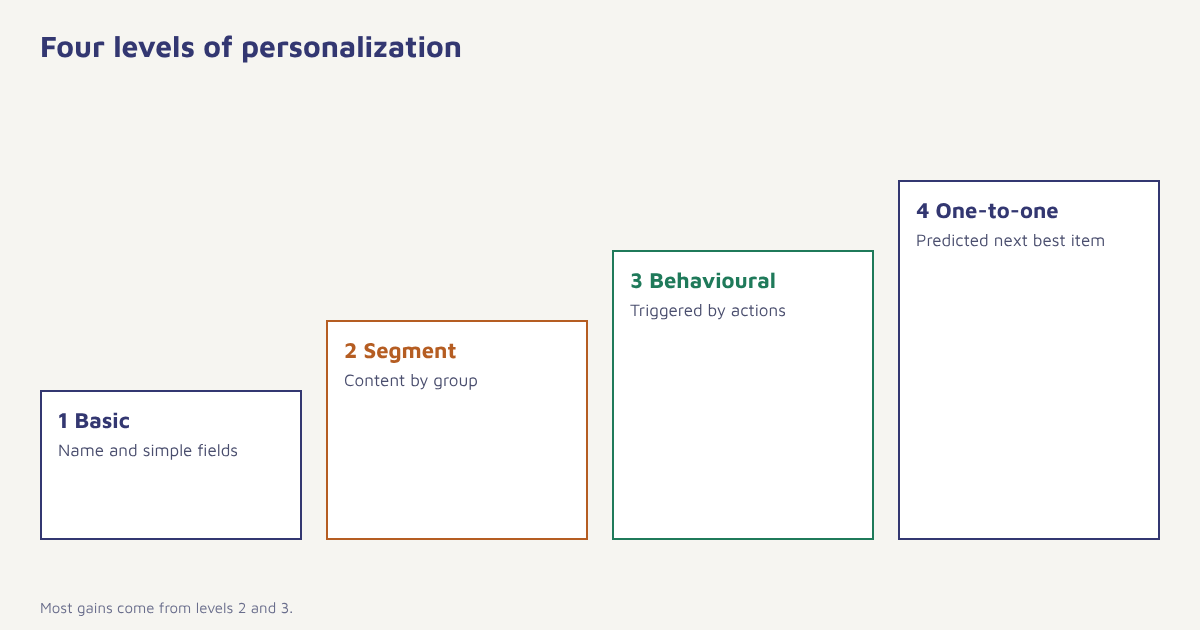
| Level | What changes | Example | Data needed |
|---|---|---|---|
| 1 Basic | Name and simple fields | Hi Asha, your order is confirmed | Name, order |
| 2 Segment-based | Content by group | Festival offer for customers in Jaipur | City, preferences, past purchases |
| 3 Behavioural | Triggered by actions | Reminder for the item left in your cart | Events: views, cart, purchase |
| 4 One-to-one | Predicted next best item or time | Products you are likely to reorder, sent at your usual hour | Rich history, models |
Do not skip to level four. Most gains come from solid segmentation and well-timed triggers, which need good data but not complex models.
What data you need
- Identity: name, email, phone, customer ID.
- Attributes: city, language, plan, birthday, preferences.
- Behaviour: product views, cart events, purchases, app opens, email and WhatsApp engagement.
- Value: order count, total spend, last purchase date.
- Consent and preferences: which channels, how often, which topics.
Our guides to the data model and sending events show how to get this into one profile, and contacts explains how profiles are stored.
Personalization examples by channel
| Channel | Personalised message | What drives it |
|---|---|---|
| Subject: Ravi, your running shoes are back in stock (size 9) | Saved product interest and size | |
| Your Trail Runner order ships today. Track: link | Order event and tracking number | |
| SMS | Your premium of Rs 4,200 is due on 5 Nov. Pay: link | Billing date and amount |
| Push | New episodes of the show you were watching are live | Viewing history |
| Web | A banner that shows the category the visitor browsed last time | Browsing behaviour |
Personalising with Liquid
In Flowfox you write dynamic content using Liquid, a simple template language. This example greets the person by name, shows the last product they viewed if there is one and falls back to a general line if not. Our Liquid guide lists the available fields and filters.
Hi {{ contact.first_name | default: "there" }},

{% if event.last_viewed_product %}
You were looking at {{ event.last_viewed_product.name }}. It is still available.
{% else %}
Here is what is new this week at Asha's Kitchen.
{% endif %}

{% if contact.city == "Jaipur" %}
Free same-day delivery in Jaipur on orders above Rs 799.
{% endif %}
Always provide a fallback value with default so a missing field does not produce “Hi ,” in thousands of inboxes. Send a test to a contact with empty fields before launch.
How to start personalizing, step by step
- Pick one use case. For example, a welcome message that reflects why the person signed up, or a cart reminder showing the actual product.
- Check the data. List the fields you need and how complete they are. If city is empty for half your contacts, fix collection first.
- Build segments. Group contacts by behaviour and value. See customer segmentation.
- Write modular content. One template with blocks that change by segment is easier to maintain than ten separate messages.
- Add fallbacks and rules. Defaults for empty fields, and rules for who must not receive the message.
- Test with edge cases. Long names, missing fields, different languages and devices.
- Measure against a control. Compare personalised messages with a generic version using A/B testing.
Personalization and privacy
Relevant is good. Creepy is not. Use data customers expect you to have, such as their orders and stated preferences, and be careful with inferences about health, finances or family. In India the Digital Personal Data Protection Act, 2023 sets expectations for notice, consent and the ability to withdraw consent. Practical habits: tell customers what you collect and why, let them set preferences, keep sensitive categories out of segments unless essential and delete or exclude people promptly when they ask.
A good test. Would the customer be surprised that you know this? If yes, either do not use it in the message or explain where it came from, for example “because you viewed this item”.
Measuring personalization
| Metric | Compare |
|---|---|
| Click-through and conversion | Personalised vs generic version |
| Revenue per message | By segment and level of personalization |
| Unsubscribe and complaint rate | Check relevance is not hurting trust |
| Fallback rate | How often missing data forced the generic version |
Personalization in Flowfox
Flowfox stores events and attributes on one profile, so any message in campaigns or journeys can use them. The email builder supports dynamic blocks, segments keep audiences current, and FoxAI can draft variations for different segments. Results by segment show up in analytics.
Personalization across the customer lifecycle
| Stage | What to personalise | Example |
|---|---|---|
| New visitor | Content by source or interest | Landing page matching the ad they clicked |
| New customer | Onboarding by use case | Setup steps for the goal they chose at sign-up |
| Active customer | Recommendations and timing | Replenishment reminder when a product is due |
| At risk | Offer and channel | Personal check-in on WhatsApp for a high-value customer |
| Lapsed | Win-back reason | We have restocked the item you bought last time |
The most common error is to personalise only the first stage. Retention messages gain a lot from knowing what the customer last did. See our guides to retention strategies and customer onboarding for examples.
Fixing the data problems behind bad personalization
| Problem | What it causes | Fix |
|---|---|---|
| Names in capitals or with titles | Hi MR SHARMA, in the greeting | Clean at capture, use a proper-case filter |
| Missing first name | Hi , | Fallback to a neutral greeting |
| Duplicate profiles | Two copies of the same email | Merge on a stable identifier |
| Stale preferences | Offers for things they no longer want | Refresh through preference centres and behaviour |
| Wrong language | Messages in English to a Hindi reader | Store language and use it in templates |
Language deserves its own mention. In a country with many languages, sending in the language the customer chose is one of the simplest and most powerful forms of personalization. The practice of adapting content for a market is known as localization, and it covers date formats, currency and tone as well as words. Store a language attribute on every profile and write template variants for your main languages. Ask before you assume: a preference selected by the customer is better than a guess.
Writing graceful fallbacks
A fallback is what the message says when the data is missing. Good fallbacks read naturally: “Hi there” instead of a blank name, “our latest arrivals” instead of a missing product, “your area” instead of a missing city. Test each template with a profile that has no data at all and read the result aloud. If it sounds odd, the fallback needs work.
Common mistakes
- Name-only personalization. It is the least effective kind.
- Dirty data. Wrong names, duplicated profiles or stale preferences erode trust.
- No fallback. Empty fields look careless.
- Over-personalising. Too much detail feels like surveillance.
- Never testing. Verify that personalised versions actually beat generic ones.
Personalization works when the customer feels understood, not watched.
Make every message feel written for one person. Combine events, segments and Liquid in one workspace.
For more, read about omnichannel marketing, email marketing and retention strategies, and browse the blog.
Frequently asked questions
What is marketing personalization?
Marketing personalization is tailoring the content, timing and channel of a message to an individual using what you know about them, such as their behaviour, purchases and preferences.
What are examples of personalization in marketing?
Product recommendations based on past purchases, cart reminders showing the actual item, offers by city, messages sent at a person’s usual time and subject lines using a saved interest.
What data do I need for personalization?
Identity, attributes such as city and language, behaviour events such as views and purchases, value data such as order count and spend, and consent and channel preferences.
Is personalization the same as segmentation?
No. Segmentation groups people and sends each group different content. Personalization can go further, adapting content for each individual using their own data.
How do I avoid personalization mistakes?
Keep data clean, provide fallback values for every field, test with edge cases such as empty or very long names, and use a control group to confirm the personalised version performs better.
Is personalization legal and private?
It is lawful when you follow data protection rules such as obtaining consent, giving notice and honouring withdrawal. In India the Digital Personal Data Protection Act, 2023 applies. Avoid using sensitive inferences.
What is Liquid in marketing platforms?
Liquid is a simple template language used to insert dynamic content, such as names and product details, and to show or hide blocks based on conditions.