Asking customers what they think is easy. Doing something with the answers, and then telling them what changed, is where most companies fall down. A survey that disappears into a spreadsheet teaches customers that their opinion does not matter, and they stop answering. A customer feedback loop is the habit of closing that gap: collect feedback, understand it, act on it and tell people what you did. This guide explains the four steps, the sources and methods of feedback, how to analyse comments without drowning in them, how to close the loop with the customer who spoke up, a worked example and how to measure whether the loop is working.
What is a customer feedback loop?
A customer feedback loop is a repeating process in which you gather feedback from customers, analyse it, make changes and then communicate the result back to them, so that the next round of feedback shows whether the change worked. The idea is borrowed from feedback in systems thinking: output is fed back as input so that the system can correct itself. In customer terms, it connects satisfaction surveys, support conversations and product usage to real improvements.
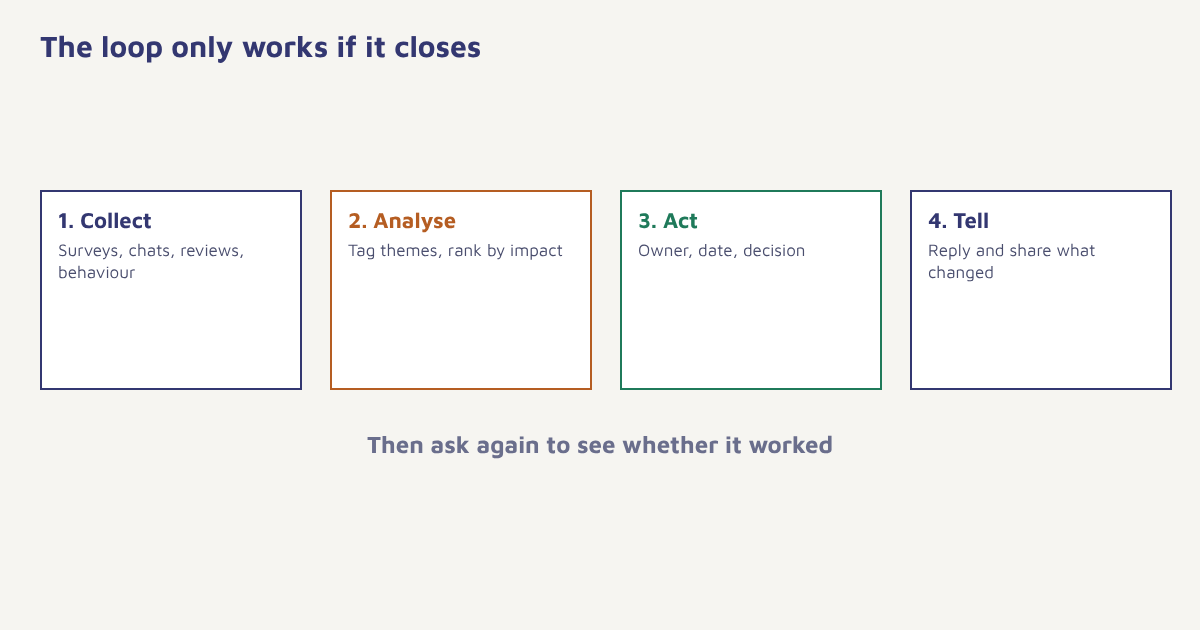
The four steps of the loop
| Step | What happens | Question to ask |
|---|---|---|
| 1. Collect | Gather feedback from many sources | Are we hearing from all kinds of customers? |
| 2. Analyse | Group comments into themes and rank them | What do customers mention most, and what hurts most? |
| 3. Act | Fix, change or decide not to change | Who owns this, and by when? |
| 4. Close the loop | Tell customers what you did | Did the person who spoke up hear back? |
Step one: collect feedback
Use more than one source, because each shows something different. Surveys give structured scores. Conversations give context. Behaviour shows what people actually do rather than what they say.
| Source | What it tells you | Watch out for |
|---|---|---|
| Relationship survey (NPS) | Overall loyalty over time | Low response; skew toward extremes |
| Transaction survey (CSAT) | How a specific interaction went | Survey fatigue if sent every time |
| Effort survey (CES) | How hard it was to get something done | Only measures one task |
| Support tickets and chats | Real problems in customers’ words | Reflects those who contact you |
| Reviews and social comments | Public sentiment | Moderated by who bothers to post |
| In-app prompts and feedback buttons | Feedback in context | Interrupts if badly timed |
| Interviews | Deep understanding | Small sample |
| Behaviour data | Where people drop off or stop | Does not say why |
Timing and channel matter. Ask close to the moment, ask briefly and ask on the channel the person uses. A one-tap rating inside the app or on WhatsApp usually gets more answers than a long email form. In Flowfox, you can trigger a short survey after an event such as a delivered order or a resolved ticket with a journey, using email, WhatsApp or in-app messages, and store the answer on the contact profile. Always check consent before messaging, and see the DPDP Act guide for data rules.
Step two: analyse and prioritise
Raw comments are noisy. Turn them into themes. Read a sample, create a short list of categories such as delivery, price, product quality, support speed and app bugs, and tag each comment. Count how often each theme appears, and how strongly people feel. Then rank by two things: how many customers it affects and how much it costs you in lost sales, refunds or churn. A frequent small annoyance and a rare serious failure may both deserve attention, but not the same kind.
Separate signal from noise. One loud customer is a story. Ten customers raising the same point is a pattern. Look for patterns, but do not ignore a single serious safety or security report.
Combine feedback with behaviour. If many customers say checkout is confusing and your funnel shows a big drop at the payment step, you have two sources pointing the same way. Our guides to conversion rate optimization, customer churn rate and marketing funnel stages show how to read the behaviour side. For text-heavy feedback, simple tagging in a spreadsheet works for hundreds of comments, and software can help beyond that. The general field is described in the article on sentiment analysis, but treat automatic sentiment scores as a rough guide and check samples by eye.
Step three: act
Give each priority an owner and a date. Decide what you will do, what you will not do and why. Not every suggestion should be built; customers often propose solutions, but the underlying problem is what to fix. Tell the team what changed and why, so that feedback is visible internally and not stuck with whoever runs surveys. Keep a public or internal log of changes made because of feedback. It motivates the team and gives you material for the next step.
Step four: close the loop
This is the step most companies skip. Closing the loop means telling customers that you heard them. There are two levels.
- Individual loop. Reply to the person who raised the issue, especially detractors and people with problems. Do this quickly, ideally within a day or two, and say what you will do.
- Group loop. Tell all customers what changed because of feedback, in a newsletter section, an in-app note or a short post: “You said checkout was slow. We fixed it.”
- Follow-up. After the change, ask again to see whether it worked.
In Flowfox you can route low scores to a task for support using a journey condition, and build a segment of people who reported a given issue so that you can tell them when it is fixed, using the segment builder. That small act of telling them often turns an unhappy customer into a loyal one. See also retention strategies and the churn use case.
A worked example
The brand and numbers here are invented to show the loop. An online pharmacy-style delivery service sends a one-question CSAT survey on WhatsApp after each delivery and a quarterly NPS email. Over a month, 1,200 responses come in. Tagging the comments shows that 31 percent of unhappy comments mention missed delivery windows, 22 percent mention packaging, and the rest are scattered. Behaviour data shows that customers who had a missed window are far less likely to reorder within 60 days. The team makes missed windows the top priority: it adds proactive delay alerts, adjusts routes and sets a rule to refund the delivery fee on a missed slot. Each unhappy respondent receives a personal reply. Three weeks later, a group message tells all customers what changed. In the next survey, mentions of missed windows fall and repeat orders in the affected group recover. The company then moves to the packaging theme.
| Step | What the team did |
|---|---|
| Collect | CSAT on WhatsApp after delivery, quarterly NPS email |
| Analyse | Tagged comments, ranked themes by volume and reorder impact |
| Act | Delay alerts, route changes, delivery fee refund rule |
| Close | Personal replies, group message, follow-up survey |
How to know the loop is working
| Measure | What it shows |
|---|---|
| Response rate | Whether customers believe it is worth answering |
| Share of feedback with an owner and a decision | Whether feedback turns into action |
| Time to respond to detractors | How fast you close the individual loop |
| Change in score on the fixed theme | Whether the fix worked |
| Retention of customers who gave feedback and got a reply | Value of closing the loop |
Track these over several rounds. A rising response rate is a good early sign, because customers answer more when they see results. Beware of survey fatigue: set a rule for how often one person can be asked, and share it across teams. The measures also feed your wider view of customer engagement and customer experience.
Writing better survey questions
The way you ask shapes what you hear. Keep questions short and neutral: “How easy was it to get what you needed today?” works better than “Don’t you agree our service was great?”. Ask one thing at a time, offer a simple scale and add one optional open question such as “What is the main reason for your score?”. Avoid jargon, and give people a reason to answer, for instance by saying how long it takes. On mobile, a single tap rating followed by an optional comment gets more replies than a long form. Be careful with incentives, because rewards can bias answers, and tell people how their data will be used. The discipline of asking good questions is covered under questionnaire construction, and the wider practice of customer satisfaction measurement is a helpful read. Pre-test every survey on a few colleagues or friendly customers before you send it widely.
Common mistakes
- Collecting without acting. It trains customers to ignore you.
- Asking too often. Survey fatigue lowers quality.
- Only asking happy customers. You miss the real problems.
- Leaving feedback with one team. Share it with product, support and marketing.
- Not closing the loop. The reply is where trust is built.
Feedback only counts as feedback once someone has done something with it, and told the customer.
Close the loop automatically. Trigger surveys, route low scores to support and tell customers when you fix things.
Read next: customer journey mapping, loyalty programs and the blog.
Frequently asked questions
What is a customer feedback loop?
A customer feedback loop is a repeating process of collecting feedback, analysing it, acting on it and telling customers what changed, so that the next round shows whether the change worked.
What are the steps of a customer feedback loop?
The four steps are collect, analyse, act and close the loop by communicating back to customers.
What does closing the feedback loop mean?
It means telling customers that you heard them, replying individually to those who raised problems and sharing with everyone what you changed as a result.
How often should I ask customers for feedback?
Ask at meaningful moments, such as after delivery or a resolved ticket, and limit how often any one person is surveyed to avoid fatigue.
What are the best channels for collecting feedback?
The best channel is the one the customer already uses, such as in-app prompts, WhatsApp or email, combined with support conversations and reviews.
How do I analyse open-text feedback?
Read a sample, create a short list of themes, tag each comment, count themes and rank them by number of customers affected and business impact.
How do I know if my feedback loop works?
Track response rate, the share of feedback with an owner and decision, response time to unhappy customers and score changes on the themes you fixed.