Every email programme runs on two sets of rules: the ones mailbox providers enforce quietly through filtering, and the ones lawmakers enforce loudly through fines. Most teams only think about the second set after a complaint arrives. This checklist walks through the points that nearly every regime asks for, in the order you would meet them when you send: who you may email, what the message must contain, how you handle opt-outs, how you secure and store data and what to keep as proof. It is a working checklist for marketers and operations teams, not legal advice, and it ends with the questions to put to a qualified lawyer.
Not legal advice. Email, privacy and consumer laws differ by country, change over time and are interpreted by regulators and courts. Use this page to organise your questions, then confirm the details with counsel and the official text of each law that applies to your audience.
Why a checklist, and why one per sender
Rules differ, but they rhyme. The US CAN-SPAM Act leans on honest headers, a physical address and a working opt-out. The EU GDPR and national e-privacy rules lean on a lawful basis, clear information and the right to object. Canada’s anti-spam law is known for its consent requirements, and India’s Digital Personal Data Protection Act, 2023 for notice, purpose-limited consent and withdrawal. If you send to people in several places, building to the strictest common denominator is usually simpler than running separate programmes. Our guides to the DPDP Act for marketers and to GDPR and email marketing go deeper on two of them.
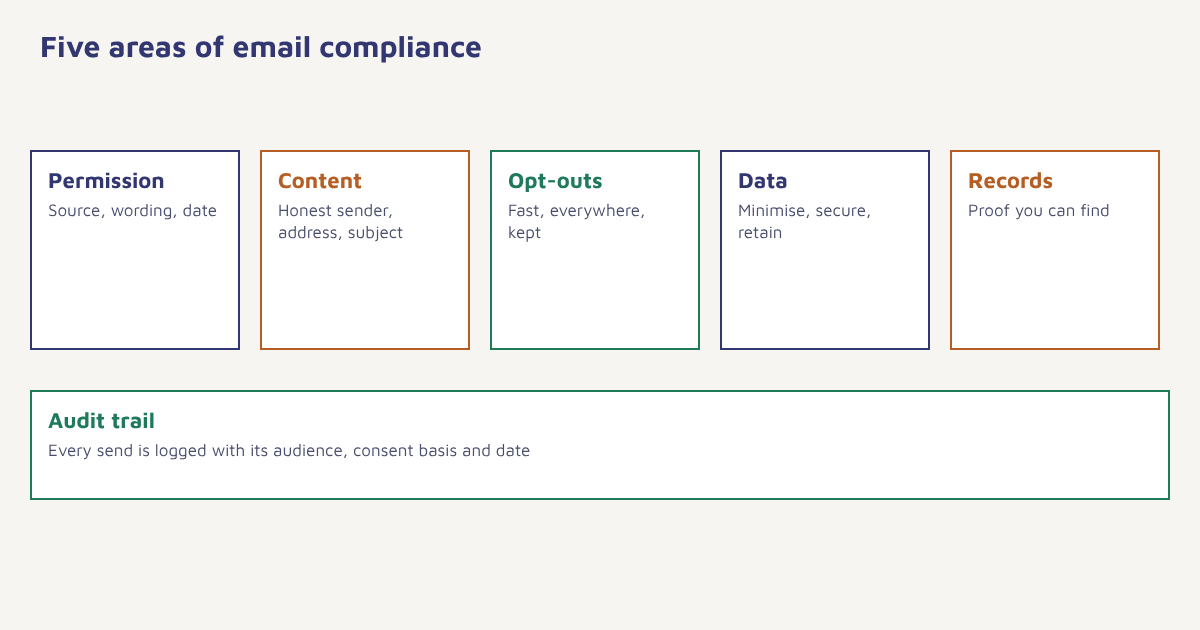
Area 1: Permission
| Check | What good looks like |
|---|---|
| You know why each person is on the list | Each contact has a recorded source, date and the wording they agreed to |
| Consent is separate by purpose and channel | Joining for receipts does not mean agreeing to promotions; email consent is not WhatsApp or SMS consent |
| No pre-ticked boxes or bundled consent | The person takes a clear action to opt in |
| No bought, rented or scraped lists | Every address came from a relationship you can explain |
| Children and sensitive data are handled with extra care | You know whether your audience can include minors and what your rules require |
| Existing-customer rules are understood | Some regimes allow follow-up marketing to customers for similar products; others do not. Check yours |
Permission is where most disputes start, so it deserves a proper system, not a spreadsheet. See consent management for how to store and use it, and email list building for collecting it well.
Area 2: What the message must contain
| Check | Notes |
|---|---|
| Honest sender identity | The From name and address reflect who is really sending |
| A non-misleading subject line | It describes the content; no fake “Re:” or invented urgency |
| Clear identification as marketing where required | Some laws expect promotions to be recognisable as such |
| A valid physical or postal address | Often required in commercial email; confirm what your target laws expect |
| A visible, working unsubscribe mechanism | Easy to find and free to use. See unsubscribe best practices |
| A link to your privacy notice | Plain language on what you collect and why |
| Accurate claims and offers | Prices, dates and terms match the landing page; see consumer-protection and advertising rules in your market |
Area 3: Opt-outs and preferences
Unsubscribes are the one promise you must keep quickly. Many rules set a maximum time to honour a request, measured in days; others say “without undue delay”. A safe operating habit is to suppress the address immediately across every system that can send to it, not just the tool where the request arrived. Offer a preference centre so that people who would otherwise leave can choose a lower frequency or a narrower topic instead. Keep a suppression list that is never deleted by a re-import, since re-mailing someone who left is both a legal risk and a fast route to complaints. The same principle holds for other channels, covered in SMS opt-in and opt-out.
- Honour the request everywhere. One unsubscribe should update the central profile, not a single tool.
- Confirm it to the person. A short confirmation page or message avoids repeat requests.
- Keep the suppression record. Store the address (or a hash) so a later import cannot restore it.
- Separate transactional from marketing. Receipts and security notices may continue, but do not slip promotions into them. See transactional emails.
Area 4: Data protection and security
- Collect only what you use. Ask for the minimum; drop fields you never read.
- Know where data lives. List your tools, processors and the countries involved, and have written agreements with processors (see our data processing addendum).
- Secure access. Role-based permissions, strong sign-in and logs for exports. See our security page for how Flowfox approaches this.
- Set retention periods. Delete or anonymise data that no longer has a purpose.
- Be ready for requests. Access, correction and deletion requests need an owner and a deadline.
- Authenticate your mail. SPF, DKIM and DMARC protect your recipients and your reputation. See authentication setup.
Area 5: Proof and records
If someone challenges you, the question will be: what can you show? Keep a record of consent (who, when, how, which wording and version of the form), the privacy notice in force at that time, suppression history, complaint handling and the results of your periodic reviews. Records you cannot find are, in practice, records you do not have. In Flowfox, the contact profile stores consent status and its source per channel, which gives you one place to answer “why did we email this person?”.
The one-page pre-send checklist
| Before you press send | Yes / No |
|---|---|
| Does every recipient have recorded permission for this type of message? | ☐ |
| Are suppressed and unsubscribed contacts excluded? | ☐ |
| Is the From identity honest and the subject line accurate? | ☐ |
| Is there a working unsubscribe link and a valid address in the footer? | ☐ |
| Do offers and claims match the landing page? | ☐ |
| Is the sending domain authenticated? | ☐ |
| Do you know which law applies to the audience in this send? | ☐ |
| Is the campaign logged with its audience definition and date? | ☐ |
A worked example (invented)
Imagine a travel-deals newsletter that wants to email 40,000 contacts, including 6,000 in the EU and 1,500 in Canada. The team splits the audit into three steps. First, it filters out any contact without a recorded source or with an unsubscribe on any list, which removes 2,300 addresses. Second, it checks that the sign-up forms used for the EU and Canadian groups captured explicit consent, and finds that an older partner-competition form only offered a pre-ticked box; those 900 contacts move to a re-permission campaign instead of the main send. Third, it updates the footer with a postal address and a plain unsubscribe link, adds a one-click preference page and logs the audit. The names and numbers are made up, but the sequence is realistic: clean first, fix the weak sources, then send.
Compliance also supports delivery. Mailbox providers watch complaint rates and bad addresses closely, which links this work to sender reputation, deliverability and list cleaning. Teams that treat compliance as housekeeping usually see fewer complaints as a side effect.
Questions to take to a lawyer
- Which laws apply to each country where our recipients live?
- What lawful basis or consent standard do we need for each message type?
- How fast must we process opt-outs and data requests?
- What must the footer and headers contain for each market?
- Do we need local representatives, data transfer clauses or registration?
Common mistakes
- Treating a purchase as blanket marketing consent. Check the rule in your market.
- Unsubscribing in one tool only. The person still hears from you elsewhere.
- Importing old lists without history. You lose the proof of permission.
- Hiding the unsubscribe link. It raises complaints, which raises risk.
- Assuming a tool makes you compliant. Software helps, but responsibility stays with the sender.
Compliance is mostly remembering who said yes, to what, and keeping your word when they say no.
Keep consent and suppression in one place. Record permission per channel and apply it to every campaign and journey.
Read next: consent management, GDPR and email marketing and the blog.
Frequently asked questions
What is an email compliance checklist?
It is a list of checks covering permission, message content, opt-out handling, data protection and record keeping that you review before sending marketing email.
Which laws apply to email marketing?
It depends on where your recipients live. Common examples are CAN-SPAM in the US, GDPR and national e-privacy rules in Europe, CASL in Canada and the DPDP Act in India. Confirm which apply to you with qualified counsel.
Do I always need consent before sending marketing email?
Not in every country. Some regimes allow certain marketing without prior opt-in if conditions are met, while others require opt-in consent. Check each market you send to.
How quickly must I process an unsubscribe?
Rules vary, from a fixed number of days to without undue delay. A safe habit is to suppress the address immediately across all systems.
Can a tool make my emails compliant?
A tool can store consent, add unsubscribe links and manage suppression, but the sender remains responsible for lawful use and accurate content.
What records should I keep?
Keep consent records with source, date and wording, privacy notice versions, suppression history, complaint handling and review notes.
Is this checklist legal advice?
No. It is general guidance. Laws change, so verify requirements with a lawyer and the official text of each regulation.