A big list feels like an achievement, but a list is only as good as the people on it who are still reachable and still interested. Over time every list decays: people change jobs, abandon inboxes, mistype addresses at sign-up or simply stop caring. Left alone, that decay raises bounces, lowers engagement and eventually damages your ability to reach even your best subscribers. Email list cleaning, also called list hygiene, is the routine of removing or fixing the records that hurt you. This guide covers what to clean, in what order, how to treat inactive subscribers fairly, how often to do it and how to avoid deleting people you should have kept.
What is email list cleaning?
Email list cleaning is the process of reviewing your subscriber records and removing, correcting or suppressing the ones that are invalid, risky or inactive. It is different from list building, which is about collecting good addresses in the first place, and from managing bounce rate, which is about reacting to delivery failures. Cleaning sits between the two: it is the scheduled maintenance that keeps a healthy list healthy. Mailbox providers watch how recipients and servers treat your mail, as described in our guide to sender reputation, and a tidy list is one of the simplest ways to protect it.
Why it matters
- Fewer bounces. Sending to addresses that do not exist is a signal of careless practice.
- Fewer spam-trap hits. Old, abandoned addresses may be recycled as traps by mailbox providers or blocklist operators. See the explanation of a spam trap.
- Better engagement figures. Rates are calculated on delivered mail, so dead weight drags every average down. See email marketing metrics.
- Lower cost. Many tools charge by list size or send volume.
- Better decisions. Clean data gives a truer picture of your audience.
What to remove, fix or suppress
| Record type | Action | Why |
|---|---|---|
| Hard bounces | Suppress immediately and permanently | The address does not exist or rejects mail for good |
| Repeated soft bounces | Suppress after a set number of consecutive failures | Mailbox full or server trouble that never clears |
| Unsubscribes | Suppress at once and keep the record of the request | A legal and reputational requirement |
| Spam complaints | Suppress at once | They told their provider you are unwanted |
| Typos and syntax errors | Correct if obvious, otherwise remove | gmial.com and missing @ signs |
| Role addresses | Review. Consider removing for marketing | info@ or sales@ addresses are shared and often complain more |
| Disposable addresses | Remove | Temporary inboxes that will soon vanish |
| Duplicates | Merge | Same person on the list twice |
| Inactive contacts | Run a re-engagement sequence, then suppress | People who stopped opening or clicking |
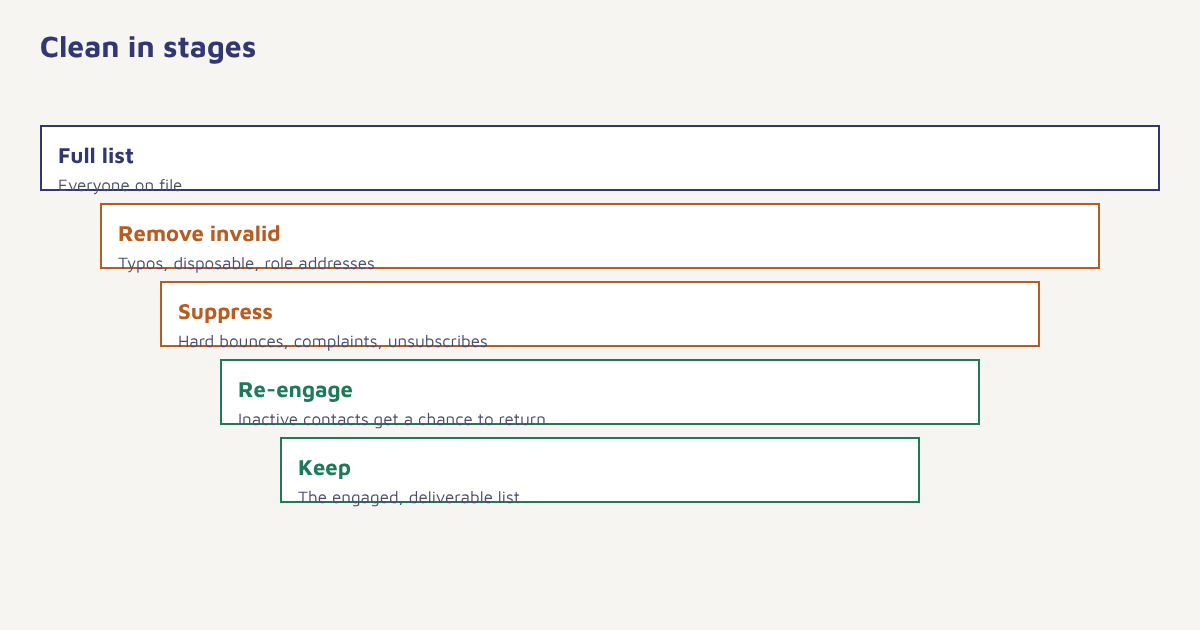
Notice the difference between suppress and delete. A suppression list keeps the address, marked as do-not-send, so that it cannot be re-imported by accident. Deleting a hard-bounced or unsubscribed address outright invites someone to add it back later. Where deletion is legally required, such as on a valid erasure request, follow your privacy process and keep only what the law allows you to keep. See the DPDP Act guide for the Indian position, and check current rules with your legal advisor.
Handling inactive subscribers
Inactive does not always mean uninterested. Some people read your emails but their client blocks image loading, and since privacy features in some mail apps now pre-load images, open data alone can mislead in both directions. Define inactivity by clicks, purchases, replies and site visits as well as opens, and treat the result as a prompt for gentler action, not an instant verdict. A common rhythm is shown below, but your own thresholds should reflect how often you send and how often people normally buy.
| Stage | Trigger (example) | Action |
|---|---|---|
| Watch | No clicks or purchases for about 90 days | Reduce frequency, send only your best content |
| Re-engage | No activity for about 150 to 180 days | Run a short win-back sequence. See win-back campaigns |
| Final notice | No response to re-engagement | Tell them you will stop sending unless they confirm |
| Suppress | Still no response | Move to a suppressed segment and stop mailing |
These windows are illustrative rules of thumb, not benchmarks. A fashion brand that emails daily and a software firm that emails monthly will draw the line in very different places.
How to clean your list
- Back up first. Export the whole list and its history before changing anything.
- Remove what you must. Apply suppression for hard bounces, unsubscribes and complaints. If you import from other tools, make sure their suppressions come with the records.
- Check syntax and domains. Catch typos, missing characters and obviously fake domains.
- Verify uncertain addresses. Use a verification step on addresses of doubtful age or source, and choose a reputable method.
- Merge duplicates. Combine records and keep the most recent consent and engagement data.
- Segment by engagement. Build groups for active, at risk and inactive contacts. See customer segmentation.
- Re-engage before removing. Send a respectful sequence to the inactive group.
- Suppress the rest. Keep them out of campaigns, but retain the suppression record.
- Schedule the next clean. Put it in the calendar.
In Flowfox, the segment builder can isolate contacts with no clicks or orders in a window, a journey can run the re-engagement and suppression steps automatically, and the contact profile keeps consent and bounce status together. Bounces and complaints from email delivery update the profile, and analytics shows how list quality affects results. When you bring in an old list, use the import guide to avoid reintroducing problems.
About verification services
Address verification tools check syntax, domain records and, in some cases, whether a mailbox seems to exist. They are useful before a large send to an old list, but they are not perfect. Some mail servers accept all mail and reject later, which makes certain addresses impossible to judge, and a verifier cannot tell you whether the person still wants your email. Treat verification as one input alongside your own bounce and engagement data. The technical basics of how delivery and bounce messages work help you read the results. Never buy a list and then “clean” it; the problem with purchased lists is consent, not just validity.
How often should you clean?
| Sending pattern | Suggested rhythm |
|---|---|
| Daily or several times a week | Monthly check, re-engagement quarterly |
| Weekly | Quarterly clean |
| Monthly or less | Twice a year, before big campaigns |
| Before a major seasonal push | Always, a few weeks ahead. See festival marketing campaigns |
| After importing or migrating | Immediately, before the first send |
Automatic rules do most of the work between cleans: suppress hard bounces and complaints instantly, and flag repeated soft bounces. A big manual clean then becomes a review, not a rescue.
A worked example
A small online bookshop has 60,000 addresses collected over six years. Its open rate has slid and a recent campaign produced a spike in bounces. The team exports the list, suppresses 1,800 hard bounces and 400 complaints and unsubscribes that never made it into its newest tool, and corrects about 250 obvious typos. It then finds that roughly 21,000 contacts have not clicked or bought in over eighteen months. Instead of deleting them, it sends a three-email sequence over two weeks: a reminder of what they signed up for, a short preference question, and a final note saying it will stop writing unless they click. About 3,000 respond. The remaining 18,000 are suppressed. The list is smaller, but deliveries rise, complaints fall, and the next campaign’s click rate is higher. The shop and every figure are invented for illustration; real outcomes vary.
Helpful rules for the long run
Write a short list-hygiene policy and keep it where the team can find it: how bounces are treated, how many soft bounces trigger suppression, what counts as inactive, who approves removals and how long suppression records are kept. Make it part of onboarding for anyone who sends mail. Check the sign-up forms that feed the list, because prevention beats cure: a validation message that catches a mistyped domain at entry saves a bounce later. Look at where bad addresses come from; if most invalid records arrive from one source, such as an event sign-up sheet typed by hand, fix that source. Keep an eye on the guidance of large mailbox providers, as the senders they accept and the complaint rates they tolerate have tightened in recent years; check their current published requirements and the Google Postmaster Tools dashboard, if it is available to you, for the signals they see about your domain. And keep a record of each clean, with the counts removed by reason, so you can see trends and prove diligence if anyone asks.
Common mistakes
- Deleting instead of suppressing. Addresses return via imports and forms.
- Judging by opens alone. Use clicks, purchases and visits as well.
- Skipping the re-engagement step. You may lose customers who still value you.
- Cleaning once and forgetting. Decay is continuous.
- Ignoring the source of problems. Fix the sign-up forms that let typos in. See progressive profiling and unsubscribe best practices.
A smaller list that wants your mail will always beat a bigger one that does not.
Keep your list healthy automatically. Segment inactive contacts, run re-engagement and suppress the rest.
Read next: email deliverability, spam trigger words and the blog.
Frequently asked questions
What is email list cleaning?
Email list cleaning is the routine of removing, correcting or suppressing records that are invalid, risky or inactive, so that your list stays healthy and deliverable.
How often should I clean my email list?
It depends on how often you send. Suppress hard bounces and complaints instantly, review inactive contacts monthly to quarterly, and always clean before a big seasonal campaign or after an import.
Should I delete unsubscribed or bounced emails?
Usually suppress rather than delete. A suppression record stops the address being added back by accident. Where the law requires erasure, follow your privacy process.
What counts as an inactive subscriber?
Someone who has not clicked, bought, replied or visited for a period suited to your sending rhythm. Use more than opens, since privacy features can distort open data.
Should I run a re-engagement campaign before removing people?
Yes. A short, respectful sequence lets interested people confirm, and those who do not respond can be suppressed with a clear conscience.
Do email verification tools clean a list completely?
No. They catch syntax errors and many invalid addresses, but cannot tell whether someone wants your email, and some servers hide whether a mailbox exists.
Will cleaning my list reduce my reach?
The list gets smaller, but results per send usually improve because deliveries, engagement and sender reputation get better.