Long forms lose people. A sign-up page that asks for name, email, phone, company size, job title, budget and three more fields may collect rich data from a few and nothing at all from many. Progressive profiling takes a gentler route: ask for the minimum at the start, then collect the rest a little at a time, across later visits, forms and messages. This guide explains what progressive profiling is, why it raises conversion and data quality, how to plan which questions to ask when, how to set it up on forms and in messages, and the privacy and design rules that keep it from feeling like an interrogation.
What is progressive profiling?
Progressive profiling is a technique for building a customer profile gradually. Instead of one long form, each interaction asks for one or two new pieces of information, skipping anything already known. A first visit might capture only an email address. A second form might ask for role, and a later email might ask a single preference question. It is widely used in lead generation and onboarding, and it complements the broader practice of lead generation. Its aim is two-fold: reduce friction at the first step, and still end up with a profile detailed enough to personalise well.
Why it works
- Shorter first step. Fewer fields generally means more people finish the form. See conversion rate optimization.
- Better answers. People answer more honestly once they trust you and have seen value.
- No repeated questions. Asking what you already know is irritating and signals a disconnected company.
- Relevant timing. Questions can follow behavior, such as asking about team size after someone views the pricing page.
- Respect. It matches how relationships build in real life, step by step.
The effect on conversion depends on your audience, offer and form, so treat claims about specific uplift with caution and test your own forms with an A/B test.
Plan your questions: the data ladder
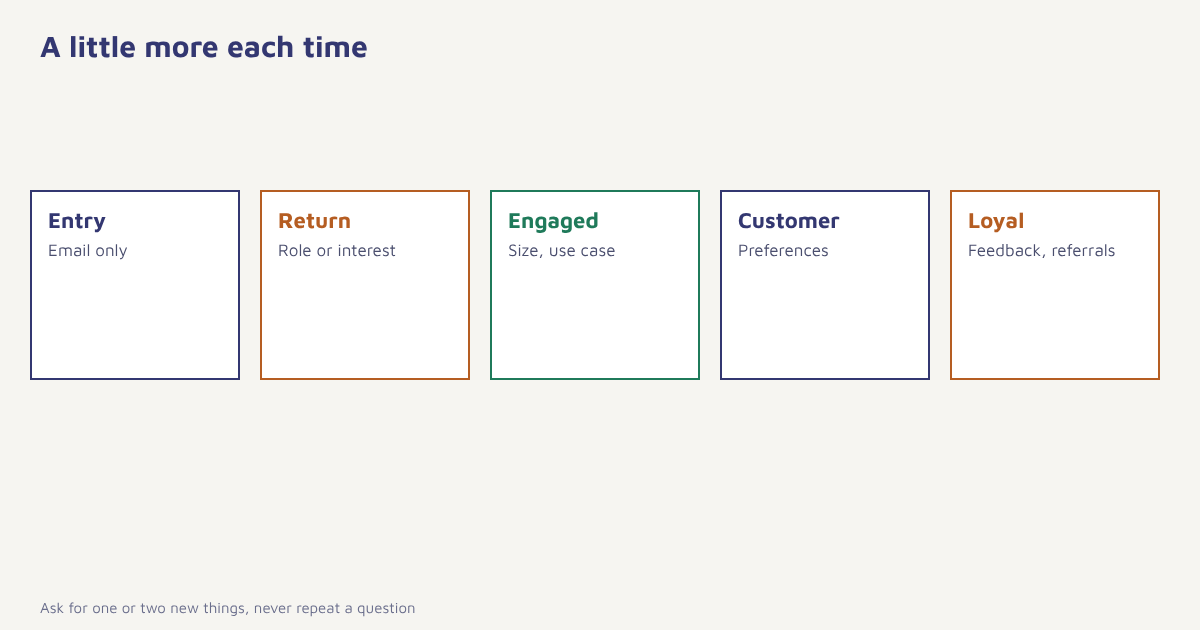
| Stage | Typical ask | Why then |
|---|---|---|
| 1. Entry | Email address (and name if needed) | Lowest barrier; enough to deliver the offer |
| 2. First return | Role, interest area or product category | The person has seen some value |
| 3. Engaged | Company size, use case, budget range, or size and style | Helps tailor offers and sales follow-up |
| 4. Customer | Delivery preferences, occasions, communication frequency | Improves experience after purchase |
| 5. Loyal | Referral willingness, feedback, product wishes | Invites deeper participation |
For each field, ask three questions. Do we need it to deliver something useful? Do we already know it from behavior or another system? What will we do differently once we have it? If you cannot answer the third, do not ask. Fields that fail that test belong in a different project or nowhere.
How to set it up
- Map your fields to stages. List every field you want, then sort by value and sensitivity. Put the least intrusive first.
- Capture the first step with a minimal form. Email, or phone for WhatsApp-led businesses, plus consent text and a hidden source field.
- Store answers on the profile. Each answer becomes an attribute with date and source. See the data model.
- Use rules to hide known fields. If the profile already has a role, the next form shows a different question.
- Trigger questions from behavior or time. After the second visit, after a download, a few days after purchase.
- Ask inside messages too. A one-tap question in an email or in-app message can fill a field without a form. See in-app messaging.
- Use each answer straight away. Tailor the next message so the person sees the point.
- Measure completion and drop-off per field. Remove or rephrase questions that cost more than they return.
In Flowfox, forms write to the contact profile, segments can target people who are missing a field and a journey can send the next question at the right moment, with analytics showing completion by step. The related technique of asking customers directly is explained in our guide to zero-party data.
Beyond web forms
| Place | Example |
|---|---|
| A poll: “What are you shopping for?” with links that record the answer | |
| Preference center | Topic and frequency settings that people can edit any time |
| In-app prompts | A short question after a key action. See mobile app onboarding |
| Checkout | One optional field, such as gift occasion |
| WhatsApp conversation | A reply button asking for a preference, within consent. See WhatsApp chatbots |
| Events and webinars | Registration with minimal fields, a follow-up survey for the rest |
A worked example
A B2B software company offers a downloadable checklist. The first form asks only for a work email. Two days later, the nurture email links to a short page asking for role and team size, with a recommended guide shown on submit. When the person views the pricing page, a prompt asks about the main use case. By the time a salesperson calls, the profile holds the email, role, team size and use case, collected across three light moments. The company is invented, and the sequence is only one sensible pattern. Compare it with your own long form to see whether completion and lead quality improve. See lead generation strategies and lead scoring for what to do with the data.
Privacy and design rules
Collect only what you will use and say why. Each time you ask, the person should understand what happens with the answer. Keep optional fields optional, explain sensitive requests and avoid collecting anything that could cause harm if leaked unless you truly need it. Under India’s DPDP Act and the GDPR, notice, purpose limitation and the right to withdraw apply, so link to your privacy notice wherever you collect, and let people update or remove what they shared; check current rules with your legal advisor. Pair this with consent management so the profile stores permission with the data.
On the design side, keep each ask short, show progress if there are several steps, never ask the same question twice and avoid fake urgency. If a person ignores a question twice, stop asking it, at least for a while. The profile is only as valuable as the trust that fills it.
Progressive profiling for B2C and B2B
The ladder looks different by business. In ecommerce, early questions are about interest and size, later ones about occasions and delivery preferences, and the profile feeds product recommendations. In B2B, early questions are about role and company, later ones about team size and buying timeline, and the answers feed lead scoring and sales follow-up. In education, a student might first share a course interest, then a start date, then a budget range. Whatever the sector, remember that a form is a conversation, and the other side may close the tab at any time. The overview of web forms is a useful reminder of how many small design choices, from labels to error messages, decide whether a person finishes. Test the order of questions as well as their number, because moving one friendly question earlier can change completion more than removing a field.
Common mistakes
- Asking what you already know. Check the profile first.
- Collecting without a plan. Every field needs a use.
- Starting with the hardest question. Earn the right to ask.
- Hidden fields that never get filled. If nothing triggers the follow-up, the profile stays thin.
- Ignoring consent. More data means more duty.
Ask for the minimum first, and make every answer earn the next question.
Build richer profiles without long forms. Capture a little at a time and use every answer straight away.
Read next: customer 360 view, first-party data and the blog.
Frequently asked questions
What is progressive profiling?
Progressive profiling is a technique that collects customer information gradually, asking for a little more at each interaction and skipping what is already known.
Why use progressive profiling instead of one long form?
Shorter first forms reduce friction and drop-off, and asking later lets you collect better answers once the person has seen value.
Which fields should I ask for first?
Ask for the minimum needed to deliver the offer, usually an email address, then add role, interests and preferences at later interactions.
How does progressive profiling work technically?
Each answer is stored on the contact profile, rules hide fields that are already known, and later forms, emails or in-app prompts ask for the next missing field.
Does progressive profiling improve conversion?
Often shorter forms convert better, but results depend on your audience and offer, so test your own forms.
Is progressive profiling allowed under privacy laws?
Yes, if each collection is covered by clear notice, a lawful basis and a defined purpose, and people can withdraw or update their data. Check current rules with your legal advisor.
How is progressive profiling different from zero-party data?
Zero-party data is the information a customer volunteers. Progressive profiling is a method for collecting information, including zero-party data, in small steps over time.