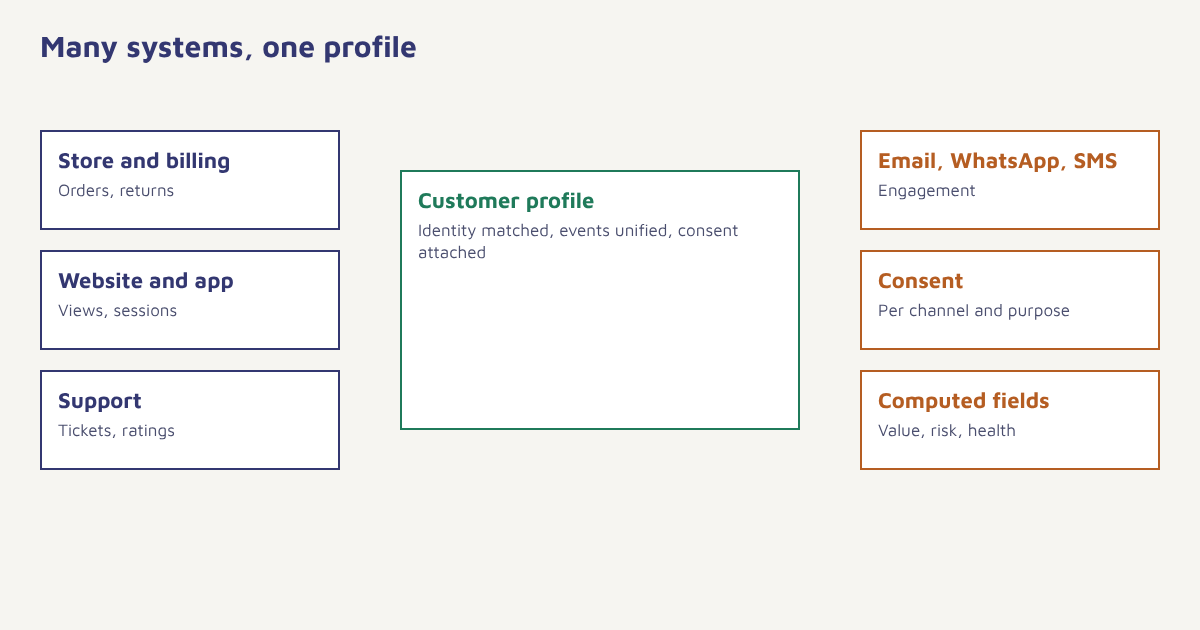
Ask five teams what they know about the same customer and you may get five different answers. Marketing sees email clicks. Sales sees a deal stage. Support sees open tickets. The store sees orders. The app team sees sessions. A customer 360 view brings those fragments into a single picture of one person, so that every team, and every automated message, works from the same facts. This guide explains what a 360-degree customer view is, what it contains, how identity resolution makes it possible, the steps to build one, the benefits and limits, and the mistakes that turn a unified profile into an expensive database nobody trusts.
What is a customer 360 view?
A customer 360 view, sometimes called a single customer view, is a unified profile that combines everything a business knows about an individual customer across channels and systems: who they are, what they have bought, how they interact with you, what they have told you and what permissions they have given. The idea overlaps with what many vendors call a customer data platform and with the record-keeping side of customer relationship management. The number 360 is a metaphor for completeness, and in practice no view is ever fully complete. The goal is a profile complete enough to make better decisions than any single system could.
What goes into the profile
| Layer | Contents | Typical source |
|---|---|---|
| Identity | Name, email, phone, customer ID, device IDs | Sign-up forms, login, checkout |
| Attributes | City, language, plan, stated preferences | Forms, quizzes, CRM |
| Transactions | Orders, items, amounts, returns, payment methods | Store, billing, payment gateway |
| Behavior | Pages and products viewed, searches, app sessions, feature use | Website and app tracking |
| Engagement | Messages delivered, opened, clicked, replied | Email, WhatsApp, SMS and push channels |
| Service | Tickets, chats, ratings, resolutions | Helpdesk, call centre |
| Value and risk | Lifetime value, recency, health score, churn risk | Computed fields. See customer health score |
| Consent | Permissions per channel and purpose, with dates and sources | Consent records. See consent management |
The hard part: identity resolution
Every system labels the customer differently: an email address in the newsletter tool, a phone number in WhatsApp, an account number in billing, an anonymous cookie on the website. Record linkage, usually called identity resolution, is the process of deciding which of those records describe the same person. Get it right and the profile is rich and trustworthy. Get it wrong and two people are merged into one, or one person is split into three, and every message built on the profile goes astray.
| Approach | How it works | Risk |
|---|---|---|
| Deterministic matching | Records share an exact identifier such as email or customer ID | Low risk, but misses records without a shared key |
| Probabilistic matching | Records are scored on similarity of name, address, device and so on | Higher coverage, higher risk of wrong merges |
| Login-based stitching | Anonymous activity is attached when the person signs in | Reliable, but only covers people who log in |
| Manual review | Staff check uncertain matches | Accurate, but slow |
Start strict. Begin with deterministic keys, keep a log of every merge and make merges reversible. A missed match costs you a little reach. A wrong merge can send one customer another customer’s details.
How to build a customer 360 view
- Define the questions it must answer. For example: who bought in the last 90 days, who has an open complaint, who has opted into WhatsApp.
- Inventory your sources. List every system that holds customer data, who owns it and what identifiers it uses.
- Choose your identity keys. Pick the strongest identifiers and decide the order of precedence when they conflict.
- Design the event and attribute model. Name things once and consistently. See the data model.
- Connect sources. Start with the two or three that matter most, such as orders, website or app events and support. Use FlowConnect or the API.
- Attach consent to the profile. Every channel and purpose, with timestamp and source.
- Make it visible. Give marketing, support and sales a readable profile page. Data nobody can see does not change behavior.
- Activate it. Use the profile for segments, triggers and personalization. See behavioral segmentation and event-triggered marketing.
In Flowfox, the contact profile is that unified record: identifiers, attributes, events, consent and computed fields live on one page, and the same data feeds segments, journeys and analytics, so reporting and messaging cannot disagree. If you are consolidating several tools, the migration guide shows how to bring history across, and our CDP guide explains how the pieces fit.
Benefits
| Benefit | What changes |
|---|---|
| Consistent experience | Support knows about the marketing offer. Marketing knows about the complaint. |
| Smarter timing | Messages respond to what the customer did on any channel. See omnichannel marketing |
| Less waste | Fewer duplicates, conflicts and mistakes, such as selling to someone who just bought |
| Better measurement | Revenue, retention and lifetime value by customer, not just by channel. See customer lifetime value |
| Easier compliance | One place to honour opt-outs and deletion requests |
| Better prediction | Models such as churn prediction work on a complete history |
A worked example
A regional furniture retailer has three systems: a store billing tool, an ecommerce site and a helpdesk. Customers appear in all three with different IDs. After matching on phone number and email, the retailer discovers that about a fifth of the people it called “new website customers” had already bought in store. It also finds customers who received a promotion for a sofa the same week they filed a complaint about a delayed delivery. With a unified profile, it adds two simple rules: suppress promotions for anyone with an open complaint, and show store purchases when sending post-delivery emails. The retailer and figures are invented; the pattern of duplicates and clashing messages is a common reason teams build a single view.
Who owns the view?
A single customer view fails more often from unclear ownership than from technology. Decide who is responsible for the identity rules, who approves new fields, who can see sensitive attributes and who handles requests to correct or delete a record. Write a short data dictionary: for each field, its meaning, its source, how often it updates and who uses it. Review it each quarter, because definitions drift. For example, “active customer” may mean someone who ordered in 90 days in marketing and 12 months in finance; pick one definition for the profile and name the other as a separate field. Agreeing definitions is dull work, but it is what lets teams trust the numbers. For measures built on the profile, see marketing KPIs and customer-centric marketing.
Limits and risks
- It is never finished. New sources and fields keep appearing. Treat it as a product with an owner.
- Data quality problems get merged too. A unified bad record is still bad. See email list cleaning.
- Concentrated risk. A rich profile is a target. Control access and log who views what. See our security page.
- Privacy duties grow. Notice, purpose limits and deletion rights apply to the whole profile. See the DPDP Act guide.
- Over-personalization. Just because you know something does not mean you should say it. Avoid messages that feel like surveillance.
A customer 360 view is not about knowing everything. It is about no two teams disagreeing on the basics.
See each customer once. Unify identity, events and consent, then act across every channel.
Read next: first-party data, progressive profiling and the blog.
Frequently asked questions
What is a customer 360 view?
A customer 360 view is a unified profile that combines what a business knows about an individual customer across systems and channels: identity, orders, behavior, engagement, support and consent.
How is a customer 360 different from a CRM?
A CRM mainly records sales and service relationships. A customer 360 view also brings in behavioral, transactional and engagement data from many systems to support marketing and product decisions.
What is identity resolution?
Identity resolution links records from different systems that belong to the same person, using identifiers such as email, phone number, customer ID or login.
How do I build a single customer view?
Define the questions it must answer, inventory sources, choose identity keys, model events and attributes, connect your most valuable sources, attach consent and then activate the profile.
Do I need a customer data platform for a 360 view?
Not always. A CDP is one way to build it, but many engagement platforms keep a unified profile as part of the product.
Is a customer 360 view allowed under privacy law?
It can be, if you give notice, have a lawful basis, limit use to stated purposes, secure the data and honour rights such as access and deletion. Check current rules with your legal advisor.
What is the biggest risk when merging customer records?
Wrongly merging two different people. Start with strong identifiers, keep a log of merges and make them reversible.