Customers message businesses on WhatsApp at all hours, and they expect an answer in minutes. A WhatsApp chatbot answers the repetitive questions instantly, collects the details a human agent would otherwise ask for, and hands over to a person when the conversation gets difficult. Done well, it shortens waiting time and frees your team. Done badly, it traps people in menus. This guide explains what a WhatsApp chatbot is, what it can and cannot do, how the rules around templates and the 24-hour window shape the design, how to build one step by step and how to measure it.
What is a WhatsApp chatbot?
A WhatsApp chatbot is software that sends and receives messages on your business number through the WhatsApp Business Platform. It can be a simple menu with buttons, a flow that gathers information step by step, or an assistant that uses a language model to understand free text. It talks to WhatsApp through the Business API, which our guide to the WhatsApp Business API explains in detail. A chatbot is different from the free WhatsApp Business app, which offers only basic auto-replies and cannot connect to your systems.
What a chatbot is good at
| Use case | Example | Why it works |
|---|---|---|
| Order status | Customer sends “where is my order” and gets live tracking | Needs a lookup, not a human |
| FAQs | Store hours, returns, shipping charges | Same questions every day |
| Lead capture | Collect name, city and budget before handing to sales | Saves the first five minutes of every call |
| Booking | Appointments, demos, test drives | Structured choices suit buttons |
| Payments and reminders | Send a payment link or an instalment reminder | Timely and low effort |
| Feedback | Post-delivery rating | One-tap replies get answers |
The rules that shape the design
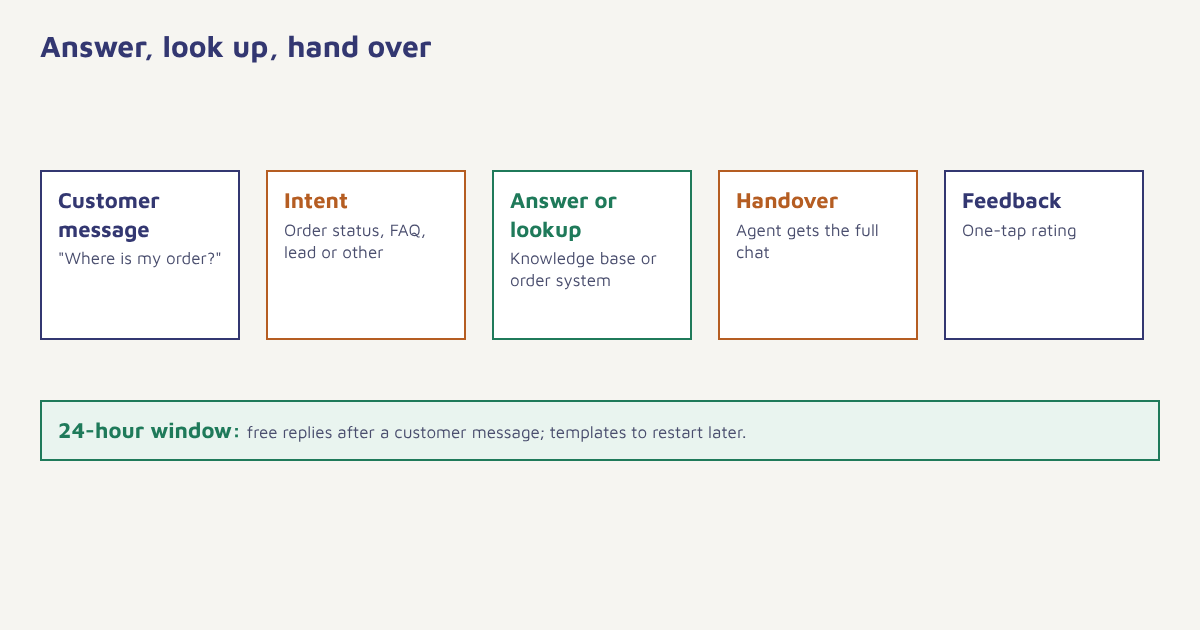
WhatsApp has a few rules every bot must respect. First, opt-in: you can message people only after they have agreed to hear from you, and they can leave at any time. Second, the 24-hour customer service window: once a customer messages you, you can reply freely for 24 hours. Outside the window, you can start a conversation only with a pre-approved message template. Third, templates must be submitted for approval, and categories such as marketing, utility and authentication are priced and treated differently. Details change, so check the current documentation from Meta before you launch. Our guides to template approval and WhatsApp marketing cover the practical side, and DLT and Meta approvals summarises the approvals in India.
Design for the window. If a conversation may run past 24 hours, such as a support query waiting on a warehouse, plan a template message that restarts it, and make the bot say what happens next.
Three kinds of chatbot
| Menu and button bot | Rule-based flow | AI assistant | |
|---|---|---|---|
| How it works | Fixed choices | Branching questions and conditions | Understands free text and answers from your content |
| Strength | Predictable, quick to build | Good for forms and bookings | Handles varied questions |
| Weakness | Rigid | Breaks on unexpected input | Needs guardrails and testing |
| Best for | Simple FAQs and menus | Leads, bookings, support triage | Rich knowledge bases and support |
Many teams combine them: buttons for the common paths, rules for transactions, and an AI layer for open questions, always with a route to a person. If you use an AI assistant, ground it in your own approved answers, set limits on what it may promise, and review the conversations regularly. FoxAI in Flowfox is built for this kind of assisted work.
How to build a WhatsApp chatbot, step by step
- Pick one job. Start with a single, high-volume task such as order status or lead capture, not a bot that does everything.
- Collect the real questions. Read a month of chats and email. List the top ten questions and the answers your team gives.
- Set up the number and templates. Connect your business number to the API and submit the templates you need for messages outside the 24-hour window.
- Draw the flow. Greeting, intent, answer or collection, confirmation, handover and close. Keep each message short.
- Connect your data. Order status, appointments and customer records come from your systems through the API or FlowConnect.
- Add a human handover. Always let people type “agent” or tap a button, and pass the conversation history to the person who takes over.
- Test with real people. Try typos, other languages and unexpected questions. Fix the dead ends.
- Launch to a small group, then widen. Watch the first conversations closely.
Writing messages that feel human
People forgive a bot that is honest about being a bot and quick to help. Say so in the greeting, offer clear options and keep each message to a few lines. Use the customer’s name only when you know it. Avoid long paragraphs and avoid asking for several things in one message. When the bot does not understand, say so and offer two ways forward, rather than repeating the menu. Support more than one language if your customers write in more than one, which is common in India. A simple greeting might look like this.
Hi Asha, I'm the Trail Runner Store assistant.
I can help with:
1. Track my order
2. Returns and exchanges
3. Talk to a person

Reply with a number, or just type your question.
Building it in Flowfox
In Flowfox, a WhatsApp conversation is part of the same customer profile as everything else. A journey can start a conversation from an event, such as a shipped order, and the reply can branch on what the customer chooses. Opt-in status lives on the contact, and segments can exclude people who have not agreed to WhatsApp. Results appear in analytics. See the WhatsApp channel page for capabilities, and our omnichannel marketing guide for how WhatsApp fits with email and SMS.
How to measure a chatbot
| Metric | What it tells you |
|---|---|
| Containment rate | Share of conversations resolved without a human |
| Handover rate | Share passed to agents, and why |
| First response time | Should be seconds for a bot |
| Resolution time | How long until the issue is closed |
| Customer satisfaction | A one-tap rating at the end. See NPS, CSAT and CES |
| Drop-off by step | Where people give up inside a flow |
| Unrecognised messages | The questions your bot could not answer. Your best source of new content |
A high containment rate is only good if customers are satisfied. A bot that resolves 90 percent of chats by frustrating people into giving up has not succeeded. Pair containment with satisfaction, and review a sample of conversations each week.
Common mistakes
- Messaging without opt-in. It risks blocks, low quality ratings and legal trouble.
- No human option. People will leave.
- Too much at once. Start small and grow with data.
- Ignoring the window. Replies that fail outside 24 hours leave customers hanging.
- Never reading the transcripts. The failures are in the chats.
If you are comparing channels, the chatbot concept is the same everywhere, but WhatsApp adds approval rules and a conversation-based pricing model, so read the current price list before you plan volumes. Our pricing page explains what is included on the Flowfox side.
Check the source. Message categories, prices and the length of the service window are set by Meta and change from time to time. Read the current WhatsApp Business Platform documentation before you finalise volumes and budgets.
The best chatbot answers fast, admits what it does not know and gets out of the way.
Launch a WhatsApp bot your customers will use. Connect your number, build the flow and hand over to your team with full context.
Read next: RCS messaging and customer onboarding, or browse the blog.
Frequently asked questions
What is a WhatsApp chatbot?
A WhatsApp chatbot is software connected to a business WhatsApp number through the Business API that answers questions, collects information and hands over to human agents automatically.
Can I build a WhatsApp chatbot without coding?
Yes. Many platforms offer visual builders for flows and buttons. You still need an approved business number, opt-in from customers and templates for messages outside the 24-hour window.
What is the 24-hour window on WhatsApp?
After a customer messages you, you can reply with free-form messages for 24 hours. After that, you can start a conversation only with a pre-approved template.
Do customers need to opt in to talk to a WhatsApp bot?
Customers who message you first have started the conversation. To send them proactive messages, you need their opt-in, which must be clear and recorded.
Can a WhatsApp chatbot hand over to a human?
Yes, and it should. Add a clear way to reach an agent and pass the conversation history so the person does not have to repeat themselves.
Is the WhatsApp Business app the same as a chatbot?
No. The free app offers basic quick replies and away messages. A chatbot uses the Business API and can connect to your systems, run flows and scale across agents.
How do I measure chatbot success?
Track containment rate, handover rate, response and resolution time, drop-off by step and customer satisfaction together, and review a sample of conversations regularly.