Every email you send ends one of three ways: delivered, deferred or bounced. A bounce is the receiving server telling you the message did not arrive. A few bounces are normal. A rising bounce rate is a warning that your list is stale, your data collection is sloppy or your sending reputation is slipping, and it can push even your good mail into spam. This guide explains what bounce rate is, the difference between hard and soft bounces, how to read the error codes, what rate to aim for, and exactly how to bring a high bounce rate down.
What is email bounce rate?
Bounce rate is the share of emails sent that the receiving mail server rejected. A bounce message is an automated reply, often called a non-delivery report, that explains why. The formula is simple.
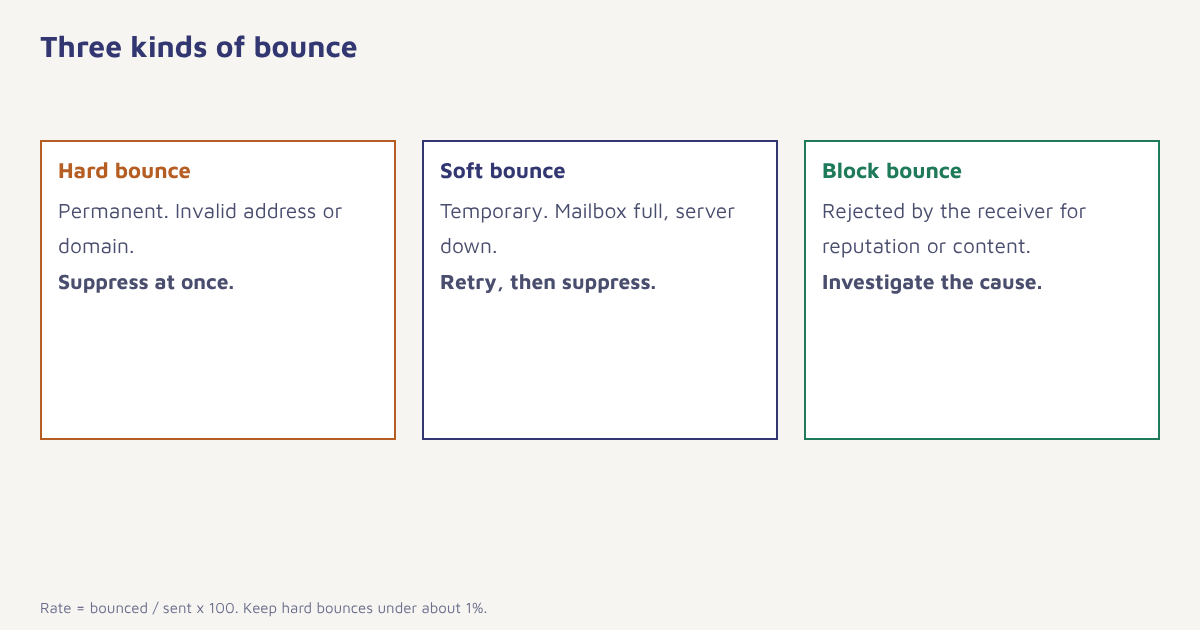
Formula. Bounce rate (%) = emails bounced ÷ emails sent × 100
If you send 20,000 emails and 300 bounce, the bounce rate is 1.5 percent. Note that bounce rate is not the same as delivery rate, which counts what arrived, and it is not the same as the website “bounce rate” measured in web analytics. A bounced email never reached the inbox at all, which is different from a message that landed in the spam folder. Mailbox providers watch bounces closely, because a sender who keeps mailing addresses that do not exist looks careless or abusive, and our email deliverability guide explains how that feeds into reputation.
Hard bounces vs soft bounces
| Type | What it means | Common causes | What to do |
|---|---|---|---|
| Hard bounce | Permanent failure | Address does not exist, domain does not exist, typo, closed account | Suppress at once; never retry |
| Soft bounce | Temporary failure | Mailbox full, server down, message too large, greylisting | Retry for a limited time, then suppress after repeated failures |
| Block bounce | Rejected because of the sender | Poor reputation, blocklist, spam-like content, failed authentication | Investigate cause; fix authentication, content or list |
| Technical bounce | Configuration problem | DNS errors, rate limits, TLS problems | Check DNS and sending setup |
Reading the error codes
Bounce messages carry a standard SMTP reply code. Codes beginning with 4 are temporary, and codes beginning with 5 are permanent. The enhanced status codes (such as 5.1.1) give more detail. A few you will see often are shown below.
| Code | Usual meaning | Action |
|---|---|---|
| 550 5.1.1 | Mailbox does not exist | Hard bounce. Remove the address |
| 550 5.7.1 | Rejected for policy or reputation reasons | Check blocklists, authentication, content |
| 552 5.2.2 | Mailbox full | Soft. Retry a few times |
| 421 4.7.0 | Temporarily deferred, often rate limiting | Slow your sending and retry |
| 554 5.7.x | Blocked as spam or by security policy | Read the text for the reason and any review link |
The text after the code often names the cause and links to a review form. Do not just count bounces. Read a sample of them every week, because they tell you what to fix.
What is a good bounce rate?
Lower is better. As a general rule of thumb, keep hard bounces below about 1 percent per send, and treat anything above 2 percent as a problem that needs action. Healthy established lists often sit well below 0.5 percent. These are guidelines, not official limits, and your email provider may set its own thresholds, so check the terms of your platform. New or recently imported lists usually bounce more, which is one reason to follow our warm-up schedule for new senders.
Why emails bounce
- Typos at sign-up. gmial.com and similar mistakes are the most common cause.
- Old addresses. People change jobs and abandon mailboxes. B2B lists decay fastest.
- Bought or scraped lists. Many addresses are invalid, and some are spam traps. See email list building.
- Fake sign-ups. Bots and people who want a freebie without the email.
- Authentication failures. Missing SPF, DKIM or DMARC can lead to rejection. See our setup guide.
- Poor reputation. Complaints and past bounces make providers stricter.
- Content and links. Blocklisted URLs or spammy phrasing.
How to reduce your bounce rate
- Validate at the point of capture. Check the format, catch common domain typos and ask people to confirm their address on forms.
- Use double opt-in where it fits. A confirmation click proves the address works and belongs to the person.
- Suppress hard bounces automatically. Never mail an address that has hard bounced. Your platform should do this by default.
- Set a soft bounce rule. For example, suppress an address after three or four consecutive soft bounces.
- Verify old and imported lists. Run a verification check before the first send to a legacy list, and send to the most recent contacts first.
- Retire inactive contacts. Send a re-engagement series, then suppress people who do not respond. See win-back campaigns.
- Fix authentication. Confirm SPF, DKIM and DMARC pass for every sending domain.
- Monitor every send. Alert yourself when the bounce rate rises above your threshold.
In Flowfox, hard bounces are suppressed automatically and shown on the contact profile. You can build a segment of contacts with repeated soft bounces or no engagement and review them before the next campaign, and analytics shows bounce rate per send and per provider. The email channel page describes the sending setup.
A simple list hygiene routine
| Task | Frequency |
|---|---|
| Remove hard bounces and complaints | Automatic, every send |
| Review soft bounce patterns | Weekly |
| Verify addresses on new imports | Before each import |
| Re-engage and suppress inactive contacts | Quarterly |
| Audit sign-up forms for typos and bot traffic | Twice a year |
Be careful with third-party verification tools. Some mark valid addresses as risky, and catch-all domains, which accept everything, cannot be verified reliably. Use verification to remove the clearly invalid addresses and treat the uncertain ones with caution, for instance by sending to them in small batches.
Special cases: greylisting, catch-all domains and role addresses
Some bounces are not what they seem. Greylisting is a technique where a receiving server temporarily rejects mail from an unknown sender and expects a legitimate server to retry, so a first-time soft bounce on a new sender is normal and usually clears on the retry. Catch-all domains accept every address, even invalid ones, so a clean send does not prove the mailbox exists. Role addresses such as info@ or sales@ often reach a team inbox that nobody owns, and they complain more than personal addresses. Treat all three with care: allow retries, send to catch-all addresses in small batches and ask for a confirming click before you add role addresses to marketing lists. The email standard behind all of this is described in the article on SMTP, if you want the technical background.
If your bounce rate spikes suddenly rather than creeping up, look for a single cause: a newly imported file, a broken sign-up form that accepts anything, or a change in your sending setup. Compare the bounces by source and by recipient domain, because one bad source usually explains most of the problem. Pause that source, clean it, and add the fixed version back in gradually.
Common mistakes
- Retrying hard bounces. It signals poor hygiene to providers.
- Ignoring soft bounces. A mailbox that is always full is as good as gone.
- Importing a list and sending to it all at once. Verify and ramp.
- Confusing bounces with spam placement. They need different fixes.
- Not reading the bounce text. The reason is usually written there.
A bounce is a free lesson. The mistake is mailing the same dead address twice.
Keep your list clean automatically. Suppress bounces, find risky contacts and watch rates per send.
Continue with email marketing metrics and transactional emails, and see the blog.
Frequently asked questions
What is email bounce rate?
Bounce rate is the percentage of emails sent that the receiving server rejected. It is calculated as bounced emails divided by emails sent, multiplied by 100.
What is the difference between a hard bounce and a soft bounce?
A hard bounce is a permanent failure, such as an address that does not exist. A soft bounce is temporary, such as a full mailbox or a server that is down.
What is a good email bounce rate?
Keep hard bounces under about 1 percent per send. Rates above 2 percent need action. Established, clean lists are often well below 0.5 percent.
What causes high bounce rates?
Typos at sign-up, old or abandoned addresses, bought or scraped lists, fake sign-ups, failed authentication and poor sender reputation.
Should I remove soft bounces from my list?
Not immediately. Retry for a limited time, then suppress addresses that soft bounce repeatedly, for example after three or four consecutive failures.
Is a bounce the same as going to spam?
No. A bounce means the message was rejected and never delivered. A message in the spam folder was accepted but filtered.
How do I reduce bounce rate?
Validate addresses when people sign up, use double opt-in, suppress hard bounces automatically, verify old lists, retire inactive contacts and fix email authentication.