Search for advice on avoiding the spam folder and you will find lists of “forbidden” words: free, winner, urgent, guarantee, act now. Marketers delete those words from subject lines in fear, then wonder why their emails still land in spam. The truth is less tidy. Spam filtering rarely turns on a single word. It weighs dozens of signals, and most of them have nothing to do with vocabulary. This guide explains how filters really judge a message, which words and habits do deserve caution, what to write instead, how to test your emails and why your sender reputation matters far more than any word list.
The myth of the forbidden word
Early spam filters leaned heavily on keyword rules, so lists of risky words became folklore. Modern filtering is statistical. Systems related to Bayesian filtering learn from the messages people mark as junk and from their reading behaviour, then combine that with authentication results, sender history and technical features. A single word like “free” does not sink a legitimate message from a trusted sender. The same word in a message from a new domain, with broken links, an all-image layout and a deceptive subject line, adds to a pile of warning signs. Think of words as small nudges, not switches.
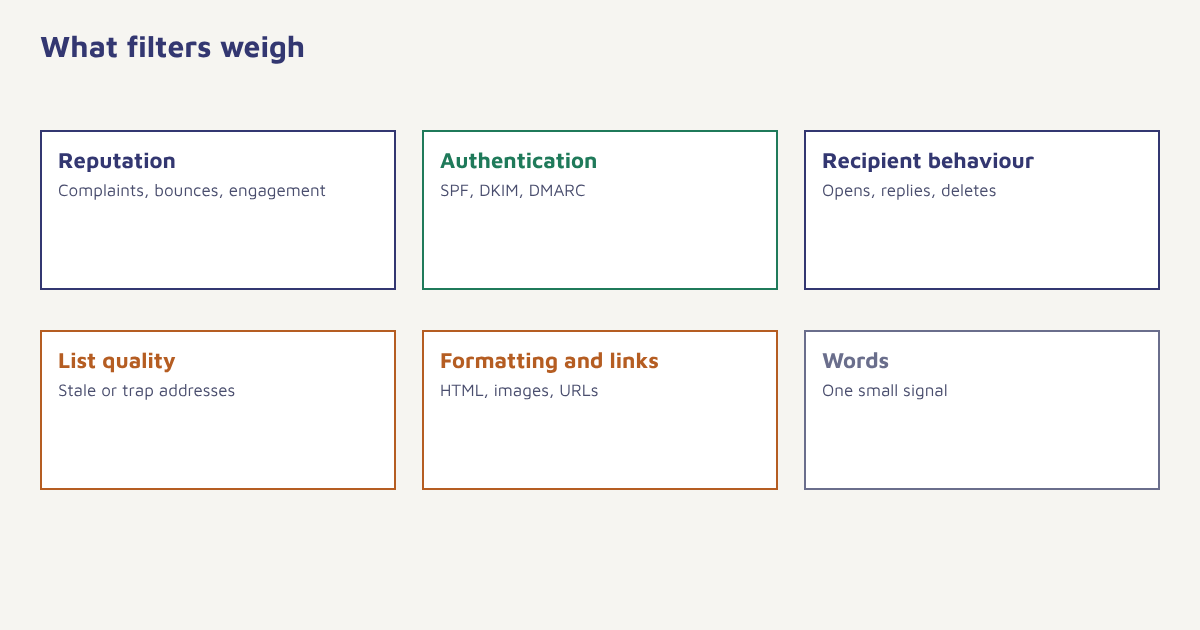
What filters actually look at
| Signal group | Examples | How much you control |
|---|---|---|
| Sender reputation | History of complaints, bounces and engagement for your domain and IP | High, over time. See sender reputation |
| Authentication | SPF, DKIM and DMARC results | Full. See authentication setup |
| Recipient behaviour | Opens, replies, deletes unread, moves to spam | Indirect, through relevance |
| List quality | Bounces, spam traps, stale addresses | High. See list cleaning |
| Content and format | Wording, image-to-text ratio, HTML quality, hidden text | High |
| Links and domains | Shortened links, mismatched URLs, blocklisted domains | High |
| Volume patterns | Sudden spikes, odd sending times | High. See email warm-up |
Notice how few of these are about vocabulary. A sender with strong authentication, a clean list and readers who engage can use ordinary sales language without trouble. A sender with a poor record will struggle even with perfectly neutral wording.
Words and habits that deserve caution
That said, some patterns look deceptive to both filters and people, and avoiding them is simply good writing. They are not banned, but they are risky when combined with other warning signs.
| Pattern | Example | Why it raises suspicion | Better approach |
|---|---|---|---|
| Hype and urgency | ACT NOW!!! LIMITED TIME!!! | Common in junk, and people distrust it | State the real deadline: “Offer ends Sunday 11:59 pm” |
| Money promises | Earn cash fast, guaranteed income | Associated with scams | Describe the actual benefit and terms |
| Free everything | FREE FREE FREE gift | Overused, and often misleading | Say what is free and the condition: “Free delivery over ₹999” |
| Fake familiarity | Re: your request (when none exists) | Deceptive, may breach rules | Be honest in the subject line |
| All capitals and punctuation | BUY NOW!!!! | Looks shouty and automated | Use normal sentence case |
| Vague clickbait | You won’t believe this | Poor relevance, high delete rate | Give a clear reason to open |
| Medical or financial claims | Miracle cure, guaranteed loan approval | Regulated areas and common scam themes | Use measured, compliant wording and consult rules |
Our guide to email subject lines goes deeper on writing ones that work. For tone and structure, see email copywriting.
Beyond words: formatting and technical habits
- Image-only emails. A single large picture with little or no text looks like a common spam tactic. Keep a healthy amount of real text and add alt text.
- Broken or messy HTML. Unclosed tags, hidden text and copy pasted from word processors cause trouble. Use a clean template.
- Mismatched links. A link whose visible text shows one address and whose destination is another looks like phishing.
- Public link shorteners. They are shared by many senders, so their reputation is mixed. Use your own branded domain.
- No plain-text version. A multipart message with both HTML and plain text is the normal pattern.
- Missing unsubscribe. It annoys readers and breaks rules. See unsubscribe best practices.
- Attachments in bulk mail. Large attachments in marketing messages raise flags; link to a page instead.
Reputation first. If most of your recipients open, click and reply, you can write naturally. If many delete unread or report spam, no clever wording will save you. Fix relevance and list quality before polishing vocabulary.
How to test before you send
- Check authentication. Send a test to a mailbox you control and view the headers or use a checker to confirm SPF, DKIM and DMARC pass.
- Send seed tests. Send to a handful of real inboxes at different providers and see where the message lands. Treat the result as a rough guide, since placement varies by recipient.
- Review the content. Read the email aloud. Does it sound like something a person would send? Remove shouting, empty promises and anything you could not defend to a customer.
- Check links. Make sure each link works, uses your own domain and shows the right destination.
- Preview in several clients. Open the email on a phone and on a desktop mail app. See email design.
- Send to a small segment first. Watch complaints, bounces and early engagement before sending to the whole list.
- Monitor after sending. Look at bounce, complaint and unsubscribe rates. Our bounce rate guide explains the numbers.
Many platforms, including the Flowfox email builder, offer preview and test-send tools, and analytics shows bounce and complaint trends by campaign. Third-party spam checkers also exist, but their scores are estimates from their own rules and do not guarantee how any mailbox provider will behave. For the bigger picture see email deliverability.
A worked example
A home-decor store sends a sale email with the subject “FREE!!! LIMITED TIME OFFER, ACT NOW” and a single large banner image. Most of it lands in promotions or spam. The team rewrites it: “Free delivery on cushions until Sunday”, adds a short paragraph of real text, a clear product grid with alt text and a visible unsubscribe link, and sends it to people who opened in the last 90 days first. Engagement rises and complaints fall, and in later sends the store can use the word “free” without trouble because its reputation has improved. The store and the outcome are invented for illustration; your own results will depend on your list and sender history.
A note on honesty and rules
Many “spammy” phrases are risky because they are misleading, and misleading subject lines can break advertising and commercial-email rules in various countries, for example under the CAN-SPAM Act. The simple test is whether the subject line matches what the email delivers. If it does, you are on safe ground ethically and, usually, practically.
Common mistakes
- Obsessing over word lists. Sender reputation matters far more.
- Ignoring authentication. It is the basics.
- Using shouting and symbols for emphasis. It reduces trust and clicks.
- Sending to old addresses. Stale lists produce spam traps.
- Relying on one spam-score tool. Scores are estimates, not promises.
Write the way you would talk to a customer across the counter, and the filters will usually follow.
Reach the inbox with a clean sending setup. Authenticate, warm up and monitor from one place.
Read next: email preheader text, email marketing metrics and the blog.
Frequently asked questions
Do spam trigger words really exist?
Certain words and patterns look suspicious, but filters weigh many signals together. A single word rarely decides placement, and sender reputation and engagement matter more.
Which words should I avoid in subject lines?
Avoid hype, empty promises and deceptive phrases such as guaranteed income or fake replies. Write clear subject lines that match the email.
Can I use the word free in an email?
Yes. Use it honestly and specifically, for example free delivery over a stated amount, and avoid combining it with shouting, symbols and image-only layouts.
Does using all capitals cause spam filtering?
Not by itself, but it looks shouty and can reduce trust and engagement. Normal sentence case is better.
How do I check whether my email will go to spam?
Check authentication, send seed tests to several inboxes, review content and links, send to a small segment first and monitor complaints and bounces.
Are spam score checkers reliable?
They give a rough guide based on their own rules, but they cannot predict exactly how each mailbox provider will treat your message.
What matters more than spam words?
Sender reputation, authentication, list quality and recipient engagement carry far more weight than individual words.