A beautifully designed email with weak words gets deleted. A plain email with clear words gets read, clicked and answered. Email copywriting is the craft of writing messages that people want to open and act on, and it is learnable. This guide covers how to know your reader, write subject lines and preview text, structure the body, craft a single clear call to action, adapt tone to the moment and test your way to better results. It includes before-and-after examples and a checklist you can use before every send.
What is email copywriting?
Email copywriting is writing the text of marketing and lifecycle emails: the subject line, preview text, body, links and sign-off, with the aim of getting a specific action. It shares ideas with the broader field of copywriting, but email has its own constraints. Readers scan in seconds, often on a phone, and have a delete key within reach. Good copy respects that. It is clear before it is clever, and it earns the next sentence at every step.
Start with the reader, not the product
Before writing, answer three questions. Who is this person and what stage are they in? What do they want right now? What single thing do you want them to do after reading? If you cannot answer the last one in one sentence, the email is not ready to write. Segmentation helps here: a message for a first-time buyer and one for a loyal customer should not be the same. See behavioral segmentation and customer lifecycle marketing for ways to match the message to the moment.
Subject line and preview text
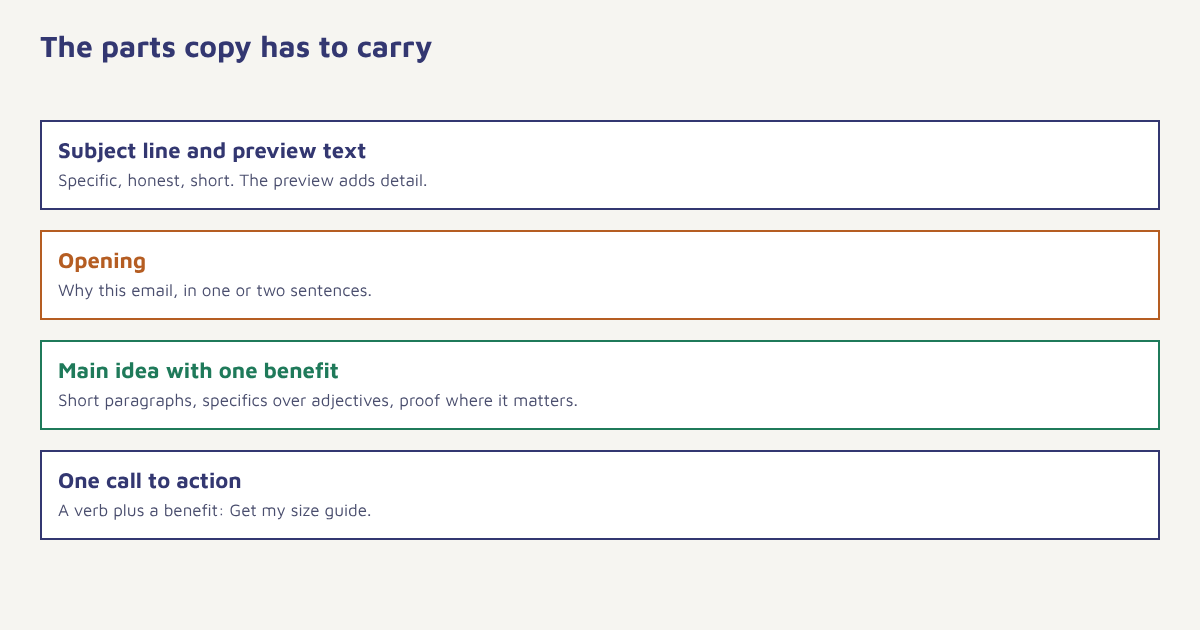
The subject line decides whether anything else gets read. Keep it specific, honest and short enough to display on a phone, which often means under about 40 characters, though the right length depends on your audience. Preview text, the snippet beside the subject, is a second line of subject copy: use it to add detail, not to repeat the first line or to show “View in browser”. Our guide to email subject lines has formulas and tests.
| Weak | Stronger | Why |
|---|---|---|
| Newsletter #42 | Three ways to cut your packing time this week | Specific benefit |
| Big sale!!! | Your size is back in stock: last pairs of the Trail Runner | Relevant and concrete |
| Update on your account | Action needed: confirm your address by Friday | Clear action and time |
| You won’t believe this | A simple fix for slow checkout pages | Honest and informative |
Write the body for scanning
Most readers scan. Give them a path:
- Open with the reason for the email in one or two sentences, not a paragraph about the company.
- One main idea per email. Secondary ideas belong in another message.
- Short paragraphs of one to three lines, with white space between.
- Benefits before features. Say what it does for them, then how.
- Specifics over adjectives. “Delivered in two days” beats “lightning-fast delivery”.
- Proof where it matters: a short review, a figure you can back up, a guarantee.
- Plain words. Write the way you would explain it to a friend.
Read it aloud. If you stumble over a sentence, the reader will too. Cut filler such as “we are excited to announce” and start with what is actually new.
One clear call to action
Every email should ask for one thing. Use a button with a verb and a benefit: “Get my size guide”, “Track my order”, “Book a 15-minute demo”. Repeat the same link once near the top and once at the end for long emails. Avoid giving five equal choices, which lowers the chance of any click. If you need secondary links, make them visibly quieter. Layout and button design are covered in our guide to email design best practices.
Match tone to the moment
| Situation | Tone | Example opening |
|---|---|---|
| Welcome | Warm and helpful | Thanks for joining. Here is how to get set up in five minutes. |
| Order update | Calm and exact | Your order FX-20481 left our warehouse today and arrives by Thursday. |
| Promotion | Energetic but honest | Our monsoon sale starts tomorrow. Here are the five items worth your attention. |
| Apology | Direct and accountable | We sent your order late. Here is what we have done about it. |
| Win-back | Curious, not guilt-tripping | It has been a while. What would make us more useful to you? |
Keep the brand voice consistent across channels. A message that sounds formal in email and casual on WhatsApp can feel like two different companies. In Flowfox, saved templates in the email builder keep voice and layout consistent, and variables let you personalise names, products and dates. Personalise only with data you are sure about, because a wrong name or product is worse than none. See marketing personalization.
A process for writing each email
- State the goal. One sentence: what should the reader do, and why would they want to?
- Write the subject lines first. Draft five and pick the clearest.
- Draft fast, edit slowly. Get the message down, then cut at least a fifth of the words.
- Check the structure. Opening reason, one main idea, one call to action, short sign-off.
- Test on a phone. Read it on a small screen, with images off.
- Proofread. Check names, dates, prices and links. A second pair of eyes helps.
- Send and learn. Compare clicks and conversions, not only opens. See email marketing metrics.
Test one change at a time, such as the subject line or the button text, using proper A/B tests. Over a few months, you will learn what your readers respond to. Keep a swipe file of your own best-performing emails, and of messages from other brands that made you act.
A before-and-after example
The following example is invented. A software company sends this to trial users:
| Before | After |
|---|---|
| Subject: Exciting updates from our team Body: We are thrilled to share the latest improvements to our award-winning platform. Our innovative features empower teams to achieve more. Click here to learn more about what is new. | Subject: Priya, your first report takes 3 minutes Body: You signed up on Monday but have not built a report yet. Here is the fastest way: pick a template, connect your sheet, press run. [Build my first report] Stuck? Reply and we will help. |
The second version names the person and a specific, small task, explains why it is being sent and offers help. It has one button. Nothing in it is clever, and that is the point. Good copy also respects the law: include an honest sender name and an easy way to unsubscribe, and follow local rules on consent. See the DPDP Act guide and the overview of the CAN-SPAM Act for US recipients.
Pre-send checklist
- Does the subject line promise something the email delivers?
- Is there one main idea and one primary call to action?
- Would the opening make sense on its own in the preview?
- Are all names, dates, prices and links correct?
- Does it read well on a phone with images off?
- Is there an easy unsubscribe and a real reply address?
Keep it readable
Plain language is not dumbing down; it is respect for the reader’s time. Short sentences, common words and active verbs make a message easy to take in on a phone. Readability formulas such as the Flesch–Kincaid tests can give a rough check, though they cannot judge tone or clarity of purpose. Treat the score as a prompt to look again, not as a target, and always have someone outside the project read the draft cold.
Common mistakes
- Writing about yourself. Readers care about their own problem.
- Clickbait subjects. They harm trust and increase complaints.
- Too many links. The reader does not know what to do.
- Walls of text. Break it up.
- Never testing. Opinions are weaker than data.
Good email copy sounds like one person who knows something useful, talking to another.
Write once, personalise at scale. Build reusable templates and send the right version to each segment.
Read next: email newsletters, welcome email series and the blog.
Frequently asked questions
What is email copywriting?
Email copywriting is writing the subject line, preview text, body and calls to action of emails so that readers open them and take a specific action.
How long should a marketing email be?
As long as it needs to be to deliver one clear idea and action. Many effective emails are short, but a story or guide can run longer if it is easy to scan.
How do I write a good subject line?
Be specific, honest and brief, lead with the benefit or the reason, avoid clickbait and test several versions against each other.
What is preview text?
Preview text is the snippet shown next to the subject line in the inbox. Use it to add detail and support the subject, not to repeat it.
How many calls to action should an email have?
One primary call to action is best. Repeat the same link in long emails, and keep any secondary links visually quieter.
How do I make my emails sound less robotic?
Write as you would speak, use specific details instead of adjectives, vary sentence length, read the draft aloud and cut filler phrases.
How do I test email copy?
Run A/B tests that change one element at a time, such as the subject line or button text, send to similar random groups and judge by clicks and conversions.