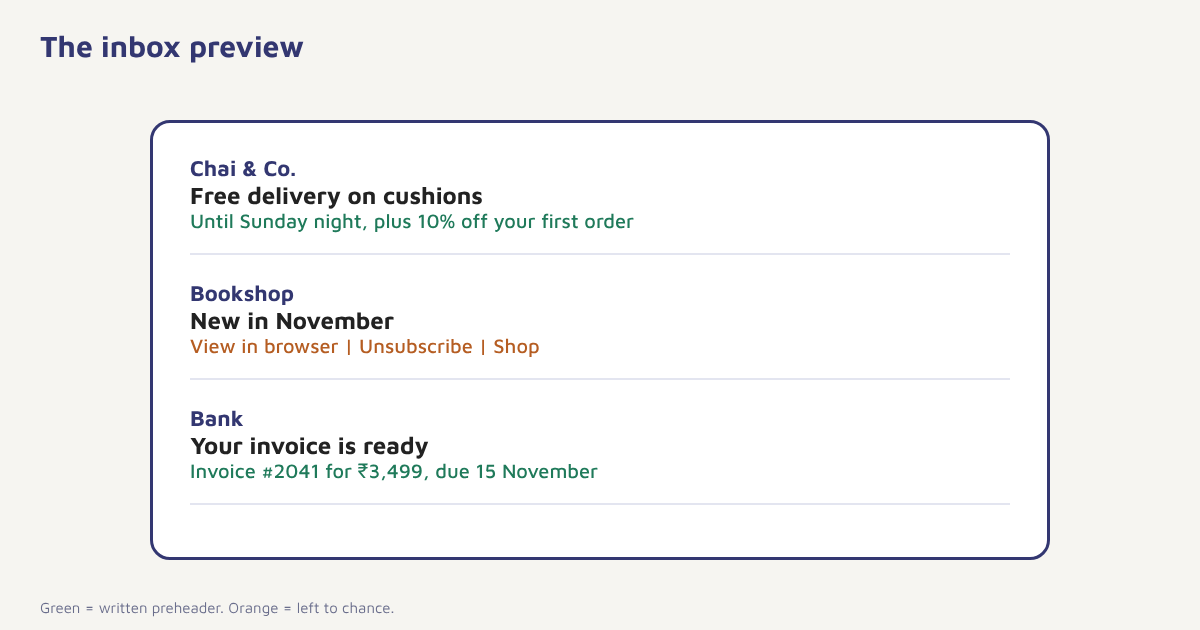
Look at your inbox on a phone. Beside each sender name you see a bold subject line and, underneath, a grey line of text that previews the message. That grey line is the preheader. Many marketers never write it, so mail apps fill it with whatever appears first in the email: “View in browser”, a row of navigation links or a stray image name. It is a small amount of space, but it sits beside the subject line in the most valuable place in email, the moment a person decides whether to open. This guide explains what preheader text is, how long it should be, how to add it in HTML, how to pair it with subject lines and the mistakes that waste it.
What is preheader text?
Preheader text, also called preview text, is the short snippet of an email shown in the inbox list next to or below the subject line. Most email clients take it from the first visible text in the email body, though some let you control it. Used well, it extends the subject line: it adds a detail, a benefit or a reason to open. Used badly, or left to chance, it repeats the subject, shows boilerplate or looks broken.
How long should it be?
The amount of preview text shown depends on the mail app, the screen width and the length of the subject line. A phone may show only around 40 to 90 characters, while a desktop client can show more. These figures vary and change, so use them as a guide rather than a rule. The safest approach is to put your key message in the first 40 to 50 characters and make sure that the line still reads well if it is cut. Test on a few devices and apps that your own audience uses. Our guide to email design best practices covers mobile layout.
| Element | Typical role | Guidance |
|---|---|---|
| Sender name | Who it is from | Recognisable brand or person |
| Subject line | The main hook | Short, clear, honest. See subject lines |
| Preheader | Supporting detail | Complete the thought, add a benefit or deadline |
| First line of body | May become the preheader if none is set | Do not waste it on “View in browser” |
How to set preheader text in HTML
Most email builders have a preheader field. If you write HTML yourself, the usual technique is to place a short block of text at the very top of the body and hide it from view, so that mail apps use it as the preview while the reader sees only the design. Because behaviour varies between clients, test your result.
<!-- Place immediately after the opening <body> tag -->
<div style="display:none;max-height:0;overflow:hidden;opacity:0;mso-hide:all;">
Free delivery on all cushions until Sunday night.
‌ ‌ ‌ ‌ ‌ ‌
</div>The trailing entities pad the preview so that the mail app does not pull in the next line of visible text after your sentence. Some teams find the padding unnecessary and others rely on it, so check how your chosen platform and target clients behave. In the Flowfox email builder you can set the preheader as a field in the campaign settings without touching code.
Writing subject and preheader as a pair
Treat the two lines as one sentence broken in the middle. The subject line sets up a curiosity or a promise, and the preheader pays it off or adds the missing detail. Never repeat the same words, since you would waste the extra line.
| Subject line | Weak preheader | Stronger preheader |
|---|---|---|
| Your cart is waiting | Your cart is waiting for you | Free delivery if you order before Sunday |
| New autumn collection | View this email in your browser | Fifteen new pieces in warm tones, plus early access for subscribers |
| Welcome to Chai & Co. | Welcome to Chai & Co. | Here is your 10% code, and how to brew a better cup |
| Your invoice is ready | Click to view | Invoice #2041 for ₹3,499, due 15 November |
| A quick question | Hi there | What would make our emails more useful to you? |
Transactional emails deserve preheaders too. A receipt, a shipping update or a password reset with a clear preview helps the reader see what they need without opening the message. See transactional emails.
Four ways to use the preheader
- Extend the subject. Add the second half of the idea: the benefit, the number or the condition.
- Add urgency honestly. Mention the real deadline. See flash sale marketing for timing ideas.
- Personalise. Use the first name or a relevant product, within reason. See personalization examples.
- Set expectations. Say what is inside: “Three tips, five minutes to read”.
Testing the preview
Send test emails to accounts at the providers your subscribers use, and view them on a phone and a desktop mail app. Pay attention to the cut-off, to whether your hidden text is picked up and to whether any visible navigation text leaks into the preview. Then treat the preheader as something to improve, in the same way as the subject. A/B testing two preheaders against the same subject line is a simple experiment, as described in our A/B testing guide. Measure clicks and conversions as well as opens, since mail apps that pre-load images can inflate open counts; see email open rate for why.
A worked example
A bookshop sends a monthly newsletter with the subject “New in November” and no preheader. Inboxes show “View in browser | Unsubscribe | Shop” as the preview. The team adds a preheader: “Twelve new novels, plus signed copies for newsletter readers.” and tests it against a version that stays unset. The version with the written preheader gets a higher click rate in the test, and the team makes it the default for every issue. The shop and numbers are invented to illustrate the approach; run your own test to see what your readers prefer.
The preheader also supports your wider email strategy. It gives you a second chance to match the message to the right segment, which links to behavioural segmentation, and it can reinforce your brand voice described in email copywriting. Together, subject, preheader and sender name form the whole envelope that your reader sees before deciding. If you maintain several templates, add the preheader to your template checklist so that it is never forgotten, and keep a short library of tested preheaders for recurring emails such as receipts, reminders and newsletters.
Accessibility and dark mode
Preheader text is read aloud by screen readers in some mail apps before the body, so a clear, meaningful line helps readers who rely on them. Avoid stuffing it with padding characters or symbols that sound strange when spoken, and keep any hidden text short. In dark mode, hidden text remains hidden, but check that your visible first line does not clash with the colours. For a broader view of designing readable messages, the guidance from the W3C Web Accessibility Initiative is a useful reference, and the idea of HTML email explains why email rendering differs so much between apps. If your list is multilingual, write a preheader for each language version so the preview matches the body, not just the subject line.
Common mistakes
- Leaving it blank. Mail apps will fill it with navigation text.
- Repeating the subject. You waste the extra line.
- Writing too long. The end gets cut off and your call to action disappears.
- Misleading previews. The preheader must match what the email delivers.
- Forgetting plain-text and dark-mode checks. Hidden text can show up in the wrong place.
- Never testing. Clients differ.
The subject line makes the promise. The preheader keeps it.
Write every part of the envelope. Set subject, preheader and sender in one campaign screen and test the variations.
Read next: email subject lines, email newsletters and the blog.
Frequently asked questions
What is preheader text in email?
Preheader text is the short snippet shown next to or under the subject line in the inbox list. It previews the email and can extend the subject line.
How long should preheader text be?
It varies by app and device, but putting the key message in the first 40 to 50 characters is a safe approach, with up to around 90 to 100 for wider screens.
How do I add a preheader to my email?
Use the preheader field in your email builder, or place a short hidden text block at the top of the HTML body so that mail apps use it as the preview.
Should the preheader repeat the subject line?
No. Use it to add a detail, benefit or deadline that continues the thought of the subject.
What happens if I do not set a preheader?
Mail apps usually pull the first visible text in the email, which is often “View in browser” or navigation links.
Does preheader text affect open rates?
It can, because it is part of what readers see when deciding to open. Test different versions against the same subject line and measure the result.
Do transactional emails need preheader text?
Yes. A clear preview of the key detail, such as the amount and due date, helps readers act without opening.