Nobody enjoys losing a subscriber, so it is tempting to hide the unsubscribe link. That is a mistake. A subscriber who cannot leave easily does not stay; they hit the spam button instead, and spam complaints do far more damage to your sending reputation than a clean opt-out ever will. A good unsubscribe process is not just a legal duty. It protects your deliverability, keeps your list engaged and sometimes keeps the relationship alive in a smaller form. This guide covers where to place the link, how one-click unsubscribe works, how to build a preference centre, what to do the moment someone leaves and the mistakes that trigger complaints.
Why a good unsubscribe flow matters
Mailbox providers watch how recipients treat your mail. When someone is annoyed and cannot find the exit, the quickest route is the “report spam” button. A high complaint rate harms inbox placement for every message you send, including those to loyal customers. An unsubscribe, by contrast, is a quiet signal: this person is not a fit, and you stop spending effort and reputation on them. See our guides to sender reputation and deliverability for how those signals add up.
What the rules expect
Requirements differ by country, so treat this as orientation and check current rules for your case. The US CAN-SPAM Act expects a clear way to opt out and requires you to honour requests within a stated number of days. The European GDPR gives people the right to withdraw consent as easily as they gave it. India’s Digital Personal Data Protection Act also centres on consent and the ability to withdraw it; see our guide to the DPDP Act for marketers. Mailbox providers add their own expectations for bulk senders, which have become stricter in recent years, so read their current sender guidelines as well. The safe approach is simple: make leaving as easy as joining, and act at once.
| Principle | What it means in practice |
|---|---|
| Easy to find | A visible link in every marketing email, not hidden in tiny grey text |
| Easy to use | One or two clicks, no login, no long form |
| Fast to act on | Stop sending immediately; do not wait days |
| Free | Never ask for payment or a reason to leave |
| Complete | Apply the opt-out across all lists and systems that send marketing |
Where to put the link
The footer is the traditional place and should always include a link. Many senders also add a short line near the top for newsletters, such as “Not interested? Unsubscribe here”. Some worry this invites more opt-outs, but the extra opt-outs would otherwise have become complaints. Use a plain text link in readable size and contrast, labelled clearly. Avoid creative labels such as “Update your relationship with us” that make people hunt for the exit. Our guide to email design best practices covers footer layout.
One-click unsubscribe headers
Besides the link in the body, modern mail systems support a list-unsubscribe header that lets the mail app show its own unsubscribe button near the sender name. A newer standard, described in RFC 8058, allows a true one-click request without opening a web page. Large mailbox providers now ask bulk senders to support it, though their exact requirements change, so check the current guidelines of the providers you send to. Your sending platform may add these headers for you; confirm that it does, and that it handles the request correctly.
List-Unsubscribe: <https://example.com/u/abc123>, <mailto:unsubscribe@example.com?subject=unsubscribe>
List-Unsubscribe-Post: List-Unsubscribe=One-Click
The header must point to an address that really removes the person. Test it by sending yourself a campaign and using the button in your mail app.
Offer choices before the goodbye
Many people leave because of volume or topic, not because they dislike you. A preference centre lets them pick a lower frequency, choose topics or switch channel instead of leaving altogether. Keep it light: a landing page with a few options and an obvious “unsubscribe from everything” button. Do not force people through the choices.
| Option | When it helps |
|---|---|
| Fewer emails (weekly digest) | Subscribers overwhelmed by volume |
| Topic choice | Mixed content such as offers, news and tips |
| Pause for 30, 60 or 90 days | Holidays, busy periods |
| Switch channel | Customer prefers WhatsApp or SMS, where consent exists. See channel guide |
| Full unsubscribe | Always available, always one click |
In Flowfox, consent and preferences are stored per channel on the contact profile, so an unsubscribe from email does not wrongly remove a WhatsApp opt-in, and a full opt-out is respected everywhere. See consent management for the wider picture.
What to do after someone unsubscribes
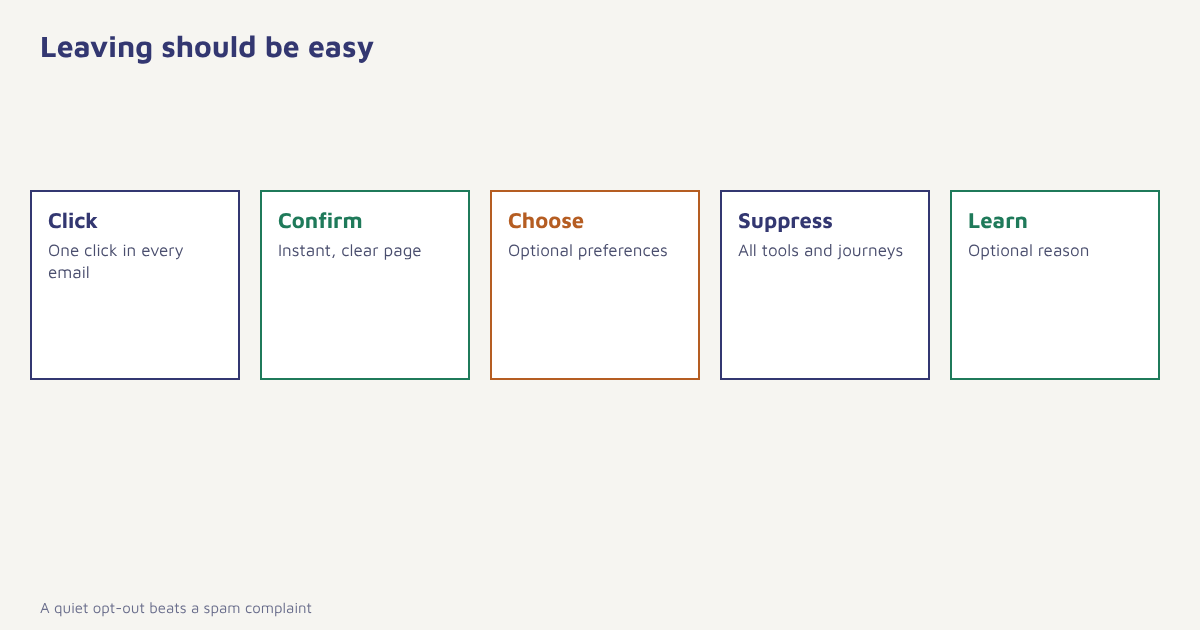
- Confirm instantly. Show a clear page saying they are unsubscribed. Avoid saying “it may take 10 days” when the change is immediate.
- Suppress everywhere. Add the address to a suppression list shared by every tool and journey that sends marketing mail.
- Stop all active journeys. Remove the person from running automations so no queued message goes out.
- Keep the record. Store the date, source and request as proof of the opt-out. Do not delete it, or the address could be re-imported by mistake.
- Ask one optional question. A single-click reason such as “too many emails” gives useful feedback. Never make it mandatory.
- Do not send a confirmation sales pitch. A short goodbye is fine; a promotion is not.
Learn from the reasons
Opt-out reasons are free research. If many people say they receive too many emails, review your frequency. If they say content is irrelevant, look at your segmentation. If unsubscribes spike after a specific campaign, check the audience and the message. In Flowfox analytics you can compare unsubscribe rates by campaign and segment. Treat an unsubscribe rate that suddenly doubles as a warning sign worth investigating the same day.
A worked example
A fashion retailer sends five emails a week to everyone and notices that complaints are creeping up. It replaces its tiny footer link with a clear one, adds the one-click header and builds a preference page with three options: weekly digest, sale alerts only and full unsubscribe. Within two months the number of people choosing the weekly digest is larger than the number who leave outright, complaints fall and overall engagement rises because fewer inactive people dilute the numbers. The business, the options and the outcome are invented to illustrate the idea; your own results will depend on your list and content.
A related clean-up task is removing people who simply stopped reading. A sunset policy, such as an automatic re-permission email after six months of no engagement followed by suppression, keeps your list healthy. Read our guide to email list cleaning for how to do it kindly.
Common mistakes
- Hiding the link. Complaints replace opt-outs.
- Requiring a login. People give up and report spam.
- Asking for a reason before leaving. It feels like a trap.
- Slow processing. Sending after an opt-out breaks trust and may break rules.
- Unsubscribing from one list only. People still get mail from another.
- Re-adding unsubscribed contacts on import. Always check your suppression list first.
A subscriber who can leave in one click is a subscriber who might come back. One who cannot is a complaint waiting to happen.
Make leaving as easy as joining. Manage consent and suppression per channel in one profile.
Read next: email compliance checklist, email bounce rate and the blog.
Frequently asked questions
Where should the unsubscribe link go in an email?
Put a clear, readable link in the footer of every marketing email. Many senders also add a short line near the top of newsletters.
Is an unsubscribe link legally required?
Most countries expect marketing emails to include a clear way to opt out, and honour it promptly. Rules differ, so check the laws that apply to you.
What is one-click unsubscribe?
It lets the recipient unsubscribe with a single action, often through a button shown by the mail app using a list-unsubscribe header, without visiting a page or logging in.
How fast must I process an unsubscribe?
As fast as you can. Best practice is immediately. Some laws set a maximum number of days, so check the rules that apply to you.
Should I use a preference centre?
Often yes. It lets people reduce frequency or choose topics instead of leaving, but a full unsubscribe must remain one click away.
Can I ask why someone is unsubscribing?
You can ask an optional, quick question, but never make it a requirement for leaving.
What happens if I keep emailing people who unsubscribed?
You risk spam complaints, damage to your sender reputation, blocklisting and possible legal consequences.