A software trial is a race against forgetting. Someone signs up, pokes around for ten minutes, gets pulled into a meeting and never comes back. Onboarding emails are how a SaaS company brings that person back to the one thing that makes the product worth keeping. This guide is about the email side specifically: which messages to send between sign-up and the first real result, how to tie them to what the user has actually done, how to handle trials that are ending and teams with several users, and how to measure whether the sequence helps people reach value. For the wider discipline of onboarding, see our guide to customer onboarding; for the very first message, see welcome email series.
Start with the activation moment, not the calendar
Most SaaS products have a small set of actions after which a new user is far more likely to stay: creating a first project, inviting a teammate, connecting a data source, sending a first campaign. Teams often call this the activation event. The research behind this idea is informal and varies by product, so find yours from your own data: compare retained and churned users and look for actions that most retained users took early. The concept is related to what product people call the aha moment. Once you know it, the job of every onboarding email becomes simple: move the user one step closer to it.
Rule. Every onboarding email should have one job, one link and one action. If you cannot say which step it moves the user toward, do not send it.
A sample SaaS onboarding sequence
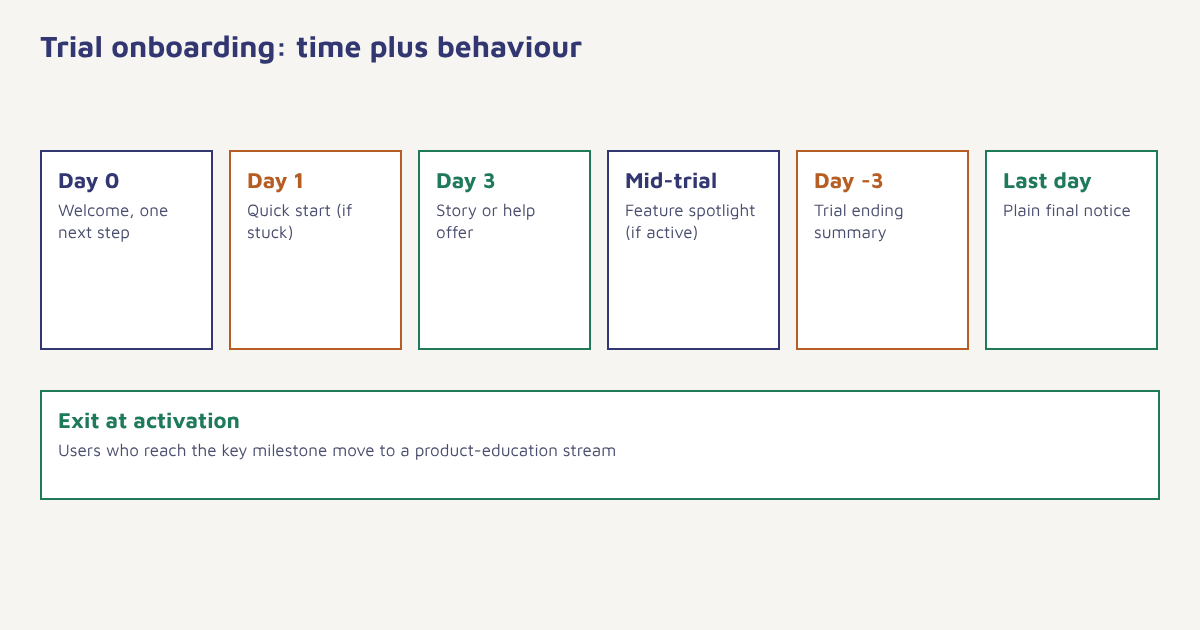
| When | Purpose | Branch | |
|---|---|---|---|
| Immediately | Welcome and one next step | Confirm sign-up, point to the first action | Everyone |
| Day 1 | Quick-start guide | Remove the blank-page problem with a template or sample | Only if first action not done |
| Day 2 to 3 | Use-case story | Show a similar company getting a result | Everyone not yet active |
| Day 4 | Help offer | Invite a reply or a short call | Users stuck at a step |
| Midpoint of trial | Feature spotlight | Introduce the second key capability | Users who reached activation |
| Three days before end | Trial ending | Summarise value, explain plans | Everyone on trial |
| Last day | Final reminder | Plain statement of what happens next | Not yet converted |
| After trial | Feedback or extension offer | Learn why, offer a path back | Did not convert |
The dates are a backbone. What makes it work is that each message checks what the user has done and changes or disappears accordingly. A user who invited three teammates on day one should not receive a message telling them how to invite a teammate.
Make it behavioural
- Track the milestones. Send an event for each step that matters: project created, data connected, teammate invited. See the data model and sending your first event.
- Define stuck and done. “Stuck” might be no first project after 24 hours; “done” is reaching activation.
- Branch the journey. Done users get the next capability; stuck users get help; silent users get a gentle reminder or a different channel.
- Exit people when they activate. Move them to a product-education stream instead of continuing the trial flow. See goals and waits.
- Keep a human option. Let replies reach a real person for the first weeks.
This is event-triggered marketing applied to a trial; the general mechanics are in our guide to event-triggered marketing. In Flowfox, you can build the branches visually in the journey builder and use the segment builder to pick out users who have not reached the milestone by a given day.
What good onboarding emails say
| Weak | Better |
|---|---|
| Welcome to our platform! Here are 12 features. | You are one step from your first report: connect your data source (takes about two minutes). |
| Don’t forget to log in | Your project is half-built. Pick up where you left off. |
| Your trial is ending | Your trial ends Friday. Here is what your team built, and the plan that keeps it running. |
| We miss you | Did something get in the way? Reply and tell us, and we will help. |
Notice the pattern: specific, personal, one action, written as a person would write. Keep the sender name human, keep the text short, and put the key link above the fold. Plain-looking emails often do as well as heavily designed ones in this setting; see email design best practices and email copywriting for guidance.
Onboarding teams, not just individuals
In B2B software, the person who signs up is rarely the only user. Plan separate tracks for three roles.
| Role | What they need | Email focus |
|---|---|---|
| Champion (signed up) | Quick proof the product works | Fast route to first result |
| Teammates (invited) | Context and a reason to log in | Invitation that explains the benefit, then role-specific tips |
| Decision maker | Evidence of value and cost clarity | Summary of progress, plan options |
Send the decision maker a short progress summary near the end of the trial rather than a stream of tips. If you cannot identify the role, ask in-product with a single question and use the answer to segment later; the idea of collecting data gradually is covered in progressive profiling.
Beyond email
Email is the backbone, but a message in the product often works better at the moment of need. Pair the sequence with in-app messages for guidance while the user is logged in, and consider mobile app onboarding patterns if there is an app. For urgent, high-intent moments, such as a failed payment on conversion, a WhatsApp or SMS message may be more effective where the user has opted in. If your product is sold mainly through self-serve trials, the approach is close to product-led growth, and handing a stuck account to a person belongs to customer success. See Flowfox for SaaS and the onboarding use case for complete flows.
A worked example
A made-up project-planning tool offers a 14-day trial. Its data suggests that teams who create a project and invite two colleagues in the first three days are much more likely to subscribe. The company builds a journey. On day zero, the welcome email asks for just one thing: create your first project from a template. If no project exists after 24 hours, a short email shows a two-minute video-free walkthrough with screenshots. If a project exists but no teammates have joined by day three, the email focuses on inviting colleagues and explains what they will see. Users who reach both milestones exit to a feature-spotlight stream. On day 11, everyone still on trial gets a summary of what their team created and a link to plans. Over a couple of cohorts, the team compares the share reaching activation and the share converting against the old, fixed-schedule sequence. The product, rules and results are invented; use your own data to set milestones.
Measuring the sequence
| Measure | Why it matters |
|---|---|
| Activation rate | The share of sign-ups reaching the key milestone, the real goal |
| Time to activation | Faster is usually better |
| Trial-to-paid conversion | The business outcome |
| Click-through on the main link | Shows whether the message moves people |
| Reply rate | Signals human interest and surfaces problems |
| Unsubscribes and complaints | Warns that the sequence is too heavy |
Judge opens with care, since privacy features can inflate them; clicks, activation and conversion are sturdier. Compare against a control group where practical. Our guides to cohort analysis, A/B testing and retention rate explain how. Once users are paying, move them into longer-term programmes such as customer health scoring and SaaS churn reduction.
Common mistakes
- Feature tours. Users want a result, not a catalogue.
- Fixed schedules only. Sending the same email to the active and the stuck.
- Too many links. One clear action wins.
- Ignoring invited users. They decide whether the product sticks.
- No human reply path. Early conversations are gold.
Onboarding is not about teaching the product. It is about getting someone to a result before their attention moves on.
Onboard users by what they do. Branch trial journeys on product events and reach people on the right channel.
Read next: lead nurturing, customer lifecycle marketing and the blog.
Frequently asked questions
What are SaaS onboarding emails?
They are the emails sent between sign-up and the first real result, designed to guide new users to the actions that make them likely to stay or convert.
How many onboarding emails should I send?
There is no fixed number. Many sequences use five to eight messages over a trial, with branches so that each person receives only the ones relevant to what they have done.
What is an activation event?
It is an early action, such as creating a first project or inviting a teammate, after which users are much more likely to stay. Find yours by comparing retained and churned users.
How do I make onboarding emails behaviour-based?
Send product events to your marketing platform, define stuck and done states, branch the journey on them and exit users once they reach activation.
What should a trial-ending email include?
A short summary of what the user achieved, a clear statement of what happens next, plan options and one call to action.
Should onboarding emails come from a person?
Often yes. A real sender name and a reply path make the messages feel personal and help you learn what is blocking users.
How do I measure onboarding email success?
Track activation rate, time to activation, trial-to-paid conversion, clicks on the main link, replies and unsubscribes, ideally against a control group.