Anyone who has tried to send a first message to a customer on WhatsApp Business has met the template. You cannot simply type a promotion and press send. Outside a short conversation window, you must use a pre-approved message format, and that format has rules about wording, variables, buttons and category. Teams that understand the rules get approvals quickly and send with confidence. Teams that do not spend days in rejection loops. This guide explains what WhatsApp message templates are, how they are built, how categories work, how to write copy that gets approved, how to submit and test, and how to keep a healthy template library.
What is a WhatsApp message template?
A message template is a pre-defined message format that a business registers with Meta, which owns WhatsApp, before using it to start a conversation through the WhatsApp Business API. The template holds fixed text plus placeholders that are filled in for each customer, such as a name, an order number or a date. Once approved, you can send it to any customer who has opted in, with their own values merged in. The purpose is to keep business-initiated messages predictable and to limit spam on a platform people treat as personal.
Templates matter because of the conversation window. As of this writing, when a customer messages you, a window opens in which you can reply with free-form text. When no window is open, for example when you want to send an order update or an offer, only an approved template can go out. The exact length of the window and the pricing rules attached to it have changed more than once, so check Meta’s current documentation instead of relying on any article, including this one.
The parts of a template
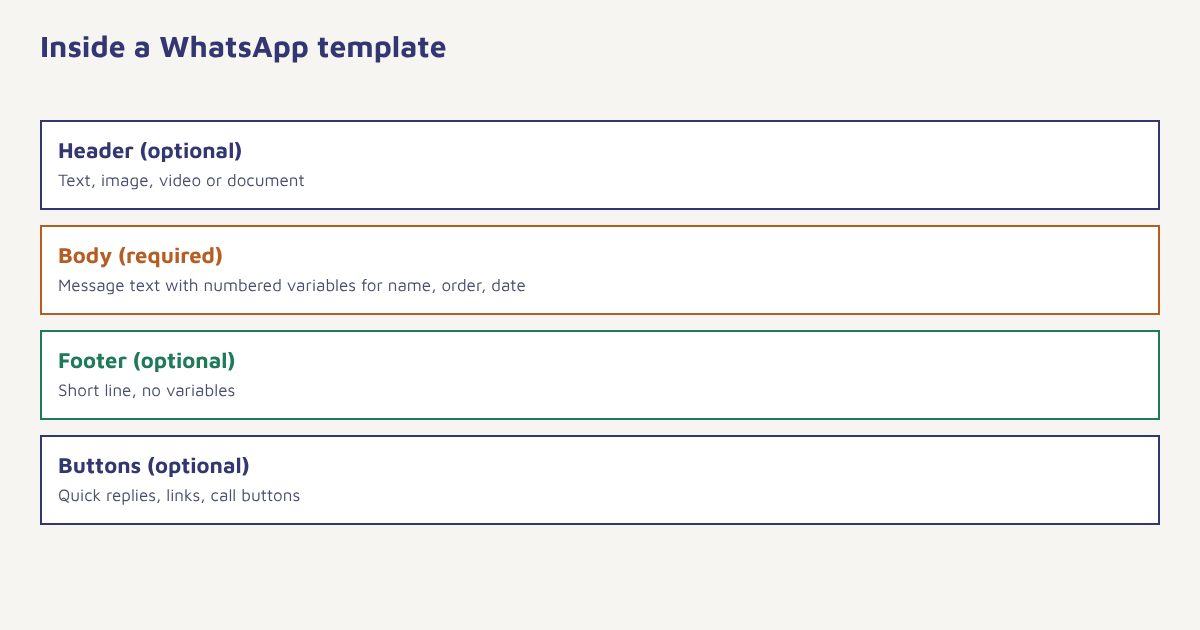
| Part | Required? | What it holds | Notes |
|---|---|---|---|
| Header | Optional | Text, image, video or document | Good for a product photo or a PDF invoice |
| Body | Required | The main message with variables | Keep it short and specific |
| Footer | Optional | A short line such as a brand name or an opt-out hint | Cannot contain variables |
| Buttons | Optional | Quick replies, links, call buttons, copy-code | The allowed mix and number are limited |
| Variables | As needed | Numbered placeholders for personal data | Written as {{1}}, {{2}} and so on |
Variables are numbered in order, and every variable needs a sample value when you submit, so that the reviewer can see what a real message will look like. Meta rejects templates where variables sit next to each other with no text between them, or where the message is mostly variables. A body of the form “{{1}} {{2}} {{3}}” will not pass.
Template categories
Every template is filed under a category, and the category affects approval, pricing and what you may put in the message. At the time of writing the main categories are marketing, utility and authentication. Meta can re-categorise a template if it decides the content does not match, and it has changed category definitions over time, so read the current guidance in the WhatsApp Business Platform documentation before you choose.
| Category | Typical purpose | Examples |
|---|---|---|
| Marketing | Promotions, announcements, anything that tries to sell or re-engage | Festival offer, new arrival, back-in-stock, win-back |
| Utility | A message about something the customer already did or requested | Order confirmation, shipping update, payment receipt, appointment reminder |
| Authentication | One-time passcodes for login or verification | Your verification code is 482913 |
A common trap. If you add a discount line or a cross-sell to an order update, Meta may treat the whole template as marketing, even though you filed it as utility. Keep transactional templates purely transactional. Put offers in a separate marketing template.
How to write templates that get approved
- Start with one purpose. A template should do one job: confirm an order, remind about an appointment or announce a sale. Mixed purposes cause category disputes.
- Write plainly. Use clear sentences and the same tone you use with customers. Avoid ALL CAPS, repeated punctuation and exaggerated claims.
- Use variables for facts, not filler. Names, order numbers, dates, amounts and links are good variables. Whole sentences are not.
- Add sample values. Realistic examples help the reviewer. Do not use placeholder text such as “test”.
- Pick the right category. Choose what the message honestly is. Mislabelling to avoid marketing rules leads to re-categorisation or rejection.
- Respect prohibited content. Meta restricts several kinds of content and products. Read the commerce and business policies for your sector.
- Give people a way out. For marketing messages, consider an opt-out quick reply so customers can say stop.
Examples by use
| Use | Category | Example wording (illustrative) |
|---|---|---|
| Order confirmation | Utility | Hi {{1}}, your order {{2}} is confirmed. We will send tracking details once it ships. |
| Delivery update | Utility | Your order {{1}} is out for delivery today. Track it here: {{2}} |
| Appointment reminder | Utility | Reminder: your appointment with {{1}} is on {{2}} at {{3}}. Reply 1 to confirm or 2 to reschedule. |
| Festival offer | Marketing | Hi {{1}}, our festive sale starts today. Enjoy {{2}} off on selected items until {{3}}. |
| Back in stock | Marketing | Good news {{1}}: {{2}} is back in stock. Tap below to take another look. |
| Login code | Authentication | {{1}} is your verification code. |
These are examples of style, not guaranteed-to-pass text. Approval depends on the reviewer, your account history and current policy. For more on how and why messages are reviewed, read our guide to WhatsApp approval, and for campaign ideas see WhatsApp marketing examples.
Submitting through the API
If your platform handles submission for you, you will fill in a form. Under the hood, the request looks something like this simplified sketch, with the language, category, components and sample values in a structured payload.
{
  "name": "order_confirmation_v1",
  "language": "en",
  "category": "UTILITY",
  "components": [
    { "type": "BODY",
      "text": "Hi (1), your order (2) is confirmed.",
      "example": { "body_text": [["Asha", "FX-20481"]] } },
    { "type": "FOOTER", "text": "Thank you for shopping with us" }
  ]
}
In the real payload the numbered variables use double curly braces; they are shown here in brackets to keep the sketch readable. Template names are lowercase with underscores, and versioning the name, such as _v1, makes later edits easier to track.
In Flowfox, you can manage templates for the WhatsApp channel alongside your other messages, map variables to profile attributes from the data model and use the template inside a journey or a campaign. Opt-in status is stored on the contact profile, so a send to someone who has not consented can be blocked before it leaves.
Keeping a healthy template library
| Habit | Why |
|---|---|
| Name templates consistently | Easier to find, version and report on |
| Create language variants | Customers respond better to their own language. Each language is submitted separately |
| Retire unused templates | A tidy library avoids accidental use of old wording |
| Watch quality signals | Blocks and reports from customers can lower your messaging limits and quality rating |
| Review performance | Compare read rate and reply rate by template, and test one change at a time |
| Keep a change log | Record who edited what and when for compliance |
Quality matters because Meta monitors how recipients react. If many people block or report your number, it may lower your sending limits or flag the account. The best protection is to message only people who asked to hear from you, send relevant content and keep frequency reasonable. See our guides to WhatsApp marketing, WhatsApp broadcast and the DPDP Act for consent practices.
A worked example (invented)
A small home-textiles store, invented for this example, wants to send delivery updates and one festival offer. It writes two templates. The first, a utility template, confirms the order and gives the tracking link. The second, a marketing template, announces a festival sale with a single link. The team submits both with realistic sample values, in English and Hindi. The utility template is approved quickly. The marketing template is returned because the first draft used a shouting headline and three exclamation marks. After a calmer rewrite, it is approved. The store sends the offer only to customers who ticked the WhatsApp consent box at checkout, and reviews read and reply rates a week later. The details are made up, but the pattern of simple, honest, consent-based templates is what tends to work.
If you are comfortable with the technical side, the general idea of an application programming interface helps explain why templates are submitted as structured data. Your platform sends the name, language, category and components, and Meta returns a status such as pending, approved or rejected, often with a reason. Build your process around that status: do not schedule a campaign until the template shows as approved, and set up an alert for rejections so that nobody finds out on launch day.
Common mistakes
- Mixing offers into utility messages. It invites re-categorisation.
- Too many variables. Mostly-variable messages are rejected.
- Vague or misleading wording. Say what the message is about.
- Ignoring opt-in. Templates do not replace consent.
- Not tracking quality. Poor feedback reduces your limits.
A good template reads like a message a sensible person would send, with the blanks filled in by real facts.
Manage WhatsApp templates in one place. Build, map variables and send inside journeys with consent checks.
Read next: WhatsApp chatbots, SMS templates and the blog.
Frequently asked questions
What is a WhatsApp message template?
A WhatsApp message template is a pre-approved message format, with fixed text and variable placeholders, that a business must use to start a conversation or message outside the customer service window.
How long does WhatsApp template approval take?
It varies. Many templates are reviewed within minutes to a day, but some take longer or are rejected. Check your platform and Meta’s current guidance.
What are the WhatsApp template categories?
The main categories are marketing, utility and authentication. Meta can re-categorise a template if the content does not match, and definitions change, so check the current documentation.
Why was my WhatsApp template rejected?
Common reasons are mismatched category, vague wording, too many or badly placed variables, missing sample values, prohibited content or promotional language in a utility template.
Can I edit an approved template?
Editing is limited and may trigger a new review. Many teams create a new version with a new name instead, and retire the old one.
Do I need opt-in to send a template?
Yes. Meta’s policies and data protection laws expect you to have clear consent from recipients, and you should store a record of it.
Do templates cost money to send?
Pricing depends on the template category, the country and Meta’s current pricing model, which has changed over time. Check Meta’s official pricing page and your provider’s rates.