In India, you cannot simply type an SMS and send it to a customer. Commercial messages travel through a regulated system, and every message you send in bulk must match a template you registered in advance. That is a good thing for customers, who get fewer junk messages, but it surprises many businesses on their first campaign. This guide explains how SMS templates work, what the variable placeholders do, how many characters you really get, how the template categories differ and gives you ready-to-adapt examples for the messages most businesses send. It also covers the common reasons templates get rejected, and how to write copy that is short, clear and compliant.
What is an SMS template?
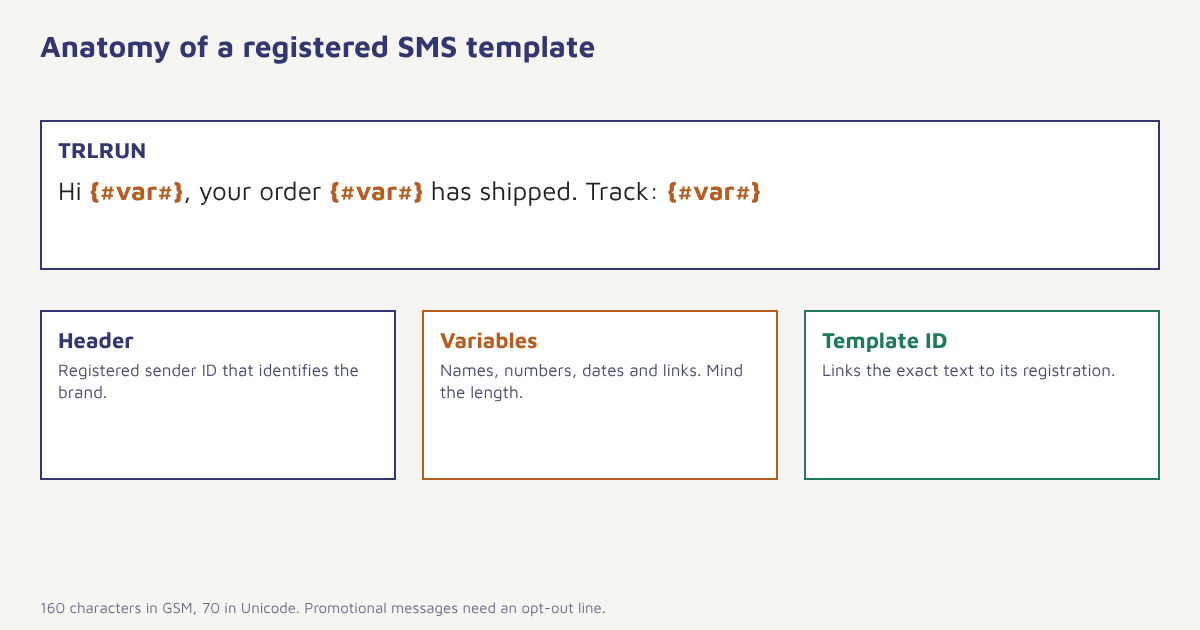
An SMS template is the fixed text of a message with placeholders for the parts that change, such as a name, an order number or an amount. Under the telecom rules administered by TRAI, senders register their business as an entity, register a sender ID called a header, and then register each template with the telecom operators on a platform commonly known as DLT, short for distributed ledger technology. When you send a message, the operator checks that the header and the text match a registered template before it delivers. Our guide to DLT registration covers the registration steps, and this page is about writing the templates themselves.
Template categories
Templates are registered under a category, and the category decides the rules for sending, the hours when you may send and whether you need the recipient’s consent on record. The names and details have changed over the years, so confirm the current definitions with your operator or your messaging provider. The broad idea is stable.
| Category | Purpose | Examples | Notes |
|---|---|---|---|
| Transactional | One-time codes and confirmations tied to a user action | OTPs, payment confirmations, login alerts | Allowed round the clock; no promotion inside |
| Service | Information about an existing relationship | Order shipped, appointment reminder, bill due | Can be implicit (no separate consent) or explicit (consent on file) |
| Promotional | Marketing of products or offers | Sales, discounts, launches | Needs consent; restricted sending hours; opt-out line expected |
| Government and public | Messages from authorities | Alerts and notices | Special registration |
The biggest mistake is putting a promotion inside a service template. Operators scan for it, and a template registered as service that contains a discount offer is likely to be rejected or blocked later. Keep each message type in its own template. For the strategic side, see our guide to SMS marketing.
Variables and how they behave
Variables are written as a placeholder, commonly {#var#}, and the values you pass in at send time must fit the registered template. A few rules help you avoid failures.
- Respect the variable length. Many registrations limit a variable to a set number of characters, so a long product name may cause a mismatch.
- Do not put a whole sentence in a variable. Operators treat that as a way around registration. Keep variables to names, numbers, dates and links.
- Keep the fixed text exact. A different comma or a different space can cause a rejection.
- Plan for missing data. If a name is empty, the message might read “Hi ,”. Use a fallback such as “Hi there” in the data you pass.
- Use registered links. Many routes require URLs to be whitelisted or registered, and short links must come from an approved domain.
Characters, encoding and cost
A standard SMS using the GSM 7-bit alphabet holds 160 characters. If your message includes characters outside that alphabet, such as Hindi script or many emoji, it is sent as Unicode and fits only 70 characters. Longer messages are split into segments and joined on the phone, and each segment holds a little less than the single-message limit, about 153 characters for GSM and 67 for Unicode. You are usually billed per segment, so a 200-character English message costs two segments and a 90-character Hindi message costs two. Count variables at their longest realistic length when you plan. A message that fits at 150 characters with “Asha” may spill into a second segment with “Venkataraghavan”.
| Message | Encoding | Per segment | Segments |
|---|---|---|---|
| 155 characters, plain English | GSM | 160 | 1 |
| 200 characters, plain English | GSM | 153 | 2 |
| 65 characters, Hindi | Unicode | 70 | 1 |
| 90 characters, Hindi | Unicode | 67 | 2 |
| 100 characters English with one emoji | Unicode | 70 or 67 | 2 |
Template examples you can adapt
The examples below show structure. Replace the brand and details, and register them exactly as you will send them. Do not copy them word for word into a registration without checking the current rules.
| Type | Template |
|---|---|
| OTP | {#var#} is your OTP for Trail Runner Store. It is valid for 10 minutes. Do not share it with anyone. |
| Order confirmation | Hi {#var#}, your order {#var#} is confirmed. We will update you when it ships. Track: {#var#} |
| Shipping | Your order {#var#} has shipped with {#var#}. Expected delivery {#var#}. Track: {#var#} |
| Delivery | Your order {#var#} was delivered. Need help? Call {#var#}. |
| Appointment | Reminder: your appointment with {#var#} is on {#var#} at {#var#}. Reply or call {#var#} to reschedule. |
| Payment due | Hi {#var#}, your bill of Rs {#var#} is due on {#var#}. Pay here: {#var#} |
| Promotion | Trail Runner Store: Get {#var#}% off on {#var#}. Use code {#var#}. Valid till {#var#}. T&C apply. Reply STOP to opt out. |
| Cart reminder | Hi {#var#}, you left {#var#} in your cart. Complete your order: {#var#} |
For the more strategic content patterns, see our guides to abandoned cart recovery and customer onboarding, where SMS often plays a small, time-sensitive part.
How to write a good SMS
- Put the point first. The first 40 characters decide whether it is read.
- Say who it is from. Your brand name should appear in the header or the text.
- One message, one action. A single link or a single number to call.
- Be specific. Amounts, dates and order numbers build trust.
- Skip the fluff. No “Dear valued customer”. Use the name or none.
- Add the opt-out for promotions. A clear way to stop messages, where your category requires it.
- Count the characters. Test at maximum variable lengths.
- Test on real phones. Check how the link and the sender display.
Why templates get rejected. Common reasons include promotional content in a service template, a variable that holds a whole sentence, an unregistered or shortened link, a header that does not match the brand, missing or inconsistent punctuation and templates that look like a copy of another business. Read the rejection reason, change one thing at a time and resubmit.
Managing SMS templates in Flowfox
Flowfox keeps your registered templates with their IDs so that campaigns and journeys use the right one. When you build a message in a campaign or a journey, you choose the registered template and map each variable to a field on the contact profile or to event data, such as an order number. The platform checks the mapped length and warns you about long values. See the SMS channel page for capabilities and the guide to DLT and Meta approvals for the approval side. Use segments to make sure promotional messages go only to people with consent, and keep service messages in a separate journey.
{
  "channel": "sms",
  "template_id": "1107XXXXXXXXXXXX",
  "header": "TRLRUN",
  "category": "service_implicit",
  "variables": {
    "1": "{{ contact.first_name | default: 'there' }}",
    "2": "{{ event.order_id }}",
    "3": "{{ event.tracking_short_url }}"
  }
}
The IDs above are placeholders. Always use the template ID shown in your own registration.
Timing, consent and frequency
Promotional SMS in India is restricted to certain hours, and recipients can register preferences that block certain categories. Check the current timing rules with your provider. Beyond the rules, good practice matters: do not send more than a few promotional messages a month to one person, avoid late evenings, and respect an opt-out immediately. Record when and how each person agreed, as described in our list building guide, and keep channel consent separate, because someone who agreed to email has not agreed to SMS. A person who receives too many messages will block your header, which hurts every future send.
If you want the wider background on the channel, the pages on SMS and on the message centres that route texts explain why the format is so short and why messages are billed in segments. That history is also why a template that looks trivial can behave unexpectedly: the same 160-character limit, set decades ago, still shapes cost and layout today.
Common mistakes
- Mixing promotion into service messages. It leads to rejections and blocks.
- Ignoring Unicode. One emoji can double the cost.
- Long links. They eat characters and look suspicious. Use an approved short domain.
- No fallback for missing names. “Hi ,” looks careless.
- Skipping tests. Always send to your own phone first.
A good SMS is short enough to read at a glance and specific enough to act on.
Send registered templates with confidence. Map variables, check length and keep service and promotional messages apart.
Next, read about RCS messaging and WhatsApp broadcasts, and visit the blog.
Frequently asked questions
What is an SMS template?
An SMS template is the fixed text of a message with placeholders for variable details such as name and order number. In India, commercial templates must be registered with operators on the DLT platform before use.
What is {#var#} in an SMS template?
It is a variable placeholder. At send time you replace it with a value such as a name, order number or link, within the length limits set in the registration.
How many characters are in one SMS?
A single SMS holds 160 characters in the GSM 7-bit alphabet or 70 characters in Unicode. Longer messages are split into segments of about 153 and 67 characters respectively.
What is the difference between transactional, service and promotional SMS?
Transactional messages are one-time codes and confirmations, service messages give information about an existing relationship, and promotional messages market products or offers and need consent and stricter timing.
Why was my SMS template rejected?
Common causes include promotional content in a service template, variables that hold whole sentences, unregistered links, a mismatched header and inconsistent text. Read the reason and resubmit with one change.
Can I include emoji in SMS?
Yes, but an emoji or a non-GSM character switches the message to Unicode, reducing the limit to 70 characters per segment and often increasing cost.
Do I need an opt-out line in SMS?
For promotional messages, a clear opt-out is expected and good practice. Check the current rules for your category with your operator or provider.