Most apps lose the majority of their new users within the first few weeks. The ones that survive do so because they get people to a first moment of value quickly, build a habit and stay useful after the novelty fades. App retention is a different problem from the general retention of customers who buy on a website or in a shop: you are fighting for a place on a crowded home screen, and your users can delete you in two taps. This guide explains how app retention is measured, what a typical retention curve looks like, nine strategies that move it, how to match strategies to each stage of the user’s life with your app and how to avoid tactics that backfire.
What is app retention?
App retention is the share of users who come back to your app after a given time since they first installed or opened it. Teams usually track it by day: day 1 (D1), day 7 (D7) and day 30 (D30). If 1,000 people install on Monday and 250 open the app the next day, D1 retention for that group is 25 percent. This is a cohort measure, a topic explained in cohort analysis, and it differs from the single blended percentage described in customer retention rate. For the wider business context, see customer retention strategies, which covers repeat purchase and loyalty for any business; this article concentrates on what is specific to apps.
Read your retention curve
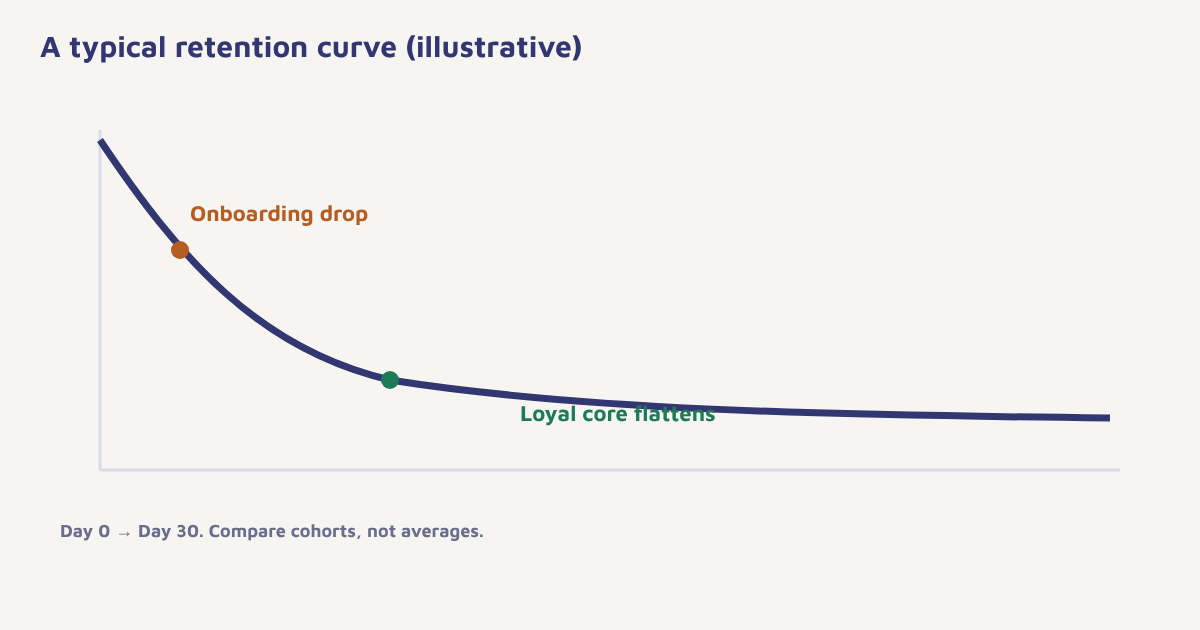
Plot the share of a cohort that is still active on each day after install. The curve usually falls steeply at first and then flattens. Two things matter: how steep the early fall is, and where the line flattens. If the curve keeps falling to zero without flattening, the app has not found a group for whom it is truly useful. If it flattens at a decent level, you have a core, and the job is to widen it. Compare cohorts by acquisition source, as users from paid campaigns, organic search and referrals often behave very differently. The comparison tools in Flowfox analytics help you see this.
Nine strategies that improve app retention
| Strategy | What to do | Stage |
|---|---|---|
| 1. Fast time to value | Cut sign-up steps; let people try before registering | First session |
| 2. Guided onboarding | Show the key action, not a long tour. See customer onboarding | First week |
| 3. Behaviour-triggered messages | Respond to what users did or did not do | All stages |
| 4. Smart push permission | Ask after value is shown, with a clear benefit. See push notifications | First week |
| 5. Personalised content | Recommend by interest and history. See personalization | Growing |
| 6. Habit hooks | Reminders tied to the user’s own routine; saved items; streaks | Growing |
| 7. Rewards and progress | Points, levels, loyalty tiers. See gamification and loyalty programs | Established |
| 8. Fix friction | Speed, crashes, confusing flows. Read reviews and support tickets | All stages |
| 9. Win-back lapsed users | Re-engage with value, not guilt. See win-back campaigns | Lapsed |
The first seven days decide most of it
If the early drop is the biggest loss, put effort there first. Define the activation moment, the action that most clearly separates users who stay from users who leave. Then build a short sequence that gets new users to it. A typical pattern uses an in-app message on first open, a welcome push the same day, an email the next day for users who skipped the key action and a nudge on day three. Stop the sequence for anyone who completes the action. The mechanics are covered in our guide to mobile app engagement and the wider first journey tutorial.
- Pick the activation event. Look at users who were still active at day 30 and find what they did in week one.
- Measure the gap. What share of new users reaches it, and how long does it take?
- Remove friction before adding messages. A confusing screen is not fixed by a push notification.
- Add a short, behaviour-based sequence. Two to four messages over a week, ending when the action is done.
- Segment by source. Users from different campaigns need different onboarding.
- Review weekly. Watch D1, D7 and D30 for each new cohort.
Apple and Google both publish guidance on notification etiquette and permissions, and the platforms keep changing the rules. For the technical side of reaching a device, read about push notifications and check current developer documentation before you plan a permission flow.
Use more than push
Push is useful but not enough. Users who have switched off notifications or uninstalled cannot be reached by it at all, and many never grant permission. Email and WhatsApp (within consent) can reach people outside the app, and in-app messages can guide those inside it. The best programmes decide the channel by what the user has opted into and how they respond. See email vs SMS vs WhatsApp and omnichannel vs multichannel for how to coordinate. In Flowfox, a journey can fall back from push to email when a push goes unopened, and a segment can isolate users whose activity has dropped.
Retention without dark patterns
It is tempting to keep users with tricks: guilt-laden uninstall messages, endless notifications, hidden cancel buttons. They may lift a number for a month and damage trust and ratings for years. Regulators in several places are also looking harder at deceptive design, sometimes called dark patterns. A more durable approach is to be useful, honest and easy to leave. Let people control notification types and frequency, and make it simple to pause instead of quitting. Our guide to the DPDP Act for marketers covers consent basics for Indian businesses.
A worked example (invented)
A language-learning app finds that users who complete three lessons in their first four days are much more likely to be active after a month. D1 retention is healthy, but D7 drops sharply. The team removes a long sign-up form, lets users start a lesson before creating an account, adds a daily-goal setting with a friendly reminder time chosen by the user and sends a push at that time only on days the goal is not yet met. Users who miss two days receive an email with an easier lesson, and those who stay away for two weeks get one message offering to restart at their old level. After two months, D7 and D30 both improve for new cohorts, and the app tracks the effect against users who joined before the change. The app, numbers and results are illustrative.
Retention differs by user type
Users do not all want the same thing from an app. Split cohorts by how they arrived, what they did first and what device they use, and you will usually find that some groups keep coming back at twice the rate of others. Study the groups that stay and ask what they have in common: the same first feature, the same content category, the same time of day. Then guide new users toward that path. Read the guide to the customer lifetime value idea to judge which groups are worth the extra effort, and use behavioral segmentation to put the finding into practice. Revisit this analysis every quarter, because product changes shift who stays.
Check first. Before adding a retention message, ask whether the product itself is the reason users leave. Messages can delay churn, but cannot fix a poor experience.
Common mistakes
- Chasing installs. Low-quality traffic lowers every retention number.
- Messaging before fixing the product. Notifications cannot fix a broken first experience.
- Ignoring cohorts. Blended averages hide trends.
- Over-notifying. It drives muting and uninstalls.
- Treating all users alike. Segment by behaviour and source.
Retention is not what you do after users start slipping. It is what you build into their first week.
Keep app users coming back. Trigger onboarding and re-engagement journeys from real behaviour.
Read next: churn prediction, app survey questions and the blog.
Frequently asked questions
What is app retention?
App retention is the share of users who return to your app after a set number of days since install, commonly measured at day 1, day 7 and day 30.
How do you calculate app retention rate?
Divide the number of users from an install cohort who were active on a given day by the number who installed, then multiply by 100.
What is a good app retention rate?
It depends on the type of app and the audience. Compare with your own previous cohorts and similar apps, and focus on the trend and where the curve flattens.
How can I improve app retention?
Get users to a first moment of value quickly, send behaviour-triggered messages, personalise content, fix friction, reward progress and win back lapsed users respectfully.
Why do users stop using an app?
Common reasons are unclear value, a confusing first experience, too many notifications, poor performance and better alternatives.
How is app retention different from customer retention?
App retention measures return visits within a product, usually by install cohort. Customer retention covers continued purchases or subscriptions across the whole business.
Does push notification increase retention?
Relevant, well-timed push can help, but excessive or irrelevant push drives muting and uninstalls. Test against a holdout group.