Getting someone to install your app is the easy part. Keeping them using it is where most apps struggle. A large share of new users stop opening an app within days of installing it, which is why engagement, not downloads, decides whether a mobile product succeeds. This guide explains what mobile app engagement is, which metrics to watch, the loop that keeps users coming back, the channels you can use (push, in-app messages, email, WhatsApp and SMS), how to time and personalise messages and the mistakes that lead people to mute notifications or uninstall.
What is mobile app engagement?
Mobile app engagement is how often and how deeply people use your app after installing it: opening it, using its main features, completing key actions and returning over time. It is related to, but different from, general customer engagement, which covers every touchpoint. App engagement is about behaviour inside the product and the messages that bring people back to it. Engagement matters because an active user is far more likely to become a paying, loyal one, and an inactive one is nearly always a lost one, however good the original acquisition campaign was. For wider background on mobile apps and their ecosystem, see the encyclopedic overview.
Metrics that show real engagement
| Metric | What it tells you | Watch out for |
|---|---|---|
| Daily and monthly active users (DAU, MAU) | How many people use the app in a period | Counts opens, not value |
| Stickiness (DAU divided by MAU) | How often monthly users come back daily | Depends on what your app is for |
| Session length and frequency | Depth and habit | Long sessions can mean confusion |
| Activation rate | Share of new users who reach the first key action | Define the key action carefully |
| Retention by day (D1, D7, D30) | Whether users return after install | Compare cohorts, not averages |
| Feature adoption | Which parts of the app get used | New features need time |
| Push opt-in and opt-out rates | Permission and annoyance | Opt-in varies by platform |
Pick one measure of engagement that matches your app’s purpose. A banking app is healthy if people check balances and pay bills monthly. A game should be played daily. A food-delivery app may be used twice a week. Comparing across such different products is meaningless. Retention curves by install cohort are the most honest view, as described in our guide to cohort analysis and in customer retention rate.
The engagement loop
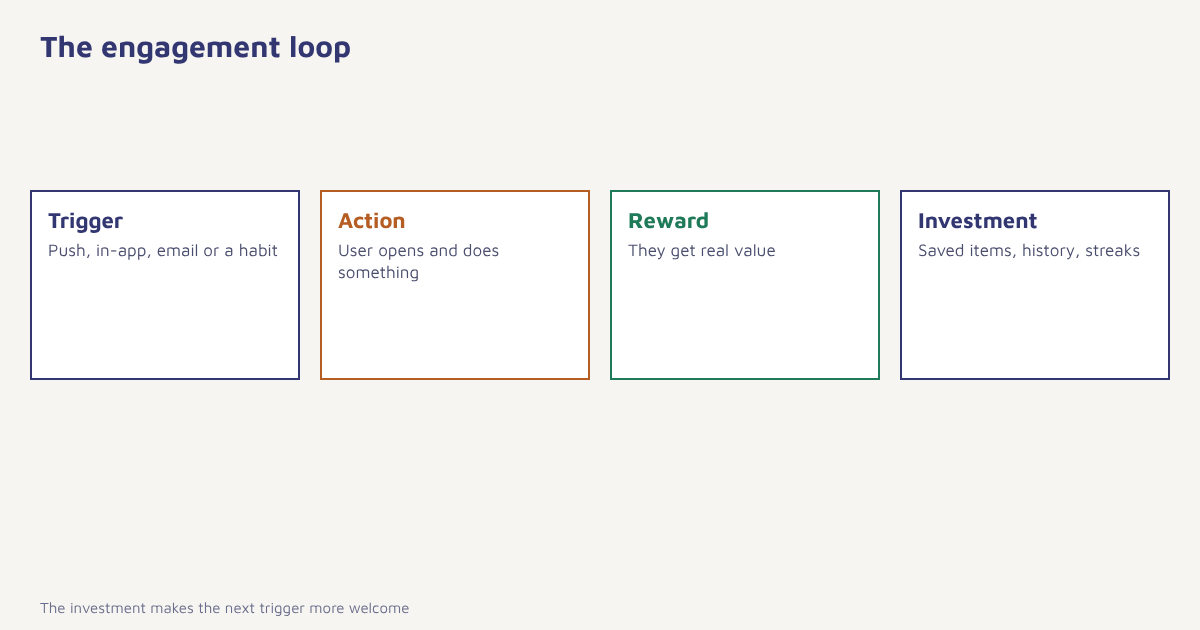
Products that keep users do so by repeating a simple loop: something prompts the user (a trigger), the user does something (an action), they get something worthwhile (a reward) and often leave something behind (an investment, such as saved items, history or a streak) that makes the next visit more valuable. Messages are one kind of trigger. The best triggers are internal, such as a habit or a need, and marketing messages are most useful when they remind people of a need that already exists, not when they invent one.
Channels for app engagement
| Channel | Best for | Limits |
|---|---|---|
| Push notifications | Timely reminders, order updates, re-opens | Needs permission; easy to mute |
| In-app messages | Onboarding, feature tips, offers while the user is active | Only reaches people who open the app |
| Longer content, summaries, win-back | Slower; not tied to the app | |
| WhatsApp and SMS | Important, time-sensitive or conversational updates | Needs consent; costs per message. See choosing a channel |
| App inbox | Messages the user can read later | Needs an inbox design |
The channels work best together. A user who ignores push may read email. A lapsed user who cannot be reached in the app might respond to a WhatsApp note, within consent. Flowfox lets you use push, in-app, email and WhatsApp in the same journey, with a rule that stops the flow when the user returns. To connect the app itself, see the SDK guide.
Engagement across the user lifecycle
| Stage | Goal | Message ideas |
|---|---|---|
| Install to first open | Get the first session | Welcome push and email, clear next step |
| First week | Reach the first key action | Short tips, progress hints, in-app tour. See customer onboarding |
| Growing | Build a habit | Useful reminders, new content, personal recommendations |
| Established | Deepen use and value | Feature education, loyalty rewards. See loyalty programs |
| Slipping | Re-engage | Relevant nudge, change of channel |
| Lapsed | Win back or let go | Win-back sequence. See win-back campaigns |
How to improve app engagement
- Find the activation moment. Identify the action most strongly linked to staying: first purchase, first saved item, first message sent.
- Shorten the path to it. Remove steps, ask for less at sign-up and delay non-essential permissions.
- Ask for push permission at the right moment. Explain the benefit first, then show the system prompt when the value is clear.
- Trigger messages from behaviour. React to what users do and do not do, not the calendar. See behavioral segmentation.
- Personalise. Use name, content interest and recent activity. See personalization.
- Cap frequency. Set a weekly limit across all channels.
- Test and measure. Compare engagement against a holdout. See A/B testing.
Timing, frequency and permission
Notification fatigue is the fastest way to lose a user. Respect quiet hours, avoid sending the same message to everyone and send only when there is something worth the interruption. Platform rules also shape what is possible: for example, iOS and recent Android versions ask for notification permission explicitly, and users can turn notifications off at any time. Read more in our guides to push notifications, notification badges and silent push. In India, promotional messages on SMS and WhatsApp also carry consent and template rules; see the DPDP Act guide. The concept of gamification can add motivation when it is honest and relevant, a theme we cover in gamification in marketing.
A worked example (invented)
A personal-finance app notices that users who add a bank account and set one budget within three days are far more likely to be active after a month. It builds a journey: a welcome push on day 0, an in-app prompt to link an account on first open, an email with a three-minute guide on day 1, a push on day 2 for users who have not set a budget and a WhatsApp message on day 4 (to users who opted in) offering help. The journey stops as soon as the user completes both steps. After a few weeks, the share of new users reaching both steps rises and the team keeps the changes that worked. The app, the steps and the effect are invented to show the pattern.
How to tell whether a change worked
App changes are easy to ship and hard to judge. A rise in opens the week after a new notification may come from a seasonal peak, a marketing campaign or a new cohort, not from your change. The cleanest approach is a holdout: leave a random share of users on the old behaviour, compare the two groups over the same weeks and look at actions that matter, such as purchases or completed tasks, not at opens alone. Record the date of each change so you can read trends later. Read the background on A/B testing if your team is new to it, and keep the sample large enough that a difference is not just noise.
Rule of thumb. If you cannot say which user action a message is meant to change, do not send it.
Common mistakes
- Counting installs, not use. Downloads without engagement are vanity.
- Asking for permissions on first launch. Wait until the value is clear.
- Blasting everyone. Segment by behaviour.
- Ignoring uninstalls. Watch what happens after a message burst.
- Using only push. Combine channels and respect each one’s limits.
An app is not engaging because it sends messages. It sends messages because it is engaging.
Bring app users back with the right message. Combine push, in-app, email and WhatsApp in one journey.
Read next: app retention strategies, app survey questions and the blog.
Frequently asked questions
What is mobile app engagement?
Mobile app engagement is how often and how deeply people use your app after installing it, including opens, key actions and return visits over time.
How do you measure app engagement?
Common measures are daily and monthly active users, stickiness, session frequency, activation rate, retention by day and feature adoption.
What is a good app engagement strategy?
Find the activation moment, shorten the path to it, trigger messages from behaviour, personalise content, cap frequency and test against a holdout.
Which channels work best for app engagement?
Push and in-app messages are the main tools, supported by email, WhatsApp and SMS for important or lapsed users, within consent.
How often should I send push notifications?
There is no universal number. Send only when a message is useful, set a weekly cap across channels and reduce frequency for users who stop responding.
Why do users uninstall apps?
Common reasons include too many notifications, slow performance, lack of value and confusing onboarding. Survey leavers where possible.
What is the difference between engagement and retention?
Engagement is how actively people use the app. Retention is whether they keep returning over time. Engagement drives retention.