If you have ever added analytics, payments or push notifications to an app, you probably did it by installing an SDK. The term appears everywhere in product and marketing conversations, yet it is often explained only to developers. This guide explains what an SDK is in plain language, what is inside one, how it differs from an API, what a marketing or engagement SDK does inside your app, how to integrate one safely and what to check for performance and privacy.
What is an SDK?
SDK stands for software development kit. It is a package of ready-made code, tools and documentation that lets developers add a capability to their software without building it from scratch. The general idea is described in the article on software development kits. Think of it as a toolbox supplied by a service provider: instead of writing the code to talk to a payment network, a maps service or a messaging platform yourself, you install the provider’s kit and call a few simple functions.
What is inside an SDK?
| Part | What it does |
|---|---|
| Libraries | Compiled code that performs the work, such as sending events or handling push tokens |
| APIs and methods | The functions your developers call, for example track("order_completed") |
| Documentation | Setup steps, reference and examples |
| Sample code | A working demo app to copy from |
| Tools | Command-line helpers, test utilities or debuggers |
| Configuration | Keys, settings and permissions the SDK needs |
SDK vs API
An API, or application programming interface, is a set of rules for how two programs talk to each other, usually over the internet. An SDK often wraps an API with ready-to-use code for a specific platform. You can use the API directly, which gives full control but needs more work, or use the SDK, which saves time and handles platform quirks.
| SDK | API | |
|---|---|---|
| What it is | A kit of code and tools | A contract for communication |
| Effort | Lower, install and call | Higher, write requests yourself |
| Platform | Specific to iOS, Android, web, etc. | Works from any language that can make requests |
| Control | Less, you follow the kit’s design | More, you decide every detail |
| Updates | You update the library | Provider may change endpoints |
| Typical use | Mobile apps, games, analytics | Server-to-server integrations |
Many products offer both. A mobile engagement platform might give you an SDK for the app and an API for your servers, as described on our developers page.
Common types of SDK
| Type | Examples of what it does |
|---|---|
| Analytics | Records screens and events so you can study behaviour |
| Engagement and messaging | Registers devices for push, shows in-app messages, tracks events for segments |
| Payments | Collects card or UPI details securely and starts a transaction |
| Authentication | Handles sign-in with phone, email or social accounts |
| Maps and location | Shows maps, geocoding and routes |
| Advertising and attribution | Measures installs and campaign sources |
| Crash reporting | Captures errors and stack traces |
What a marketing SDK does in your app
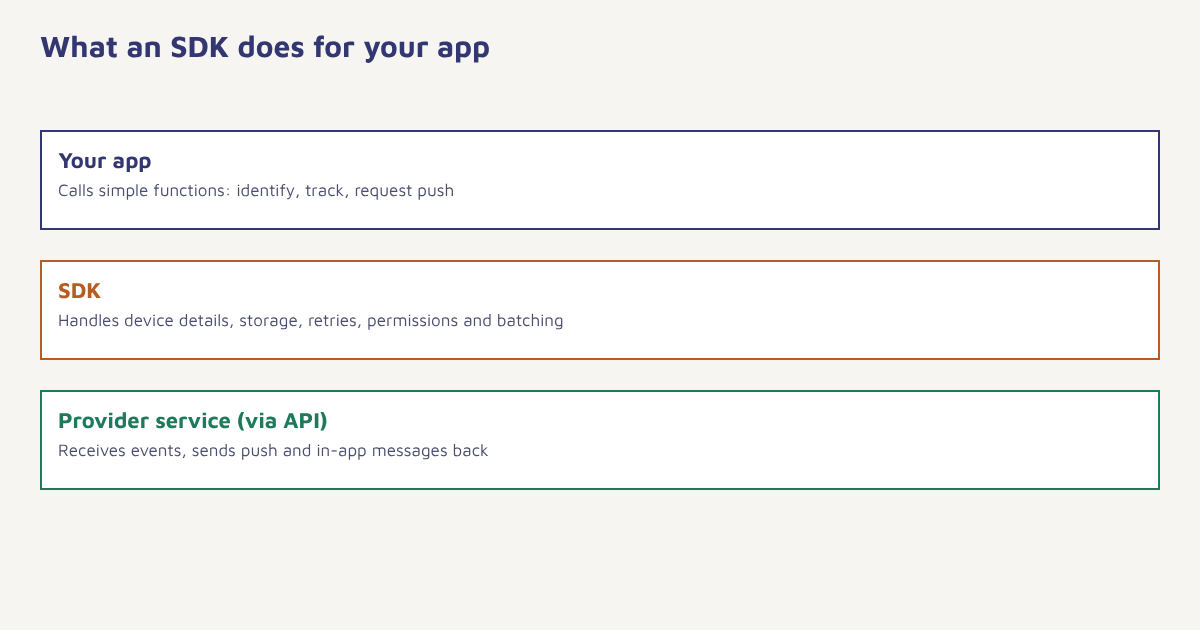
An engagement SDK is the bridge between your app and your marketing platform. Once installed, it typically does four jobs.
- Identifies the user. It creates or links a profile, using an anonymous ID first and a login ID later, so activity belongs to one person.
- Collects events and attributes. Screens viewed, products added, orders placed and traits such as plan or city flow to the platform.
- Registers for push. It obtains the device token and manages permission, so that you can send push notifications.
- Displays messages. It renders in-app messages and handles clicks and deep links.
In Flowfox, those events land on the same profile used for segments and journeys, which is why a tap in the app can change what an email or WhatsApp message says. The data model page explains how events and attributes are structured, and sending your first event walks through a test.
// Illustrative pseudocode, not a real library
Client.init({ apiKey: "YOUR_KEY" })
Client.identify("customer_8841", { plan: "gold", city: "Jaipur" })
Client.track("product_viewed", { sku: "TR-07", price: 3499 })
Client.requestPushPermission()
The calls above show the pattern: initialise, identify, track, ask for permission. Real syntax differs by provider and platform.
How to integrate an SDK safely
- Read the documentation first. Check supported OS versions, permissions and known limits.
- Install in a test build. Use a separate environment and test keys before production.
- Add only what you need. Enable the modules you will use, not every feature.
- Name events consistently. Agree a tracking plan with product, marketing and engineering.
- Ask for permissions at the right moment. Explain why before showing the system prompt for push or location.
- Test on real devices. Check behaviour on low-end phones, poor networks and different OS versions.
- Release gradually. Roll out to a small percentage first and watch crash rates.
What to check before adding an SDK
| Area | Questions to ask |
|---|---|
| Size | How much does it add to the app download? |
| Performance | Does it slow startup or drain battery? |
| Privacy | What data does it collect, where is it sent and stored? |
| Security | Is the code maintained, signed and regularly updated? |
| Compliance | Does it support consent, deletion and regional rules such as the DPDP Act? |
| Support | Is there documentation, a changelog and responsive help? |
| Exit | How easy is it to remove or replace later? |
Each SDK is code from a third party running inside your app, with the same access to the device that your own code has. App stores such as Apple’s require you to describe what data your app and its SDKs collect, so keep a simple register of every SDK, its version and its purpose. Keep them updated; old versions are a common source of bugs and security issues. The concept of software supply chain security explains why this matters.
What marketers should know
You do not need to write code to work well with an SDK, but a few points help you plan. SDK releases depend on app releases, so a new event or feature may take weeks to reach users, who must update the app. Plan tracking in advance and ask for events you will need later. Events sent only after login lose the anonymous browsing history unless identity is merged properly, so ask engineers how identity works. And remember that push permission can only be requested once on iOS in a useful way, so design the moment carefully. Our guide to customer data platforms explains why consistent identity matters so much.
An integration walk-through
Say a food-delivery app wants to send an order-ready push and a win-back email. The developer adds the SDK, initialises it with the project key on app start and calls identify when the customer logs in. From then on, each order is sent as an event with the restaurant, the amount and the delivery time. Marketing builds a segment of people with no order in 30 days and a journey that sends a push first and an email two days later if the app has not been opened. None of this required the marketing team to touch code, but it did depend on the developer planning the right events early.
Common mistakes
- Installing too many SDKs. Each adds weight and risk.
- Skipping the tracking plan. Messy event names are hard to fix later.
- Ignoring consent. Collect only after permission where required.
- Never updating. Old versions break and leak.
- Testing only on a new phone. Real users have older devices.
An SDK is borrowed code with a key to your app. Choose it the way you would choose a new team member.
Connect your app to your customer profile. Send events, push and in-app messages from one platform.
Read next: customer data platform, notification badges and the blog.
Frequently asked questions
What is an SDK?
An SDK, or software development kit, is a package of code, tools and documentation that lets developers add a capability to their software without building it from scratch.
What is the difference between an SDK and an API?
An API is a set of rules for how programs communicate. An SDK is a kit that often wraps an API with ready-to-use code for a particular platform.
What does a marketing SDK do?
It identifies users, records events and attributes, registers devices for push notifications and displays in-app messages, sending the data to the marketing platform.
Do I need a developer to add an SDK?
Yes, usually. A developer installs and configures the SDK in the app, though marketers can plan events and use the data afterwards.
Can an SDK slow down my app?
It can, if it is heavy or poorly built. Check size, startup impact and battery use, and test on low-end devices.
Are SDKs safe for user privacy?
They can be, if they collect only what is needed, honour consent and are well maintained. Review each SDK’s data practices and describe them in your privacy notice.
How often should I update an SDK?
Review releases regularly, update at least a few times a year and promptly for security fixes, testing each update before release.