Email reminders recover carts. WhatsApp reminders recover them faster, in a channel where many Indian shoppers already spend their day and where a reply is one tap away. But WhatsApp is also the channel where a clumsy message does the most damage: it lands next to messages from family and friends, it is governed by opt-in and template rules and it can get your business number restricted if customers mark it as unwanted. This guide is about doing it properly: who may be messaged, what the message should say, how it fits with email, how to time it, what to do when the customer replies and how to measure whether it earns its place. For the general cart recovery flow, start with abandoned cart recovery; this article focuses on what is specific to WhatsApp.
Why WhatsApp suits cart recovery
WhatsApp is a conversation channel. A reminder there does not have to be a one-way broadcast: the shopper can ask about size, delivery or payment and get an answer in the same thread, which removes the friction that often causes the abandonment in the first place. The channel also tends to be read quickly, and messages are short, so a reminder can sit alongside the chat the customer was already having with your store. The trade-off is strictness. Business messages sent outside the customer-initiated window have to use pre-approved templates and respect opt-in, as explained in WhatsApp Business API and WhatsApp message templates.
Who you may message
Only customers who have agreed to receive messages from your business on WhatsApp. A phone number typed at checkout is not automatically consent to marketing; the opt-in has to be clear, specific to WhatsApp and recorded. Many stores add an unticked box at checkout or on the cart page, such as "Send order updates and reminders on WhatsApp". Transactional messages about an order the customer placed have different treatment from marketing reminders, and the categories, rules and pricing are set by Meta and change over time, so check the current official documentation before you design a flow. The Indian privacy position is summarised in the DPDP Act guide, and consent management is covered in consent management.
Policies change. Template categories, opt-in wording, rate limits and pricing are controlled by Meta and your provider. Check the current WhatsApp Business documentation and your provider’s terms before you launch, and get legal advice for your own case.
A cart recovery flow that uses WhatsApp well
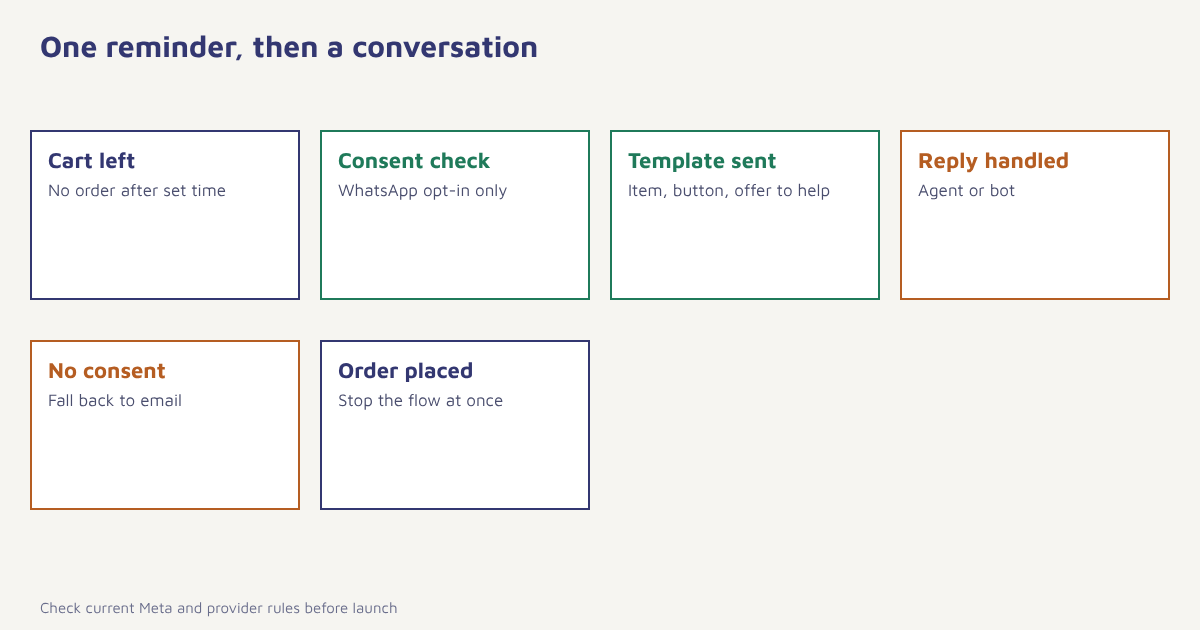
| Step | What happens | Why |
|---|---|---|
| 1. Trigger | Items added, no order after a set time | Defines the audience |
| 2. Check consent | Only customers opted in to WhatsApp continue | Compliance and sender quality |
| 3. Exclude | Orders placed meanwhile, open support issues, recent reminders | Avoid irritating messages |
| 4. Wait | Often 1 to 4 hours for the first reminder | Too soon feels pushy; too late loses momentum |
| 5. Send | Approved template with name, item, button to the cart | Short and useful |
| 6. Handle replies | Route questions to a person or bot | The conversation is the advantage |
| 7. Fall back | If no WhatsApp consent, use email or push | Do not lose the reachable shoppers. See channel choice |
| 8. Stop | Cancel as soon as the order is placed | Never remind someone who already bought |
One reminder on WhatsApp is usually enough. A second can be sent by email a day later, where a longer message and images fit more naturally. Combining channels in one journey, so that each customer receives the right message once, is the idea behind omnichannel marketing. In Flowfox you build this as a journey with a consent check, a wait and a branch for each channel, and the WhatsApp channel handles templates and delivery.
What the message should say
Keep it short, personal and useful. Name the item, make the next step one tap and offer help, not pressure. Avoid capital letters, a wall of emojis and fake urgency. Remember that the template text has to be approved, so write it to work with variables for the name and product.
| Element | Weak | Better |
|---|---|---|
| Opening | Hi, you left something | Hi Meera, your Cotton Kurta Set is still in your cart. |
| Value | Complete your order now! | It’s in stock in your size and can reach Jaipur by Friday. |
| Action | Click here | Button: Go to my cart |
| Help | (none) | Reply here if you want to check size or delivery. |
| Close | Hurry! | Happy to help if you need anything. |
{
  "name": "cart_reminder_1",
  "language": "en",
  "category": "MARKETING",
  "components": [
    { "type": "BODY",
      "text": "Hi (1), your (2) is still in your cart. Reply here if you need help with size or delivery." },
    { "type": "BUTTONS",
      "buttons": [ { "type": "URL", "text": "Go to my cart", "url": "https://example.com/cart/(3)" } ] }
  ]
}
The structure above is an illustrative sketch of a template, not the exact format of any provider’s API; variable markers and fields differ, and the category you must choose depends on current Meta rules. Always submit through your provider and follow the approval guidance in WhatsApp approval.
Handling replies
A reminder that invites a reply must be ready for one. If a customer asks "Is this available in medium?" and nobody answers for a day, the reminder did harm. Decide in advance who owns the reply: a human agent in business hours, a simple WhatsApp chatbot that answers common questions and hands over when unsure, or both. Reply messages within the customer service window are handled differently from template messages, so check the current rules. Keep a record of the conversation on the customer profile so the next message, whether on WhatsApp or email, knows what was said.
Timing and frequency
The best timing depends on the product and the customer. A grocery basket is forgotten quickly, while a sofa may take days of thought. Start with a first reminder one to four hours after abandonment, avoid late nights, and send at most one WhatsApp reminder per cart. Cap total marketing messages per person per week across channels. See the best time to send for how to test timing. High-ticket items may suit a slower sequence with helpful content in between, using ideas from lead nurturing.
A worked example (invented)
A furniture store tests WhatsApp against email for cart recovery. Customers who opted in to WhatsApp at checkout are randomly split. One group receives an email after two hours, the other receives a WhatsApp template after two hours with an email a day later if there is no order. A holdout group receives nothing. The store compares orders per thousand eligible carts, opt-out and block rates, support conversations started and revenue per recipient, over several weeks. It also checks that replies were answered within an hour in business time. The business, setup and figures are invented to show how to design the test; the right answer for your store depends on your audience and product.
Measuring the results
Track recovered orders and revenue against the holdout, message delivery and read status where available, reply rate, opt-out and block rate, quality rating signals shown by your provider and the share of recovered customers who bought again later. Be cautious about last-click attribution, because a customer might have returned anyway. See attribution models and marketing ROI for ways to judge value, and the definition of a controlled comparison in the article on the holdout method. Analytics in Flowfox breaks results down by channel and journey step.
Setting it up
- Collect WhatsApp consent. Add a clear opt-in at checkout or the cart page and store it on the contact profile.
- Connect the channel. Link your WhatsApp Business account through your provider and register your templates.
- Write and submit the template. Short, with variables for name and item and a button to the cart.
- Build the journey. Trigger on abandoned carts, check consent, wait, send, then branch to email if needed.
- Staff the replies. Assign agents or a bot and set response-time targets.
- Add stop rules and caps. End the flow on purchase and cap messages per week.
- Test, launch, measure. Run a holdout and review results after a few weeks.
Where to check the rules
The approach here belongs to the wider idea of conversational commerce, in which selling happens inside a chat. The authoritative source for what is allowed is Meta’s own documentation, available at the WhatsApp Business Platform documentation, together with the terms of the provider you use. Review template categories, opt-in requirements, messaging limits and pricing there before you launch, and again every few months, because they change. Keep a short internal checklist of the rules you rely on, with the date you last checked them, so that the whole team knows how current your understanding is.
Common mistakes
- Messaging without opt-in. It risks complaints, blocks and a restricted number.
- Several reminders in a row. One is enough on this channel.
- No one to answer. A reply-inviting message needs a reply.
- Ignoring the stop rule. Reminding someone who already bought is worse than saying nothing.
- Copying email wording. WhatsApp reads like a chat, not a newsletter.
- Skipping the holdout. You cannot tell recovered sales from sales that would have happened.
On WhatsApp, a reminder is a knock on a door the customer left open. Knock once, and be ready to talk.
Recover carts where your customers chat. Build a consent-aware journey across WhatsApp and email.
Read next: WhatsApp commerce, browse abandonment emails and the blog.
Frequently asked questions
Can I send cart reminders on WhatsApp?
Yes, to customers who have opted in to receive messages from your business on WhatsApp, using approved templates outside the service window. Check Meta’s current rules and your provider’s terms.
How is WhatsApp cart recovery different from email?
WhatsApp is a conversation channel, so customers can reply with questions. It also has stricter opt-in and template rules, and one short reminder usually works better than a sequence.
When should I send the first WhatsApp cart reminder?
A common starting point is one to four hours after abandonment, avoiding late nights. Test the timing for your products and customers.
How many WhatsApp reminders should I send per cart?
Usually one. A second reminder, if any, often works better by email a day later.
Do I need consent for WhatsApp cart reminders?
Yes. You need a clear, specific opt-in for WhatsApp messages, recorded on the customer profile. A phone number alone is not enough.
What if the customer replies to the reminder?
Be ready to respond quickly through an agent, a chatbot or both, and record the conversation on the customer profile.
How do I know WhatsApp cart recovery is working?
Compare orders and revenue against a holdout group and watch opt-out and block rates, reply rates and quality signals from your provider.