Most visitors to an online store leave without adding anything to the cart. They looked at a product, maybe two, and then wandered off. If you know who they are, because they are logged in or came from your own email, you have a chance to remind them gently and help them decide. That is what a browse abandonment email does. It is a close cousin of the cart reminder but needs a lighter touch, since the person has shown less intent. This guide explains what browse abandonment emails are, how they differ from cart emails, how to set them up, what to write, when to send, how to measure them and how to stay on the right side of privacy.
What is a browse abandonment email?
A browse abandonment email is an automated message sent to a known contact who viewed one or more products or categories on your site or app but did not add anything to the cart or buy. It is a form of behavioral retargeting that happens in the inbox, WhatsApp or push instead of in an ad. It relies on identity: you can only send it when you know who the visitor is and they have agreed to hear from you.
Browse abandonment vs cart abandonment
| Browse abandonment | Cart abandonment | |
|---|---|---|
| Intent shown | Interest | Strong intent |
| Trigger | Product or category view, no add to cart | Items added, no order |
| Tone | Helpful, light | More direct |
| Typical timing | A few hours to a day | About an hour to a few hours |
| Incentive | Rarely, not at first | Sometimes, in a later message |
| Volume | Much higher | Lower |
| Risk | Feeling watched | Annoyance if repeated |
Because volumes are higher and intent lower, be careful with frequency. See abandoned cart recovery for the stronger-intent case and run both so that a shopper who adds to the cart leaves the browse flow and enters the cart flow instead.
How to set it up
- Track the right events. You need product viewed, category viewed, add to cart and order placed, each linked to a customer identity. See the data model.
- Identify visitors. Use login, a click from your email or a recognised device ID. Anonymous traffic cannot receive email.
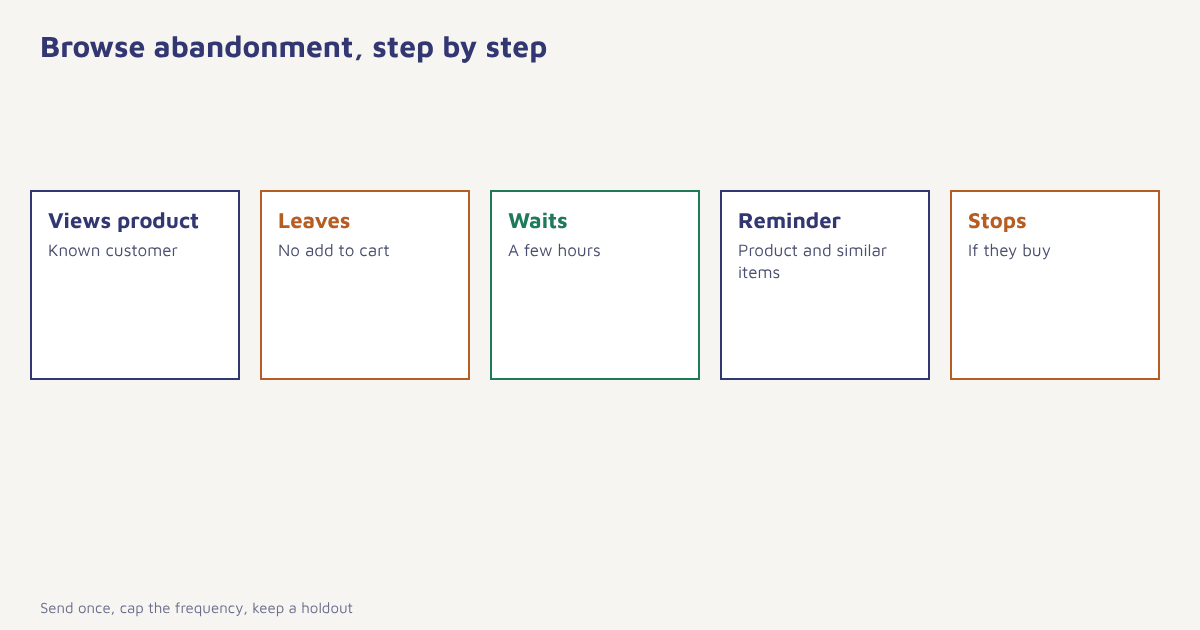
- Define the trigger. For example: viewed a product page twice or for more than 30 seconds, no add to cart in the next three hours.
- Set exclusions. Skip people who bought in the last few days, who are already in a cart journey or who received a browse email in the last seven days.
- Choose the delay. Test a window of 2 to 24 hours. Short enough to be remembered, long enough not to feel like stalking.
- Write one message. Show the product viewed and a few related items. Add a second message only if the first performs.
- Cap frequency. No more than one browse email a week per person, and respect the overall limit across channels.
- Measure against a holdout. Hold back 10 percent to see how many would have bought anyway.
In Flowfox you can build this in a journey: trigger on the product view event, wait, check that no cart or order event happened, then send through email, push or WhatsApp depending on consent. The email builder supports dynamic product blocks, and the ecommerce solution page shows more flows.
What to write
The best browse emails feel like a helpful shop assistant, not a hunter. Lead with the product they looked at, since recognition drives the click. Add something that reduces doubt: a short review, delivery information, size help or a comparison with a similar item. Offer a few related products, chosen by what other customers viewed or bought, as discussed in our guide to the product recommendation engine. Keep a single button such as “See it again”.
| Element | Good practice | Avoid |
|---|---|---|
| Subject | “Still thinking about the Trail Runner?” | “We saw what you did” |
| Hero | Image and name of the product viewed | Unrelated bestsellers only |
| Reassurance | Reviews, returns, delivery date | Fake scarcity |
| Extras | Three related items | A wall of products |
| Offer | None at first; maybe a later reminder | Discounting every browser |
| Footer | Clear unsubscribe and preference link | Hiding the opt-out |
For subject line ideas, see email subject lines, and for general writing tips, email copywriting.
Timing and frequency
There is no universal best delay. Many stores start with a window between a few hours and a day and test from there. High-consideration products such as furniture or electronics may deserve a longer gap and a second email with a comparison guide. Impulse items may suit a quick reminder the same evening. Look at your own data on when browsers return: if most come back within two hours, a reminder at three hours may arrive too late. Our guide to the best time to send email explains how to run such tests.
Measuring results
| Metric | Why it matters |
|---|---|
| Click rate | Is the message relevant? |
| Conversion within 3 days | Did it lead to a purchase? |
| Incremental conversion vs holdout | How many sales would not have happened otherwise? |
| Revenue per recipient | The true value of the flow |
| Unsubscribe and complaint rate | Whether it feels intrusive |
| Share of recipients who also got cart emails | Whether flows overlap |
Incrementality matters most. Some people who got the email would have returned anyway, so compare with a randomly held-out group before you claim credit. See A/B testing for the method.
A worked example: a shoe store
The following example is invented. A shoe retailer sets up a browse flow for logged-in visitors who view the same product twice and do not add it to the cart within four hours. The email shows the shoe, three customer review snippets, the delivery date for their pin code and three similar models. A holdout group of 10 percent receives nothing. After a month, the team finds that the flow produced a modest but real lift in orders compared with the holdout, a click rate several times higher than its regular newsletter and a slightly higher unsubscribe rate than average. It cuts the frequency to one email per week per person and removes the flow for shoppers who bought in the last 14 days. The figures are deliberately unspecific because results vary widely between stores.
Privacy and consent
Browse emails use behavioural data, so tell people how you use it. State in your privacy notice that browsing activity may be used to personalise messages, record marketing consent per channel and honour opt-outs at once. Avoid referring to sensitive categories in a message, such as health products, and never imply you are watching someone. Learn the main duties under India’s law in our DPDP Act guide, and consider the broader privacy policy you publish. When in doubt, ask your legal advisor.
Getting the data right
A browse flow is only as good as its events. Check that product views fire reliably on mobile web and in the app, that product IDs match your catalogue and that cart and order events arrive quickly enough to stop the flow. A common fault is a delayed order event that lets a reminder go out after someone has already bought. Test with your own account and several devices. For the technical idea of tracking user actions, the overview of web analytics is a useful starting point.
Common mistakes
- Treating browsers like cart abandoners. Their intent is lower, so be gentler.
- No exclusions. Emailing someone who already bought is embarrassing.
- Discounting by default. You train shoppers to browse and wait.
- Overlapping flows. Cart and browse emails arriving together look careless.
- Skipping the holdout. You cannot tell what the flow really adds.
A browse email should feel like someone holding the door open, not following you down the street.
Bring interested shoppers back, gently. Trigger from product views, stop on purchase and measure against a holdout.
Read next: back-in-stock alerts, marketing personalization and the blog.
Frequently asked questions
What is a browse abandonment email?
A browse abandonment email is an automated message sent to a known contact who viewed products but did not add anything to the cart or buy, reminding them and helping them decide.
How is browse abandonment different from cart abandonment?
Cart abandonment targets shoppers who added items, which shows strong intent. Browse abandonment targets those who only looked, so the tone is lighter and the volume is higher.
When should a browse abandonment email be sent?
Test a delay between a few hours and a day. Impulse products may suit a same-day reminder, while considered purchases suit a longer gap.
Do I need to offer a discount in a browse abandonment email?
Not at first. Start with reassurance and related products, and keep discounts for later messages or specific segments so that you do not train shoppers to wait.
How do I identify visitors for browse abandonment emails?
You need an identity, such as a login, a click from your own email or a recognised device, plus marketing consent. Anonymous visitors cannot receive email.
How often should I send browse abandonment emails?
Limit them to about one per person per week and exclude people who recently bought or are in a cart journey.
How do I measure whether browse abandonment emails work?
Compare conversion and revenue per recipient with a randomly held-out group, and watch unsubscribe and complaint rates for signs of intrusion.