Few messages are as welcome as the one that says the thing you wanted is available again. A shopper who tapped “notify me” on a sold-out product has told you exactly what they want, and the only question is whether you remember to follow up. Back-in-stock alerts turn out-of-stock pages from dead ends into a list of interested buyers. This guide explains how they work, how to set up the sign-up and the alert, which channels to use, how to handle low stock and queue fairness, how to measure the results and the pitfalls to avoid, with a worked example for an online store.
What is a back-in-stock alert?
A back-in-stock alert is a message sent to a customer who asked to be told when a particular product, size or variant becomes available again. It is sometimes called a restock notification or a waitlist message. It is one of the highest-intent triggered messages you can send, because the customer chose the product and asked for the message. The idea is related to wider inventory management work, since the alert depends on accurate stock data.
Why back-in-stock alerts work
- Explicit interest. The customer asked, so consent and intent are both clear.
- Recovered sales. Demand that would have gone to a competitor is held for you.
- Demand signals. The size of the waitlist tells you what to restock first.
- Low irritation. A requested alert is rarely seen as spam.
- New contacts. Visitors who would not subscribe to a newsletter will leave an address for a product they want.
How to set it up
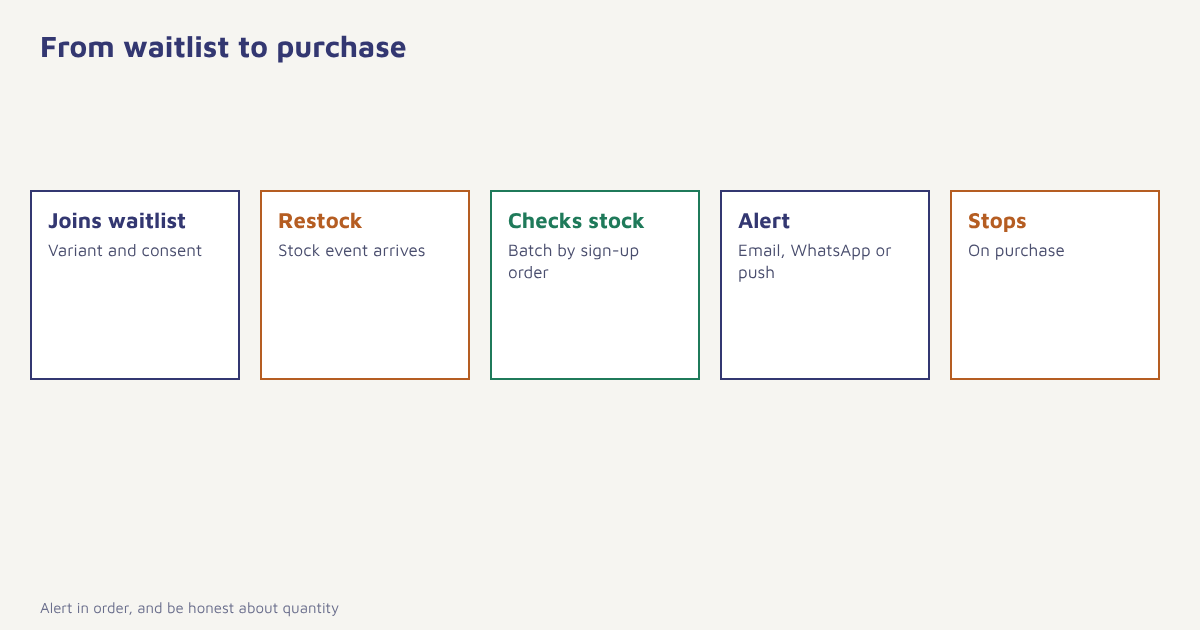
- Add a waitlist button. On sold-out product and variant pages, replace the dead “Out of stock” label with “Notify me when available”.
- Collect minimum details. An email address or phone number, the variant (size, colour) and consent for that channel. Logged-in customers need only one tap.
- Store it as an event. Record
waitlist_joinedwith product, variant and channel on the customer profile. See the data model. - Connect stock data. Trigger when inventory for that variant rises above a threshold, through an API or a FlowConnect integration with your store.
- Send in order of sign-up. First on the list, first alerted, with batches sized to your stock.
- Write a clear message. Product, variant, price, a buy link and an honest note about limited quantity if true.
- Stop on purchase. Remove people who bought, and avoid repeat alerts for the same restock.
- Follow up once. If the item sells out again, tell people and keep them on the list.
In Flowfox this is a journey that listens for a stock event, picks matching waitlist members and sends through email, WhatsApp, SMS or push depending on what each person agreed to. See the ecommerce solution page for related flows.
Which channel to use
| Channel | Strengths | Cautions |
|---|---|---|
| Room for images, size options and related items | Slower to be seen when stock is limited | |
| Fast and personal, quick replies possible | Needs opt-in and an approved template. See WhatsApp approval | |
| SMS | Immediate, short | Needs DLT-approved templates in India. See SMS templates |
| Push | Instant for app users | Only if notifications are enabled. See push notifications |
Offer the choice at sign-up and honour it. For scarce items, a faster channel such as WhatsApp, SMS or push gives the customer a better chance of getting the product, while email suits less urgent restocks. Compare options in our guide to email vs SMS vs WhatsApp.
Handling limited stock fairly
If 500 people are waiting for 40 items, alerting all 500 at once creates a rush and plenty of disappointed customers. Several approaches help. Alert in sign-up order, in batches proportional to stock. Reserve the item for a short time, say 30 minutes, once someone adds it to the cart. Tell people honestly how many units are available. Send a short apology and a similar alternative to those who miss out. And avoid pretending stock is scarce when it is not, since false urgency damages trust and can breach consumer protection rules. The idea of demand versus supply is explained in the article on scarcity in economics, but customers respond best to honest information.
| Situation | Good response |
|---|---|
| Stock far exceeds the waitlist | Alert everyone together |
| Stock is less than the waitlist | Batches in sign-up order with short reservation |
| Item sells out again before alert | Keep them on the list and tell them honestly |
| Variant never returns | Offer alternatives and close the waitlist |
| Customer already bought elsewhere on your site | Remove them from the list |
A worked example: a sneaker store
The following example is invented. An online sneaker store sells out of a popular model in size 9 in two days. The product page shows a “Notify me” button, and 320 shoppers join, 70 percent choosing WhatsApp and the rest email. When 60 pairs arrive, the journey alerts the first 90 people on the list, since not everyone will buy. The message, sent on WhatsApp, reads: “Good news: the Trail Runner in size 9 is back. A few pairs only. Tap to buy before they go.” Each recipient who adds the shoes to the cart gets a 30-minute reservation. After 12 hours, remaining stock is offered to the next 90 people. Those left without a pair receive a short note offering the similar Trail Lite in size 9 and a promise to alert them at the next restock.
| Step | What happens |
|---|---|
| Day 0 | Model sells out, waitlist opens |
| Day 2 | 320 people on the list |
| Day 9 | Restock of 60 pairs, first batch of 90 alerted |
| Day 9, +12 hours | Second batch of 90 alerted for any remaining pairs |
| Day 10 | Alternative offered to those who missed out |
The numbers are made up, and your own ratios of alerts to units will differ. Start with a cautious multiple, check how many recipients actually buy and adjust.
Measuring back-in-stock alerts
| Metric | What it tells you |
|---|---|
| Waitlist sign-up rate on sold-out pages | How well the button works |
| Alert-to-purchase rate | How strong the demand is |
| Time from alert to purchase | Whether urgency is working |
| Revenue per alert | Value of the flow |
| Waitlist size by product | What to reorder first |
| Share of waitlist buyers who return | Long-term value of these customers |
The waitlist is also a planning tool. Share the demand counts with the buying team, and compare them with sales after restock. Over time, you will learn how many alerts you need per unit. For more on analysing customer groups, see cohort analysis, and consider related flows such as cart recovery and browse abandonment emails. A short price-drop version of the same idea works for items people are watching, within consent.
Keeping stock data reliable
The alert is only as trustworthy as your inventory number. Decide which number triggers the message, for example available-to-sell stock after reservations, and ignore tiny fluctuations that come from returns being processed. Add a minimum threshold, such as five units, before alerting, so you do not message people for one returned pair. For a general look at how stock is tracked, the article on stock keeping units explains the identifiers that variant-level alerts rely on.
Common mistakes
- No variant detail. Alerting for the wrong size wastes trust.
- Alerting everyone at once. Disappointment follows when stock runs out.
- Using the sign-up for general marketing. The consent covers the alert, so ask separately before adding people to promotions.
- Stale stock data. If the alert goes out before stock is truly available, you create angry customers.
- Never pruning the list. Remove people when the product is discontinued.
A customer who asks to be told is the easiest sale you will ever make. Do not let a spreadsheet forget them.
Never lose a sold-out sale again. Trigger alerts from stock events, in sign-up order, on each customer’s preferred channel.
Read next: product recommendation engine, customer lifecycle marketing and the blog.
Frequently asked questions
What is a back-in-stock alert?
A back-in-stock alert is a message sent to a customer who asked to be told when a sold-out product, size or variant becomes available again.
Why do back-in-stock emails work so well?
The customer chose the product and asked for the message, so intent and consent are clear, which makes these among the most relevant triggered messages you can send.
Which channel is best for back-in-stock alerts?
Fast channels such as WhatsApp, SMS or push suit scarce items, while email suits less urgent restocks. Let customers choose at sign-up and respect their choice.
How do I avoid alerting more people than I have stock for?
Alert in sign-up order in batches sized to your stock, reserve items briefly once added to the cart and tell customers honestly when quantities are limited.
Can I use waitlist sign-ups for newsletters?
Not without separate permission. Consent for a back-in-stock alert covers that alert, so ask clearly before adding people to promotional lists.
What data do I need to send back-in-stock alerts?
You need the customer contact and consent, the product and variant they wanted and a reliable stock feed that triggers when inventory returns.
How do I measure back-in-stock alerts?
Track waitlist sign-up rate, alert-to-purchase rate, revenue per alert and waitlist size per product, which also helps decide what to reorder.