In India, people already ask shops questions on WhatsApp, send photos of what they want and pay by UPI in the same chat. WhatsApp commerce is the practice of turning that behaviour into a reliable sales channel: showing products, answering questions, taking orders, confirming payments and handling after-sales, all inside the conversation. This guide explains what WhatsApp commerce is, the features involved, how a typical buying journey works, how to set it up, what to automate and what to leave to humans, and the compliance points to watch. For the messaging basics, see our guides to WhatsApp marketing and the WhatsApp Business API.
What is WhatsApp commerce?
WhatsApp commerce means selling products or services through WhatsApp conversations. It ranges from a small shop replying manually with photos and payment links to a brand running catalogue browsing, cart building, order tracking and support through the Business API with automation. The common thread is that the customer never has to leave the chat to discover, decide and pay. Features, rules and pricing are set by Meta and change from time to time, so check the current official documentation before you design anything around a specific feature.
The building blocks
| Block | What it does | Notes |
|---|---|---|
| WhatsApp Business App | Free app for small businesses: catalogue, quick replies, labels, away messages | Manual use by one or a few people |
| WhatsApp Business API (Platform) | For larger volumes, automation, multiple agents and system integration | Needs a provider or direct access. See WhatsApp Business API |
| Catalogue | Product list with images, prices and descriptions | Customers browse inside WhatsApp |
| Message templates | Pre-approved messages for starting conversations, such as order updates | Approval needed. See template approval |
| Interactive messages | Buttons and lists for quick replies and choices | Fewer typing errors |
| Click-to-chat entry points | Links, QR codes and ads that open a chat | Bring traffic from web, print and ads |
| Payments and links | UPI or payment-gateway links in chat | Availability varies by country and setup |
| Chatbot and agents | Automation for common questions with a handover to people | See WhatsApp chatbot |
Some features, such as in-chat payments or native cart tools, are available only in certain countries or to certain accounts. Treat this table as a map of the kind of capabilities that exist, and confirm what is available for your number and market.
A typical WhatsApp buying journey
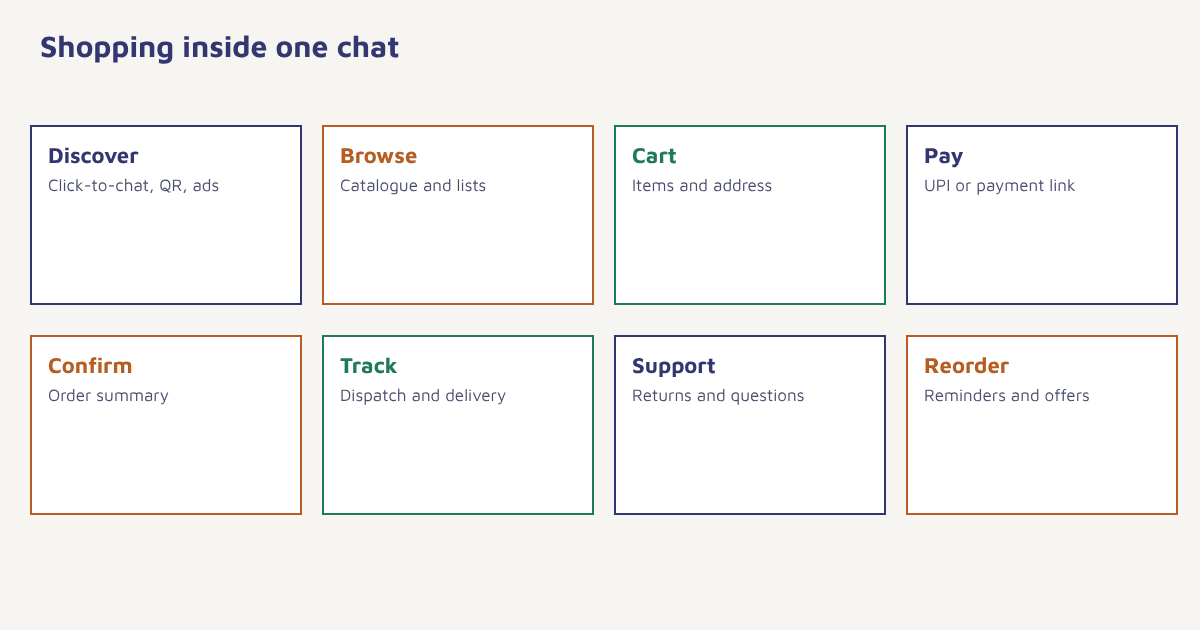
- Discovery. The customer taps a click-to-chat button on your website, an advert, a QR code on a package or a social post.
- Greeting and routing. A short automated welcome offers choices: browse products, track an order, talk to someone.
- Browsing. The customer views a catalogue or receives a curated list of products with photos and prices.
- Questions. A bot answers common questions about sizes, delivery and returns, and passes complex ones to a person.
- Cart and address. The customer confirms items, quantity and delivery address, using buttons where possible.
- Payment. A payment link or UPI request is shared. Cash on delivery can be confirmed with an order summary.
- Confirmation and tracking. Order, dispatch and delivery updates arrive as template messages.
- After-sales. Returns, reviews and reorder reminders continue in the same thread.
This works especially well where customers already prefer chat to forms: fashion, jewellery, home decor, groceries, pharmacies, local services and high-consideration products where questions matter. Look at the sector pages for ecommerce, travel and healthcare for examples.
How to set up WhatsApp commerce
- Choose the route. The Business App for a few chats a day, the Business API for scale. Read the API guide for the trade-offs.
- Prepare your catalogue. Good photos, clear names, prices, variants and links to product pages.
- Collect opt-in. Get clear permission to message customers. See WhatsApp marketing and the DPDP Act guide.
- Create your templates. Order confirmation, shipping, delivery, cart reminder and feedback, submitted for approval.
- Design the conversation. Draft the greeting, menu, FAQ answers and the moments that hand over to a person.
- Connect your store and payments. Orders should flow into your order system and stock should stay in sync.
- Test with real customers. Start with a small group, read the conversations and fix confusing steps.
- Measure and improve. Track conversion from chat started to order, response times and satisfaction.
In Flowfox, WhatsApp is one of the channels in a journey, so a cart reminder, order update and review request can run from the same customer profile as your email and SMS, with opt-in recorded in the contact record. FlowConnect links your store and order data.
What to automate and what to leave to people
| Automate | Keep human |
|---|---|
| Greeting and menu | Complaints and emotional situations |
| Order status and tracking | Custom or high-value orders |
| Store hours, delivery and returns FAQs | Negotiation and special requests |
| Cart and payment reminders | Sensitive health or financial advice |
| Feedback requests | Anything the bot did not understand twice |
Always give a visible way to reach a person, and respond to human handover quickly. A bot that traps people is worse than no bot.
Policies, consent and good conduct
WhatsApp has business and commerce policies that cover what can be sold, how users must opt in, how templates are categorised and how often you may message. Payments in India often run on UPI, and whether they can be completed inside the chat depends on your setup. Pricing for business conversations or messages has changed in the past and is set by Meta, so check the current price list for your country instead of assuming a figure. Respect opt-out requests immediately, never send unrequested promotions to bought lists and honour data protection law; in India that includes the Digital Personal Data Protection Act. For context on the broader field, see the overview of conversational commerce. Our guide to WhatsApp broadcasts covers promotional sending in detail.
A worked example (invented)
A home-textiles brand in Jaipur sells bedsheets and curtains. Customers often send room photos and ask which colours would suit. The brand adds a click-to-chat button on product pages and a QR code on packaging. A short automated greeting offers “browse”, “track order” and “talk to a designer”. Browsing shows curated catalogue collections, while design questions go to staff. Orders are confirmed with a summary and a payment link, and dispatch and delivery messages follow as templates. A cart reminder goes out once, two hours after an abandoned cart, only to customers who opted in. After a few months, chat-led orders become a noticeable share of total orders, with a higher average basket than the website because staff can suggest matching items. The brand and results are invented, but the structure is a sound starting point.
Measuring WhatsApp commerce
| Metric | What it shows |
|---|---|
| Chats started by source | Which entry points work |
| Chat-to-order conversion | How well the conversation sells |
| First response time | Speed matters in chat |
| Resolution without a human | How well automation works |
| Average order value | Basket size from chat |
| Opt-out and block rate | Whether messages are welcome |
| Repeat orders from chat customers | Long-term value |
Compare these with your other channels in analytics, and see our guide to email vs SMS vs WhatsApp for deciding which channel fits each message.
Common mistakes
- Messaging without consent. It causes blocks and can breach policy and law.
- An over-clever bot. Keep menus short and hand over early.
- Slow human replies. Chat implies speed.
- Messy catalogue. Poor photos and missing prices lose sales.
- Unsynced stock. Selling items you do not have in a chat is awkward.
- Too many promotions. Conversations are personal space.
On WhatsApp, the shop counter and the receipt live in the same thread. Treat it with the care you would give a customer standing in front of you.
Sell where your customers already talk. Run WhatsApp conversations, orders and updates from one customer profile.
Read next: WhatsApp chatbot, abandoned cart recovery and the blog.
Frequently asked questions
What is WhatsApp commerce?
WhatsApp commerce is selling products or services through WhatsApp conversations, including browsing a catalogue, asking questions, ordering, paying and getting order updates in the chat.
Do I need the WhatsApp Business API for commerce?
Not for a small shop, which can use the WhatsApp Business App. The API is better for larger volumes, automation, several agents and integration with your systems.
Can customers pay inside WhatsApp?
It depends on the country, the account and the setup. Many businesses share UPI or payment-gateway links in chat. Check what is currently available for your market.
Do I need customer consent to message on WhatsApp?
Yes. You need clear opt-in before sending business messages, and you must honour opt-outs promptly, in line with WhatsApp policy and data protection law.
What should a WhatsApp chatbot handle for a store?
Greetings, menus, order tracking, delivery and returns FAQs, and cart reminders, with an easy handover to a person for complex or sensitive requests.
How much does WhatsApp commerce cost?
Costs depend on your provider and on Meta pricing for business messages, which has changed over time. Check the current price list and your provider’s fees for your country.
Which businesses suit WhatsApp commerce best?
Businesses where customers ask questions before buying, such as fashion, home decor, jewellery, groceries, pharmacies and local services, tend to benefit most.