Most push notification advice is a list of tips. This guide is a list of actual messages: what a good one looks like for each situation, how it is built, and why it works. A push notification has about two lines and a second of attention to earn a tap, so every word counts. Below you will find the anatomy of a notification, thirty-odd example messages grouped by purpose, the payload behind them, rules for timing and frequency, a worked example and the mistakes that get notifications muted. If you are new to the channel, start with our guide to push notifications and come back for the copy.
The anatomy of a good push notification
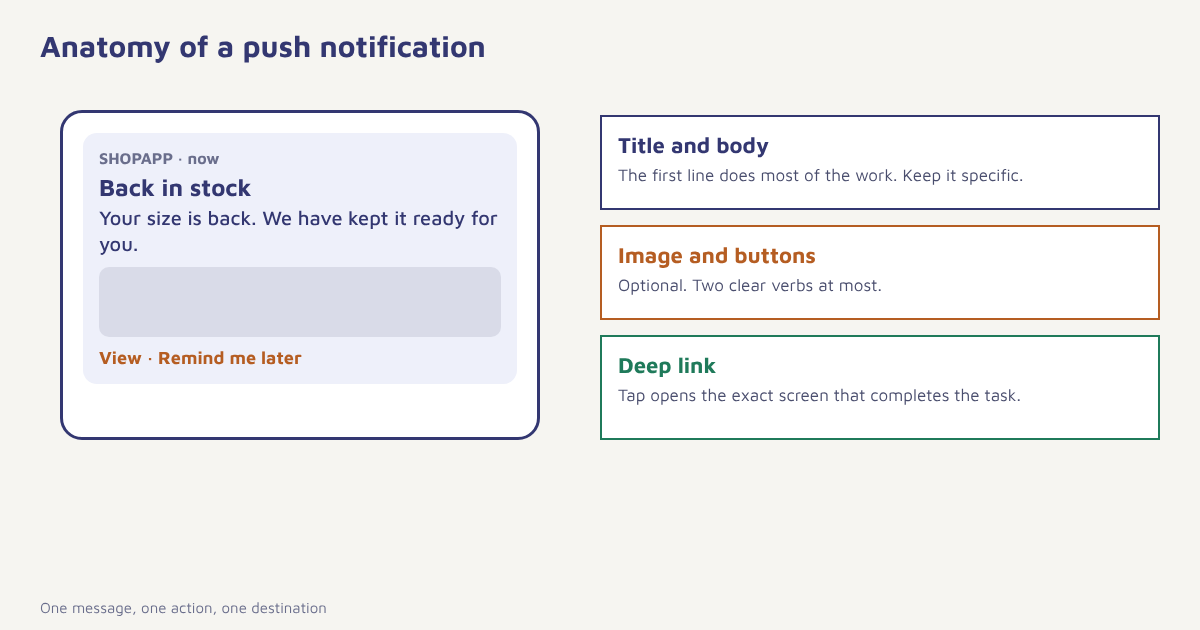
A push notification is built from a few parts, and each one has a job. The platform decides how much of each part is shown, which is why the first line matters most.
| Part | Job | Practical limit |
|---|---|---|
| Title | Say what this is about in a few words | Keep it short; long titles are cut off on lock screens |
| Body | Give the reason to tap: the detail, the benefit, the deadline | Front-load the important words, since previews truncate |
| Image (optional) | Show the product, place or person | Large images are shown differently by each OS version |
| Action buttons (optional) | Let people act without opening the app | Two clear verbs at most |
| Deep link | Open the exact screen that completes the task | Never land on the home screen. See deep linking |
| Sound and badge | Signal urgency or count | Use sparingly. See notification badges |
Four rules behind every example
- Specific beats clever. “Your order #4821 is out for delivery” outperforms a pun every time, because it tells the person something they care about.
- One message, one action. If the notification asks for two things, it gets neither.
- Relevant to what they did. Base it on behaviour, not on the calendar. See behavioral segmentation.
- Worth interrupting for. Ask whether you would want to be interrupted by this message at this moment.
Push notification examples by purpose
Transactional and service
| Situation | Example message | Why it works |
|---|---|---|
| Order shipped | Your order is on its way. Arriving Thursday by 8 pm. Track it here. | Useful, time-bound, one action |
| Payment received | Payment of ₹1,499 received. Thank you, Asha. | Confirms what happened, builds trust |
| Payment failed | Your payment didn’t go through. Tap to try another method. | Clear problem, clear fix |
| Delivery delay | Your parcel is running a day late. New date: Friday. Sorry for the wait. | Honest and specific |
| Appointment reminder | Dr. Mehta, tomorrow 11:30 am. Tap to confirm or reschedule. | Two clear options |
| Security alert | New sign-in from a new device. Was this you? | Urgent, personal, safe |
Behavioural and triggered
| Situation | Example message | Why it works |
|---|---|---|
| Item left in cart | Still thinking about the grey trainers? They’re waiting in your cart. | Names the item, gentle tone |
| Price drop on viewed item | The jacket you looked at is now ₹500 lower. | Based on real interest |
| Back in stock | Good news: your size is back. We’ve kept it ready for you. | Answers a request they made |
| Browse without buying | Not sure which one to pick? Here is a quick comparison. | Helps, does not push |
| Streak at risk | You’re 1 day from a 7-day streak. Two minutes is enough. | Clear stakes, low effort |
| Goal progress | You’re 80% of the way to your monthly saving goal. | Progress feels good |
Promotional
| Situation | Example message | Why it works |
|---|---|---|
| Sale starting | Our weekend sale starts at 6 pm. Your saved items are included. | Time and relevance |
| Festival offer | Diwali gifts, delivered in time. Order by Friday for guaranteed delivery. | Real deadline |
| New arrival in liked category | New in running: three styles we think you’ll like. | Category-based |
| Loyalty reward | You have 300 points. That’s a free coffee waiting. | Concrete value |
Re-engagement and lifecycle
| Situation | Example message | Why it works |
|---|---|---|
| Welcome | Welcome, Asha. Set up your first goal in one minute. | One easy next step |
| Inactive 14 days | It’s been a while. Here is what is new since your last visit. | Reason to return |
| Win-back | We’ve missed you. Here is ₹200 off, valid for 7 days. | Incentive with limit. See win-back campaigns |
| Feature launch | Try the new bill splitter: share costs in two taps. | Benefit, not feature name |
| Renewal coming | Your plan renews on 12 Nov. Review or change it anytime. | Respectful notice |
The example messages above are illustrations for style. Adapt names, amounts and tone to your own brand, and check that every claim in a message, such as a price or delivery date, is true when the message is sent.
What the payload looks like
Behind each example is a small structured message sent through the platform push service. This is a simplified illustration of an iOS-style payload with a title, body, a category for action buttons and a custom field that carries the deep link. Real payloads depend on your provider and SDK.
{
  "aps": {
    "alert": {
      "title": "Back in stock",
      "body": "Your size is back. We've kept it ready for you."
    },
    "category": "PRODUCT_ACTIONS",
    "sound": "default"
  },
  "deeplink": "myapp://product/TR-07?size=9",
  "campaign": "back_in_stock_oct"
}
In Flowfox, the same content is set in a journey step or a campaign, with variables from the profile, as described on the push channel page. The SDK on the device handles delivery, taps and the deep link.
Timing and frequency
A perfect message at the wrong time is a bad message. Triggered messages should go out when the event happens or soon after. For promotional pushes, test windows against your own engagement data and avoid late nights. Our guide to the best time to send email applies the same testing method. Cap the number of notifications per person per day and per week across all campaigns, because people who feel spammed simply switch notifications off, which is hard to reverse. See push opt-in rates for why that permission is precious.
How to write a notification in five minutes
- Name the moment. What did the person just do, or what is about to happen?
- State the one thing that matters. The detail, the benefit or the deadline.
- Write the first line as if it were the whole message. It may be truncated.
- Pick the destination screen. Deep link to exactly where the action is completed.
- Test on real devices. Check the preview on iOS and several Android phones, in light and dark mode.
A worked example
Imagine a grocery app that wants to reduce abandoned baskets. Its first attempt is a generic push at 9 pm every day: “Don’t forget your groceries!”. It is ignored. The second version triggers two hours after a basket is left, names the first two items, mentions that slots for tomorrow morning are filling, and opens the basket directly. A third version adds a rule: if the person has already ordered since, send nothing. The team compares each version against a holdout group that gets no push and measures orders per recipient. The numbers are not shown here because the example is invented, but the pattern is typical: relevance, timing and suppression do more than copywriting tricks.
For more on messaging that responds to behaviour, see abandoned cart recovery, event-triggered marketing and mobile app engagement. Apple publishes interface guidelines for notifications at Apple’s Human Interface Guidelines, which are worth reading before you design rich notifications, and the idea of a clear call to action applies to push as much as to email.
Mistakes that get notifications muted
- Generic blasts. The same message to everyone, at the same time.
- Fake urgency. “Last chance!” every week teaches people to ignore you.
- Landing on the home screen. The tap should finish the job.
- Too many a day. Frequency caps protect your permission.
- Promotional messages dressed as alerts. It erodes trust and can break platform rules.
- Never testing on real devices. Truncation surprises are common.
A good push notification feels like a helpful tap on the shoulder. A bad one feels like a pop-up ad on the lock screen.
Send pushes people actually open. Trigger them from behaviour, cap frequency and measure against a holdout.
Read next: push vs SMS, silent push notifications and the blog.
Frequently asked questions
What makes a good push notification?
A good push notification is specific, relevant to something the person did, asks for one action and opens the exact screen that completes it, at a time that suits them.
How long should a push notification be?
Keep the title to a few words and the body to one or two short lines. Put the key information first because lock screens truncate longer text.
What are examples of push notifications?
Order and delivery updates, payment confirmations, cart reminders, price drops, back-in-stock alerts, streak reminders, sale announcements, welcome messages and win-back offers.
How many push notifications per day is too many?
There is no universal number. Set a daily and weekly cap across all campaigns, watch opt-out and mute rates, and lower the cap if they rise.
Should I use emojis in push notifications?
Sparingly and only if they suit your brand. Test them, and check that they display correctly on all devices.
Can I send promotional push notifications?
Yes, for users who have allowed notifications, but follow platform rules and your own consent promises, and keep promotional pushes relevant and limited.
How do I test a push notification?
Send test messages to real iOS and Android devices, check truncation in light and dark mode, confirm the deep link opens the right screen and compare variants against a holdout group.