You send a push notification about a pair of shoes. The customer taps it, and the app opens on the home screen. Now they have to search for the shoes themselves, and many will not bother. Deep linking fixes this: it makes a link open the exact screen inside the app that the message promised. It sounds like a developer detail, but it decides whether your push, SMS, email and WhatsApp messages complete the journey or drop people at the start. This guide explains what deep links are, the different types, how they work on iOS and Android, how to use them in campaigns, how to test them and the problems that most often break them.
What is a deep link?
A deep link is a link that points to a specific location inside an app, such as a product page, an order tracker or a particular lesson, instead of just launching the app. The wider idea of linking to content inside a page rather than its front door is described under deep linking. In mobile marketing, it means that a tap on a notification, message or ad takes the person straight to the relevant screen, with the right content loaded.
Types of deep links
| Type | Example | How it works | Best for |
|---|---|---|---|
| URI scheme link | myapp://product/TR-07 | A custom scheme registered by the app | Simple internal links, push payloads; fails if the app is not installed |
| Universal Link (iOS) | https://shop.example.com/p/TR-07 | A normal web URL that opens the app when installed, otherwise the website | Email, SMS, ads, anywhere a web link is expected |
| App Link (Android) | https://shop.example.com/p/TR-07 | A verified web URL that opens the app | Same as above on Android |
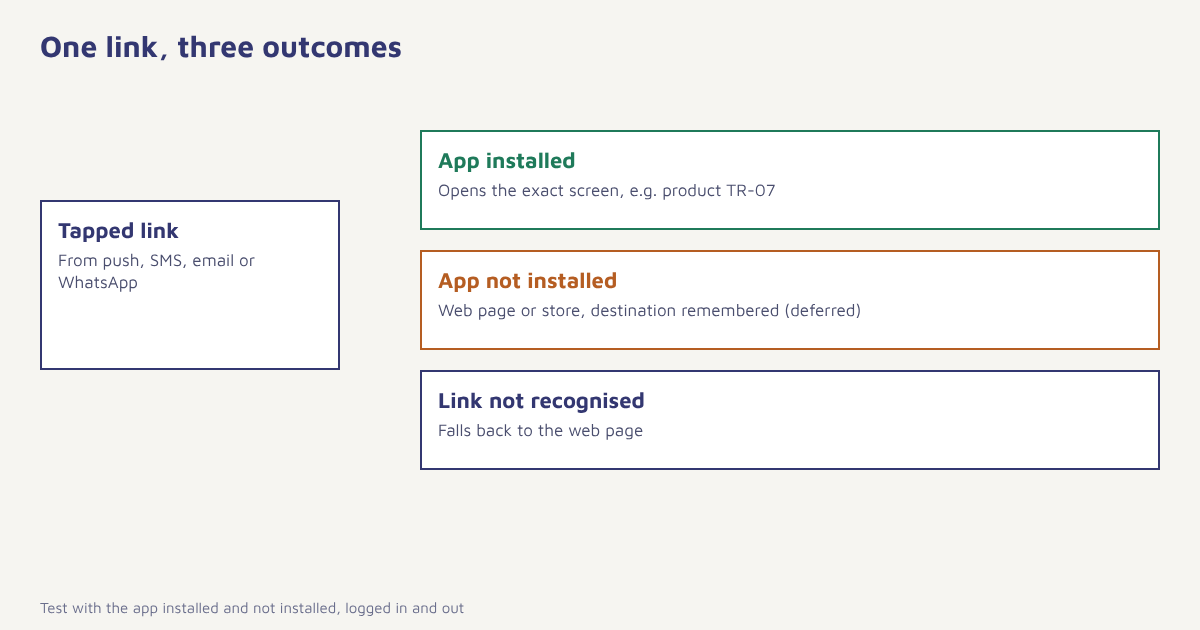
| Deferred deep link | Link that survives install | Remembers the destination, and opens it after the user installs and launches the app | New user acquisition and install campaigns |
| Contextual deep link | Link carrying campaign or referral data | Adds parameters such as source, coupon or referrer | Attribution, referrals, personalised onboarding |
Apple documents Universal Links and Google documents Android App Links. Details change with operating system versions, so always check the current guidance before you implement.
Why deep links matter for marketing
- Less friction. Every extra tap loses people. The right screen at the first tap lifts completion. See conversion rate optimization.
- Messages keep their promise. A notification about a price drop opens that product.
- Better measurement. Parameters tell you which campaign brought the person.
- Onboarding that continues. A friend invite can open the app with the invitation already applied. See referral programs.
- Cross-channel consistency. The same link can work in SMS, email, WhatsApp and push.
How it works under the hood
With web-style links (Universal Links on iOS and App Links on Android), your website domain hosts a small file that tells the operating system which app is allowed to open which links. When a user taps such a link, the system checks the file and, if the app is installed, opens it and passes the URL. The app then reads the path and parameters and shows the right screen. If the app is not installed, the link simply opens in the browser, which can show the product or send the person to the store.
// Android: /.well-known/assetlinks.json (simplified illustration)
[{
  "relation": ["delegate_permission/common.handle_all_urls"],
  "target": {
    "namespace": "android_app",
    "package_name": "com.example.shop",
    "sha256_cert_fingerprints": ["AA:BB:...:FF"]
  }
}]

// iOS: /.well-known/apple-app-site-association (simplified illustration)
{
  "applinks": {
    "details": [{
      "appIDs": ["TEAMID.com.example.shop"],
      "components": [{ "/": "/p/*" }, { "/": "/orders/*" }]
    }]
  }
}
These are only illustrations to show the idea. The exact file format, location and signing details are specified by Apple and Google, and your developers should follow the current documentation.
Using deep links in campaigns
| Channel | How to use deep links | Tip |
|---|---|---|
| Push | Put the destination in the payload so a tap opens the right screen. See push examples | Use web-style links when you can; they degrade gracefully |
| Use universal or app links for buttons; they open the app on phones that have it | Test in major email apps, some open links in an in-app browser | |
| SMS | Short links that resolve to a universal link | Keep within DLT rules for links. See DLT approval |
| Buttons or links in templates | Template links may need to be approved. See WhatsApp templates | |
| In-app messages | Buttons that route to another screen. See in-app messaging | Handle expired or unavailable destinations |
| QR codes | Print a link that opens the app or falls back to the store | Add campaign parameters |
In Flowfox, a button in a campaign, journey or email can carry a deep link, with profile variables such as the product ID, so that each person lands on their own item. See the push, SMS and WhatsApp channel pages, and the developer docs for SDK setup.
How to set up and test deep linking
- List the destinations you need. Product, cart, order, offer, profile, category. Map each to a URL pattern.
- Choose web-style links first. Use universal or app links, with URI schemes only for internal routing.
- Publish the association files. Host the files on your domain as your developers specify, and verify them.
- Handle the incoming link in the app. Parse the path and parameters, load the screen and the data.
- Plan the fallback. If the app is not installed, show the web page or send to the store with the destination remembered.
- Add campaign parameters. Source, medium, campaign and any coupon, for measurement.
- Test on real devices. Test with the app installed and not installed, with the user logged in and out, in several apps such as mail clients and messengers.
Why deep links break
| Symptom | Likely cause | Fix |
|---|---|---|
| Opens the browser although the app is installed | Association file missing, wrong or not verified; link opened inside another app’s browser | Check the files and use a link that the system recognises |
| Opens the app on the home screen | App ignores the path or the screen is not handled | Implement routing for every link pattern |
| Works when open, not from a cold start | Link handled too late in the launch | Handle the launch URL early and store it |
| Needs login first and then loses the destination | Destination not kept through sign-in | Save the destination and resume after login |
| Wrong product shown | Parameter mismatch or stale cache | Validate IDs and fetch fresh data |
| Breaks after a redesign | Routes renamed | Keep old routes working or redirect |
A worked example
A fashion app sends a price-drop notification for a jacket. In version one, the payload contains only the app name, so a tap opens the home screen. The team changes it so the payload carries a link to the product page and the size the customer viewed. For people without the app installed, the same link opens the mobile web page, which offers to install the app and remembers the product for later. They also add a rule that if the item is out of stock when the link is opened, the screen shows similar products and a back-in-stock option. The brand and flow are invented and no results are claimed, but each change removes a point where a person could give up. For the related reminder flow, see abandoned cart recovery.
Governance matters too. Links that carry personal data in the URL can leak it through logs and referrers, so pass identifiers, not names or emails. Links that perform an action, such as applying a discount, should be validated server side. And since links are often opened in many contexts, make sure that your privacy practices cover the tracking parameters you attach. For background on how apps are distributed and opened, see mobile apps.
Common mistakes
- Landing on the home screen. It defeats the point.
- Using only custom schemes. They fail when the app is missing.
- No fallback. New users see an error.
- Skipping tests inside email and chat apps. They often open links in their own browser.
- Personal data in URLs. It leaks.
- Forgetting login state. Keep the destination through sign-in.
A deep link is a promise. The message says where you are going, and the link has to take you there.
Send people to the exact screen. Add deep links to push, email, SMS and WhatsApp with profile variables.
Read next: mobile app engagement, what is an SDK and the blog.
Frequently asked questions
What is a deep link?
A deep link is a link that opens a specific screen inside an app, such as a product page or order tracker, instead of only launching the app.
What is the difference between a universal link and a deep link?
A universal link is a type of deep link on iOS that uses a normal web URL and opens the app if installed, otherwise the website. Android has a similar feature called App Links.
What is a deferred deep link?
A deferred deep link remembers the destination when the app is not installed, and opens it after the user installs and launches the app.
Why does my deep link open the browser instead of the app?
Common causes are a missing or unverified association file, a link opened inside another app’s browser, or the app not handling that path.
Can I use deep links in email and SMS?
Yes. Use web-style universal or app links so they work whether or not the app is installed, and test in the mail and messaging apps your customers use.
How do I track campaigns with deep links?
Add campaign parameters such as source, medium and campaign name to the link, read them in the app and send them as event properties.
Are deep links safe?
They can be, if you avoid personal data in URLs, validate parameters on the server and treat links that trigger actions with care.