A push notification can only be sent to someone who has said yes. That yes, the permission, is the real asset, and everything in your push programme depends on how many people give it and keep it. Teams often search for an “average push opt-in rate” and find numbers that disagree wildly, because opt-in depends on the platform, the version of the operating system, the type of app and above all the moment you ask. This guide does not give you a benchmark to chase. It explains how opt-in works on each platform, how to measure your own rate properly, what moves it and how to ask in a way that earns permission without burning it.
What is a push opt-in rate?
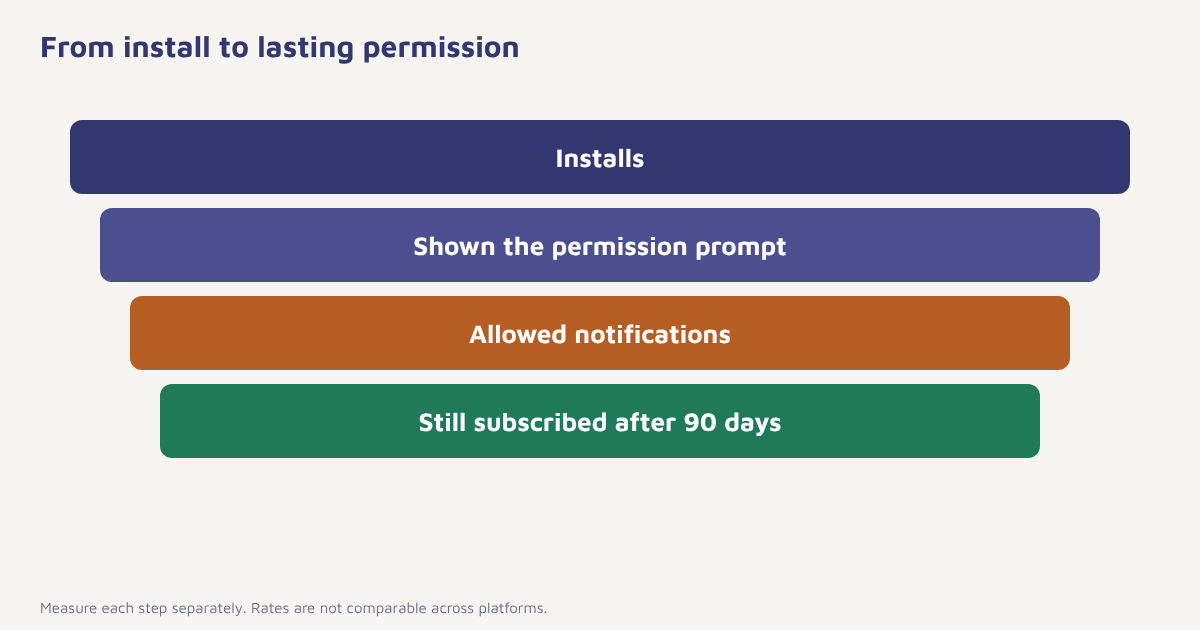
The opt-in rate is the share of your app users who have allowed notifications. It sounds simple, but there are several ways to count it, and mixing them up is the main reason rates are hard to compare. Before looking at numbers, decide which version you are tracking. See also our general guide to push notifications and the background on opt-in consent.
| Measure | Formula | What it tells you |
|---|---|---|
| Overall opt-in rate | Users with permission ÷ all active users × 100 | How big your reachable audience is |
| Prompt acceptance rate | Users who allowed ÷ users shown the prompt × 100 | How well you ask |
| Prompt reach rate | Users shown the prompt ÷ installs × 100 | Whether people ever see the ask |
| Retained subscription rate | Users still subscribed after 90 days ÷ users who allowed × 100 | How well you keep permission |
Count the same way every time. Write down the definition, the date range and the platforms included. A rate of 60 percent on active users and a rate of 40 percent on all installs can describe the same app.
How permission works on each platform
The rules differ by operating system, and they have changed over time, so check the current documentation for the versions you support. In general, iOS has long required an explicit permission prompt for notifications, which can only be shown once in the normal flow, so a poorly timed ask is costly. Android historically allowed notifications by default, but newer versions introduced a runtime notification permission, described in the Android developer documentation. Browsers have their own prompt for web push, covered in our web push guide.
| Platform | How permission is typically requested | Implication |
|---|---|---|
| iOS | System prompt, shown once; later changes happen in Settings | Do not waste the single prompt |
| Android (newer versions) | Runtime permission prompt that can be shown under conditions | Ask at a meaningful moment |
| Android (older versions) | Notifications on by default; users can turn them off | Opt-in looks high, but engagement may be low |
| Web browsers | Browser prompt, controlled per site | Sites that ask on page load are often blocked |
Because defaults differ, never compare an Android rate on older versions with an iOS rate and conclude that one audience likes you more. Segment by platform and OS version.
What moves the rate
| Factor | Effect | What to do |
|---|---|---|
| Timing of the ask | Asking at first launch, before value is shown, usually performs worse | Wait until the user has seen what notifications would do for them |
| Pre-permission message | An in-app screen that explains the benefit before the system prompt | Show it first; only trigger the system prompt if they say yes |
| Clarity of the benefit | People allow what they understand | Name the exact notifications: delivery updates, price drops, reminders |
| Type of app | Delivery, banking and messaging apps have obvious reasons; others must earn it | Match the ask to real utility |
| Trust in the brand | New or unknown brands face more doubt | Show reviews, say how often you will message |
| Past behaviour | Spammy history leads to opt-outs | Control frequency |
| Design of the ask | Clear choice, no tricks | Offer a visible “not now” and ask again later in context |
How to ask for permission well
- Pick the right moment. Ask right after an action that makes notifications obviously useful, such as placing an order or following a team.
- Use a pre-permission screen. Explain in one line what they will get and how often. Keep the system prompt in reserve.
- Be specific. “Get delivery updates for this order” works better than “Allow notifications”.
- Offer control. Let people choose topics or frequency so they do not have to choose all or nothing. See progressive profiling.
- Respect a no. If someone declines, do not ask again straight away. Retry later in a new context, with a reasonable limit.
- Offer an in-app alternative. If they decline, use in-app messages and an inbox, and consider other consented channels such as email.
Do not use dark patterns, such as hiding the decline option or using shame in the button text. Apart from being unpleasant, they can attract complaints and violate platform and privacy rules. See the discussion of dark patterns and our guide to consent management. For Indian rules, read about the DPDP Act.
How to measure your own rate
-- Illustrative schema: devices(user_id, platform, os_version, push_allowed, prompt_shown_at)
SELECT platform,
       COUNT(*)                                        AS active_devices,
       SUM(push_allowed)                               AS allowed,
       ROUND(100.0 * SUM(push_allowed) / COUNT(*), 1)  AS opt_in_pct,
       ROUND(100.0 * SUM(push_allowed)
             / NULLIF(SUM(prompt_shown_at IS NOT NULL), 0), 1) AS prompt_acceptance_pct
FROM devices
WHERE last_seen_at >= CURDATE() - INTERVAL 30 DAY
GROUP BY platform;
In Flowfox, the device and permission state lives on the contact profile, so you can build a segment of users who have not yet allowed notifications and show them a tailored in-app prompt or fall back to another channel through a journey. Trends then appear in analytics.
Keeping permission once you have it
Getting a yes is half the work. People can turn notifications off in system settings at any time, and some will do so silently, so you may only see the change as falling delivery. Watch the share of subscribers who remain after 30, 60 and 90 days. Control frequency, send only messages the person would value and use suppression rules so that nobody receives a reminder for something they have already done. Review which campaigns are followed by sharp drops in permission, and retire them. A single bad campaign can undo months of careful asking. Our guide to push notification examples shows messages worth sending.
A worked example
A food-delivery app notices that its overall opt-in is lower on iOS than on Android and assumes iOS users dislike notifications. A closer look shows that the app asks for permission at first launch, before the user has even browsed. The team moves the ask to the order-confirmation screen, with a pre-permission line: “Get live updates when your order is picked up and on its way.” It also adds a topic choice: order updates on by default, offers off until chosen. Over the next cohorts, prompt acceptance rises and complaints about unwanted offers fall. The numbers are not shown because the app and the result are invented, but the logic holds: ask in context, explain the value, give control.
Common mistakes
- Chasing an average. Industry averages mix platforms, versions and app types.
- Asking on first launch. People have no reason yet.
- Wasting the iOS prompt. You rarely get a second system prompt.
- Ignoring Android versions. Defaults vary.
- Over-sending. Opt-outs in system settings are silent.
Permission is not a number to inflate. It is trust you borrow one message at a time.
Know who you can reach. Track permission by platform and follow up with other channels where needed.
Read next: mobile app onboarding, notification badges and the blog.
Frequently asked questions
What is a good push notification opt-in rate?
There is no single good rate. It depends on the platform, OS version, app type and when you ask. Track your own rate by platform and improve it over time.
How do you calculate push opt-in rate?
Divide the number of users with notification permission by all active users and multiply by 100. Also track prompt acceptance, which divides those who allowed by those who were shown the prompt.
Why is push opt-in lower on iOS than Android?
iOS has long required an explicit prompt, while older Android versions allowed notifications by default. Newer Android versions require a runtime permission, so rates are not directly comparable.
When should I ask for push permission?
Ask after the user has done something that makes notifications clearly useful, such as placing an order, and explain the benefit first with a pre-permission screen.
What is a pre-permission prompt?
It is a screen inside your app that explains what notifications the user will get and why, shown before the real system prompt, so that you only trigger the system prompt for people likely to accept.
Can I ask again if a user declines?
Yes, but wait, ask in a new and relevant context and limit the number of retries. On iOS, further changes must be made by the user in Settings.
How do I keep people subscribed?
Control frequency, send relevant messages, suppress ones people no longer need and review which campaigns cause opt-outs.