Web push notifications reach people who are not on your website at all. A visitor reads an article on Monday, allows notifications, and on Thursday a message appears on their phone or desktop even though the browser tab is closed. For publishers, ecommerce sites and any business without a mobile app, it is a way to bring people back without needing their email address or app install. It is also one of the easiest channels to misuse, because the permission prompt appears in front of strangers. This guide explains how web push works, what you need to set it up, how to ask permission without being blocked, which messages work, how browser support varies and how web push compares with app push, email and SMS.
What are web push notifications?
Web push notifications are messages that a website sends to a subscriber’s browser, delivered through the browser vendor’s push service, and shown by the operating system as a notification. They rely on the browser’s Push API and notifications features, and on a background script called a service worker. They are a cousin of mobile push notifications but work without an app. If you do have an app, read our guide to push notifications.
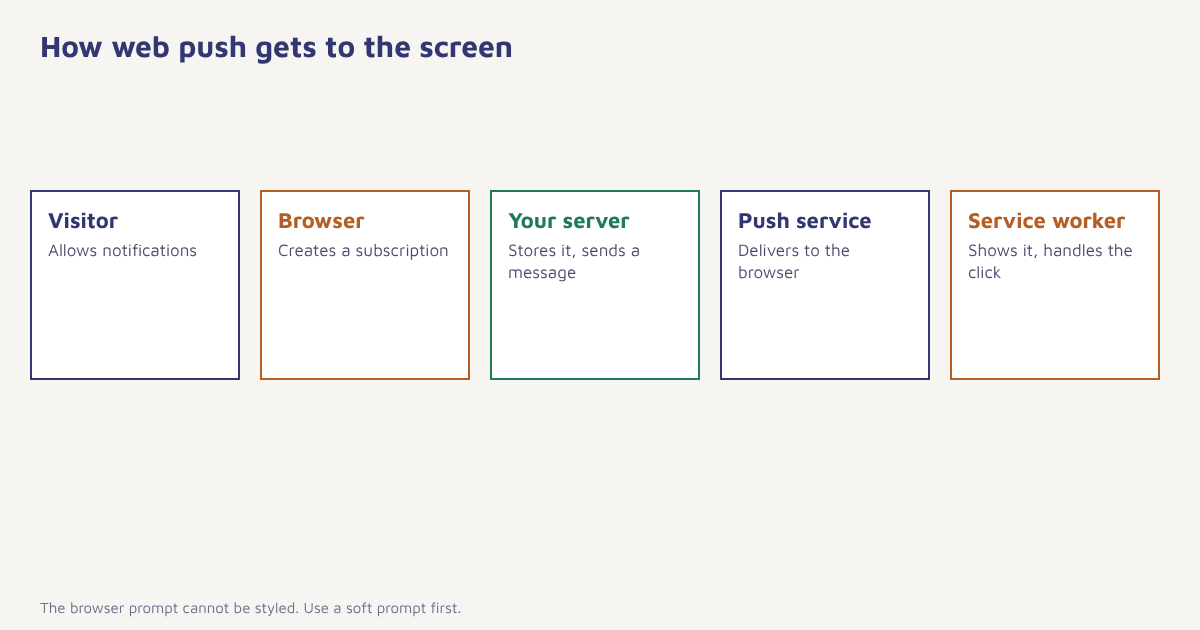
How web push works
- The site registers a service worker. A small script that the browser keeps and can wake in the background.
- The visitor is asked for permission. The browser shows its own prompt. The site cannot style it.
- The browser creates a subscription. It contains an endpoint URL for that browser and keys for encryption.
- Your server stores the subscription. Linked to the visitor’s profile where possible.
- You send a message. Your server posts an encrypted payload to the endpoint, authenticated with your server keys.
- The browser push service delivers it. Even if the site is closed, as long as the browser can run.
- The service worker shows the notification. And handles the click by opening or focusing a page.
// Simplified illustration of a subscription flow
const reg = await navigator.serviceWorker.register('/sw.js');
const permission = await Notification.requestPermission();
if (permission === 'granted') {
  const sub = await reg.pushManager.subscribe({
    userVisibleOnly: true,
    applicationServerKey: PUBLIC_VAPID_KEY
  });
  await fetch('/api/push/subscribe', { method: 'POST', body: JSON.stringify(sub) });
}

// sw.js
self.addEventListener('push', e => {
  const d = e.data.json();
  e.waitUntil(self.registration.showNotification(d.title, { body: d.body, data: { url: d.url } }));
});
self.addEventListener('notificationclick', e => {
  e.notification.close();
  e.waitUntil(clients.openWindow(e.notification.data.url));
});
The code is a sketch to show the pieces, not production code. The VAPID keys identify your server to the push services, and the details are defined in web standards. Your developers or your platform’s SDK handle the rest.
Browser and device support
Support has changed over the years and still differs by browser, operating system and whether the site is installed as a progressive web app. Desktop Chrome, Edge and Firefox have supported web push for a long time. Android browsers generally support it too. On Apple devices, support has historically been more limited and has depended on the OS version and, for iPhones, on the site being added to the home screen, so verify the current position in Apple’s and your platform’s documentation before planning a campaign. Never assume that every visitor can receive web push.
| Environment | What to check |
|---|---|
| Desktop Chrome, Edge, Firefox | Generally supported; check privacy settings and browser quiet-notification features |
| Android browsers | Generally supported; users may have blocked site notifications in system settings |
| Safari on Mac | Support depends on version; check current documentation |
| Safari on iPhone and iPad | Depends on OS version and often on installing the site to the home screen; verify current rules |
| In-app browsers (social apps, email apps) | Often unsupported |
| Private browsing | Subscriptions are usually not kept |
Asking for permission without being blocked
Browsers are strict about permission because sites have abused it. Many browsers now suppress or quiet the prompt on sites that users routinely decline, and a blocked site is hard to recover. The same principles as for app push apply, as covered in push opt-in rates, but with added care.
- Never ask on page load. The visitor knows nothing about you yet.
- Use a soft prompt first. A message on the page, styled by you, explains the value and offers “Yes, notify me” and “Not now”. Only trigger the browser prompt after a yes.
- Ask after value. For example after reading a second article, or when viewing an out-of-stock product.
- Be specific. “Tell me when this is back in stock” beats “Allow notifications”.
- Remember a no. Do not show the soft prompt again for a while.
Messages that work on web push
| Use case | Example | Notes |
|---|---|---|
| Publishers | New article in a topic the reader follows | Let readers choose topics |
| Ecommerce | Back in stock, price drop, cart reminder | Tie to a product the visitor viewed. See back-in-stock alerts |
| Travel | Fare change for a searched route | Time-sensitive and personal |
| Events and webinars | Starting in 15 minutes | Short and useful |
| Service updates | Order status, appointment reminder | Strong reasons to subscribe |
| Re-engagement | New content since the last visit | Use sparingly |
Web push is best for timely, low-effort messages with a clear destination. Tie each message to visitor behaviour using event-triggered marketing, set frequency caps and measure results by clicks, return visits and conversions rather than sends. For message copy, see push notification examples.
Web push vs app push vs email vs SMS
| Web push | App push | SMS | ||
|---|---|---|---|---|
| Needs an app | No | Yes | No | No |
| Needs contact details | No, a browser subscription is enough | No, device token | Email address | Phone number |
| Reach | Subscribed browsers that are reachable | Installed apps with permission | Anyone with a valid address | Nearly all phones |
| Richness | Short, with optional image | Short, with rich options | High | Low |
| Identity | Anonymous until the visitor identifies | Tied to app user | Known person | Known person |
| Best for | Return visits, alerts | Engagement with app users | Stories, offers, records | Urgent, OTP, reminders |
A subscription is tied to a browser on a device, not to a person. One customer may have several, and clearing browser data removes it. Link subscriptions to a profile when the visitor logs in, so that web push joins your other channels. In Flowfox, the web messaging channel and push channel work with the same contact profile, so a journey can try web push first and fall back to email if the visitor is not reachable. For the decision between channels, see email vs SMS vs WhatsApp and push vs SMS.
A worked example
An online bookstore with no app wants to bring back readers who view books but do not buy. It adds a soft prompt on product pages for out-of-stock books: “Want a heads-up when this is back?”. Only people who click yes see the browser prompt. A service worker handles the notification, and the click opens the book page with the add-to-cart button ready. A journey sends one notification when stock returns and nothing afterward unless the person views another out-of-stock title. A second flow, for subscribers who have not visited for a month, sends at most one message about new arrivals in a genre they browsed. The store and flows are invented, and no results are claimed. The point is the design: ask at a moment of real need, send rarely, link straight to the item.
Privacy and compliance apply to web push as to any messaging. Be clear about what you will send, record the permission and its source, give an easy way to unsubscribe in the notification settings or on your site, and read our guides to consent management and the DPDP Act. If you serve visitors in Europe, also consider rules such as the GDPR and ask your legal adviser about your case.
Common mistakes
- Prompting on page load. It gets you blocked.
- Assuming all browsers work. Check support, especially on Apple devices.
- Sending the same broadcast to everyone. Segment by interest and behaviour.
- Ignoring identity. Anonymous subscriptions limit personalisation.
- Too many messages. Users can block your site with a click.
- No measurement. Track clicks and conversions, not sends.
Web push asks for permission from strangers. Earn it with one good reason, then keep it with restraint.
Bring visitors back, with permission. Combine web push with email and SMS in one journey.
Read next: silent push notifications, customer engagement and the blog.
Frequently asked questions
What are web push notifications?
Web push notifications are messages a website sends to a subscriber’s browser through the browser vendor’s push service, shown as a system notification even when the site is closed.
Do web push notifications need an app?
No. They work through the browser using a service worker, so a site can send them without a mobile app.
Do web push notifications work on iPhone?
Support on Apple devices has depended on the OS version and, for iPhones, on the site being added to the home screen. Check Apple’s current documentation before relying on it.
How do I get more web push subscribers?
Use a soft prompt on the page that explains the benefit, show it after the visitor has seen value, and be specific about what you will send. Never prompt on page load.
What is a service worker?
A service worker is a script that the browser runs in the background, separate from the web page. For web push, it receives the message and shows the notification.
Can I personalise web push notifications?
Yes, if you link the browser subscription to a profile, for example when the visitor logs in, you can use behaviour and attributes to target and personalise messages.
How is web push different from app push?
Web push works in the browser without an app and starts anonymous, while app push needs an installed app with permission and is tied to an app user.