Opens used to be the number everyone quoted. Since mail apps started pre-loading images, opens have become a shakier signal, and clicks have moved to the centre of email reporting. Click-through rate tells you how many people took an action because of your email, which is much closer to what you actually want. This guide covers the two ways of calculating it, which differ more than people realise, how click-through rate relates to click-to-open rate and conversion rate, what a realistic benchmark looks like, a diagnosis table for low clicks and a set of practical changes, from link placement to button copy, that tend to help. It focuses on this one metric; for the wider set, see our guide to email marketing metrics.
What is email click-through rate?
Email click-through rate (CTR) is the percentage of recipients who click at least one link in your email. It belongs to the family of ratios described in the article on click-through rate, which began with banner ads and now covers any measure of clicks relative to exposure. In email, the exposure is either the number of emails sent or, more usefully, the number delivered.
Two ways to calculate it
Formulas. Click-through rate (%) = (Unique clickers ÷ Emails delivered) × 100. Click-to-open rate (%) = (Unique clickers ÷ Unique opens) × 100.
| Metric | Denominator | What it tells you | Weakness |
|---|---|---|---|
| CTR (on delivered) | Emails delivered | How much of your audience acted | Includes people who never saw the email |
| CTR (on sent) | Emails sent | Overall programme efficiency | Mixes in bounces, which are a list-quality issue |
| Click-to-open rate (CTOR) | Unique opens | How persuasive the content was for those who opened | Opens are inflated by image pre-loading |
| Click-to-conversion | Unique clickers | How well the landing page converts | Depends on page, not email |
| Total vs unique clicks | Clicks or clickers | Total counts every click; unique counts people | Total clicks overstate when one person clicks several times |
Pick one definition and keep to it. Report unique clickers over delivered emails as the standard, since it is the least distorted. Check how your tool defines the figure before comparing numbers from two platforms.
| Example (invented) | Value |
|---|---|
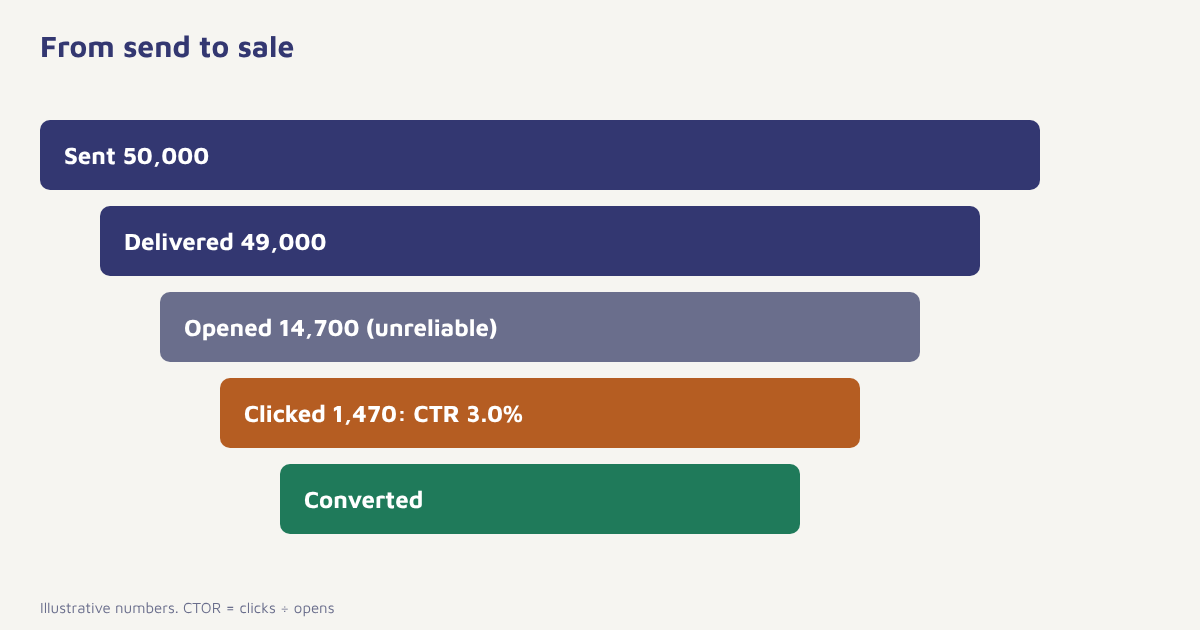
| Emails sent | 50,000 |
| Bounced | 1,000 |
| Delivered | 49,000 |
| Unique opens | 14,700 |
| Unique clickers | 1,470 |
| CTR on delivered | 1,470 ÷ 49,000 × 100 = 3.0% |
| CTOR | 1,470 ÷ 14,700 × 100 = 10.0% |
Why clicks matter more than opens now
Features such as Apple Mail Privacy Protection can load images automatically, marking an email as opened even when no one read it. That makes open-based metrics, and CTOR which depends on them, less reliable than before. A click is a deliberate act, so it is a stronger sign of interest and a better input for segmenting, testing and judging revenue. This is also why many teams now judge subject-line tests by clicks or conversions. See email subject lines and A/B testing. Security scanners can also click links automatically, which inflates clicks. Good tools filter out known bot clicks, but treat sudden unexplained spikes with suspicion.
What is a realistic benchmark?
Industry reports publish average click rates, and they often fall in the low single digits. The averages vary a lot by source, sector, list quality and how a report defines clicks, so use them only as a rough sanity check. Your best comparison is your own history, segmented by email type. Welcome emails and triggered reminders usually earn higher click rates than broadcast newsletters because the recipient has just done something. Promotions to a cold part of the list earn less. Compare like with like, and track the trend over months rather than fretting over a single send.
If click-through rate is low
| Symptom | Likely cause | What to try |
|---|---|---|
| Opens fine, clicks low | Weak call to action, unclear offer or too many choices | One main button, clearer benefit |
| Clicks low everywhere | List fatigue or poor targeting | Segment by interest. See segmentation |
| Clicks only on top links | Layout hides lower content | Shorter email, important link higher |
| Clicks low on mobile | Small tap targets, desktop-first layout | Larger buttons, single column. See email design |
| Clicks good, conversions poor | Landing page mismatch | Match the page to the email. See CRO |
| Sudden spike | Bot or scanner clicks | Check filtering and look at click timing |
| Clicks falling month by month | Fatigue or deliverability decline | Review frequency, check deliverability |
Eleven ways to raise click-through rate
- Have one job per email. A single main call to action beats several competing ones.
- Write the button as the next step. “See the three plans” works better than “Click here”.
- Put the main link above the fold. Do not make people scroll to find what to do.
- Repeat the link in text and button. Some readers click words, others click buttons.
- Use a bulletproof button. Real HTML buttons that show even when images are blocked.
- Segment by behavior. Show browsers new arrivals and buyers accessories. See behavioral segmentation.
- Personalize beyond the name. Use products viewed or past purchases. See personalization.
- Send when people read. Test send times. See best time to send email.
- Keep the email short and scannable. A clear headline, a few lines, one image.
- Make mobile the default. Large tap targets, readable text.
- Test one thing at a time. Subject, button text, image or layout, with a proper sample.
In Flowfox, the email builder supports bulletproof buttons and mobile-first layouts, the segment builder lets you target by behavior and analytics shows clicks by link, so you can see which links earn the clicks. Link-level data is often the most useful view: it shows whether people want the offer, the story or the footer link. Read more about email delivery and the campaign tools.
Read click maps carefully
A click map shows which links earn clicks. Use it to learn, not to decorate. If the product image gets more clicks than the button, make the image a link to the same place. If the footer link to returns policy is popular, customers are worried about returns, so address it in the body. If nobody clicks the second product block, remove it or merge the offers. Tag links consistently so analytics can tie clicks to sessions and orders; that is what turns a click metric into a revenue metric. For attribution caveats, see attribution models.
# UTM tagging example for one email link
https://example.com/shop/new-arrivals
  ?utm_source=flowfox
  &utm_medium=email
  &utm_campaign=oct-new-arrivals
  &utm_content=hero-button
A worked example (invented numbers)
A book retailer sends a weekly newsletter with six equal blocks and a CTR of 1.8 percent. The click map shows that most clicks go to the first block. The team rebuilds the newsletter with one featured book, a clear “Read the first chapter” button and three small picks below. It also splits the list: readers who bought crime novels receive a crime-led version. After four sends, the CTR averages 2.9 percent, and the orders per thousand emails rise by roughly a third. The retailer, results and figures are made up to show the reasoning. In your own data, confirm the effect with a control split before changing the whole programme.
Common mistakes
- Mixing definitions. Sent-based and delivered-based CTR are not comparable.
- Optimising clicks, not outcomes. A clickbait button can win clicks and lose sales.
- Ignoring bot clicks. Filter them where you can.
- Comparing different email types. Triggered and broadcast emails behave differently.
- Skipping the landing page. The click is only half the job.
A click is a person raising a hand. What you do next decides whether it counts.
See which links earn the clicks. Build mobile-first emails and track clicks by link and segment.
Read next: email open rate, email automation examples and the blog. For background on how email tracking works, see the overview of email tracking and the standards body Litmus resources for design and testing articles.
Frequently asked questions
What is email click-through rate?
Email click-through rate is the percentage of recipients who click at least one link in an email, usually measured as unique clickers divided by emails delivered.
How do you calculate email CTR?
Divide the number of unique clickers by the number of emails delivered and multiply by 100. For example, 1,470 clickers from 49,000 delivered emails is 3.0 percent.
What is the difference between CTR and click-to-open rate?
CTR uses delivered emails as the base. Click-to-open rate uses unique opens, so it shows how persuasive the content was for those who opened, but it is affected by inflated opens.
What is a good email click-through rate?
Published averages are often in the low single digits but vary by source, sector and definition. Compare with your own history, split by email type.
Why are my email clicks low?
Common causes are a weak or crowded call to action, poor targeting, a desktop-first layout on mobile, list fatigue and landing pages that do not match the email.
Do bots affect email click rates?
Yes. Security scanners and other tools can click links automatically. Use a tool that filters known bot activity and check for suspicious spikes in click timing.
How can I increase email click-through rate?
Use one clear call to action, bulletproof mobile-friendly buttons, behavior-based segmentation, relevant personalization, good timing and structured tests.